


In an era where cyber threats are more prevalent than ever, the need for effective malware prevention strategies is critical. With cyber attacks occurring every 39 seconds and the financial impact of ransomware attacks soaring, executives must prioritize strong defenses to protect their organizations. This article explores ten essential best practices that not only bolster security but also empower leaders to navigate the intricate landscape of malware threats. Yet, as these tactics evolve, one must ask: are organizations genuinely prepared to implement these strategies and safeguard their vital assets against the relentless threat of cybercrime?
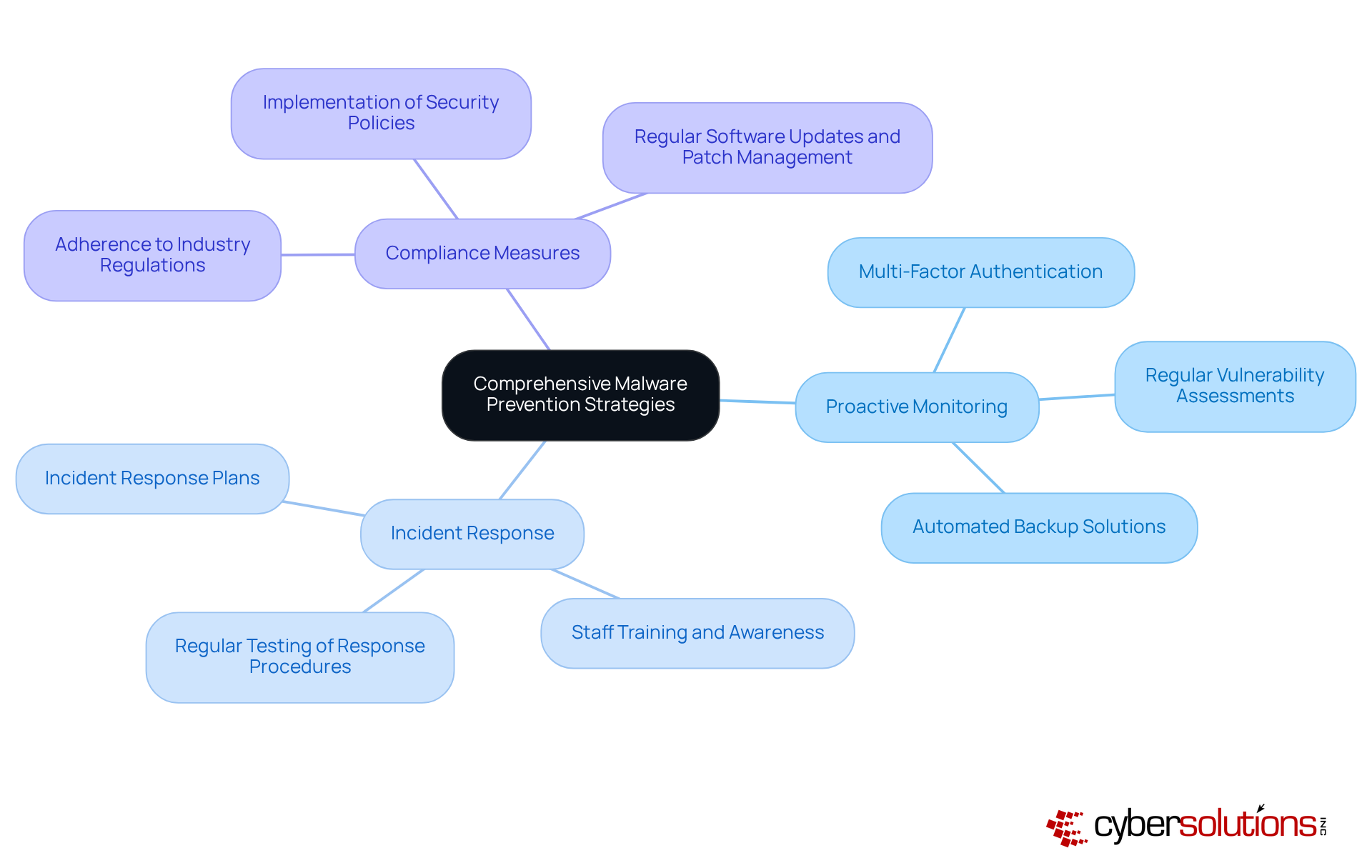
Cybersecurity is not just a necessity; it’s a critical component of organizational resilience in today’s digital landscape. With cyber attacks occurring every 39 seconds and the average cost soaring to $4.54 million, the stakes have never been higher. Cyber Solutions Inc. offers a comprehensive suite of threat prevention strategies tailored to meet the unique challenges faced by various industries. These strategies encompass:
This ensures that organizations are not only shielded from malware threats but also adhere to industry regulations.
The implications of these threats are profound, especially for organizations that handle sensitive data. Implementing malware prevention measures is essential for preventing malicious software. Implementing security protocols significantly reduces unauthorized access risks. Regular and consistent software updates are crucial for maintaining robust defenses. Moreover, regular backups enhance recovery options, allowing organizations to recover swiftly in the event of an attack. Real-world examples underscore the effectiveness of these measures; companies with comprehensive plans report significantly reduced downtime and financial losses during cyber incidents.
As the landscape of cyber risks evolves, with a staggering 62% rise in ransomware incidents since 2021, it’s imperative for organizations to stay ahead of potential vulnerabilities. Cyber Solutions Inc. is committed to providing tailored solutions that not only protect but also empower businesses to thrive in an increasingly regulated environment. Are you ready to fortify your defenses and ensure your organization is prepared for the challenges ahead?
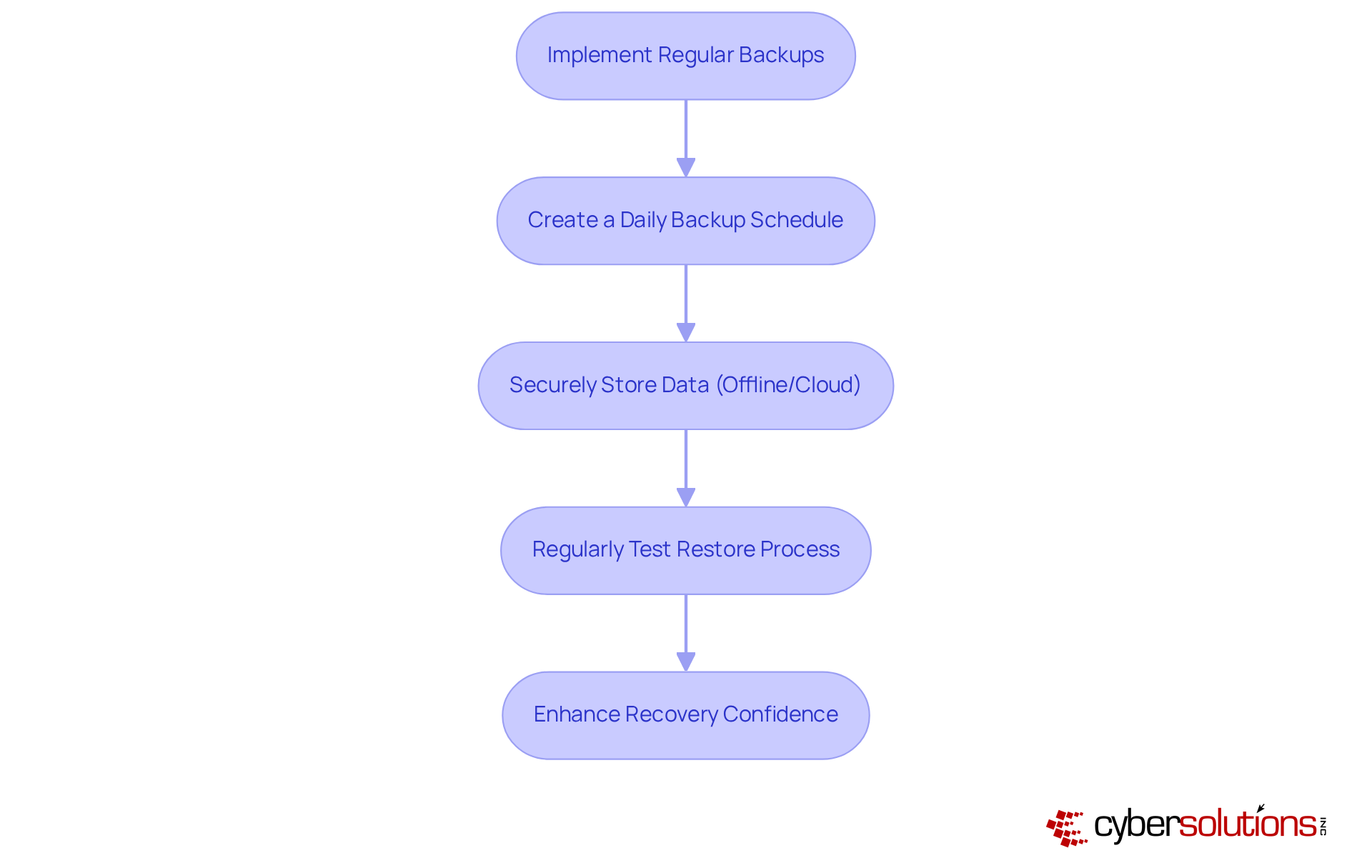
Creating a schedule for backups is essential for implementing strategies to safeguard your data against harmful software threats. Organizations must implement a backup solution, ensuring that data is securely stored - ideally offline or within a robust cloud environment. But it doesn’t stop there; testing is equally crucial. This confirms that backups are functional and can be relied upon in an emergency.
In fact, by 2025, 100% of Managed Service Providers (MSPs) report that they regularly test their backups. This statistic serves as a strong indicator of best practices. Such a proactive approach not only protects data but also enhances recovery confidence. Consider this: a mid-sized construction firm in Alberta successfully resumed operations within two hours after a hardware fire, all thanks to their backup strategy.
By prioritizing backups and testing them as part of your disaster recovery plan, companies can significantly reduce the risks posed by malicious software and ensure business continuity. Are you ready to take the necessary steps to protect your organization?
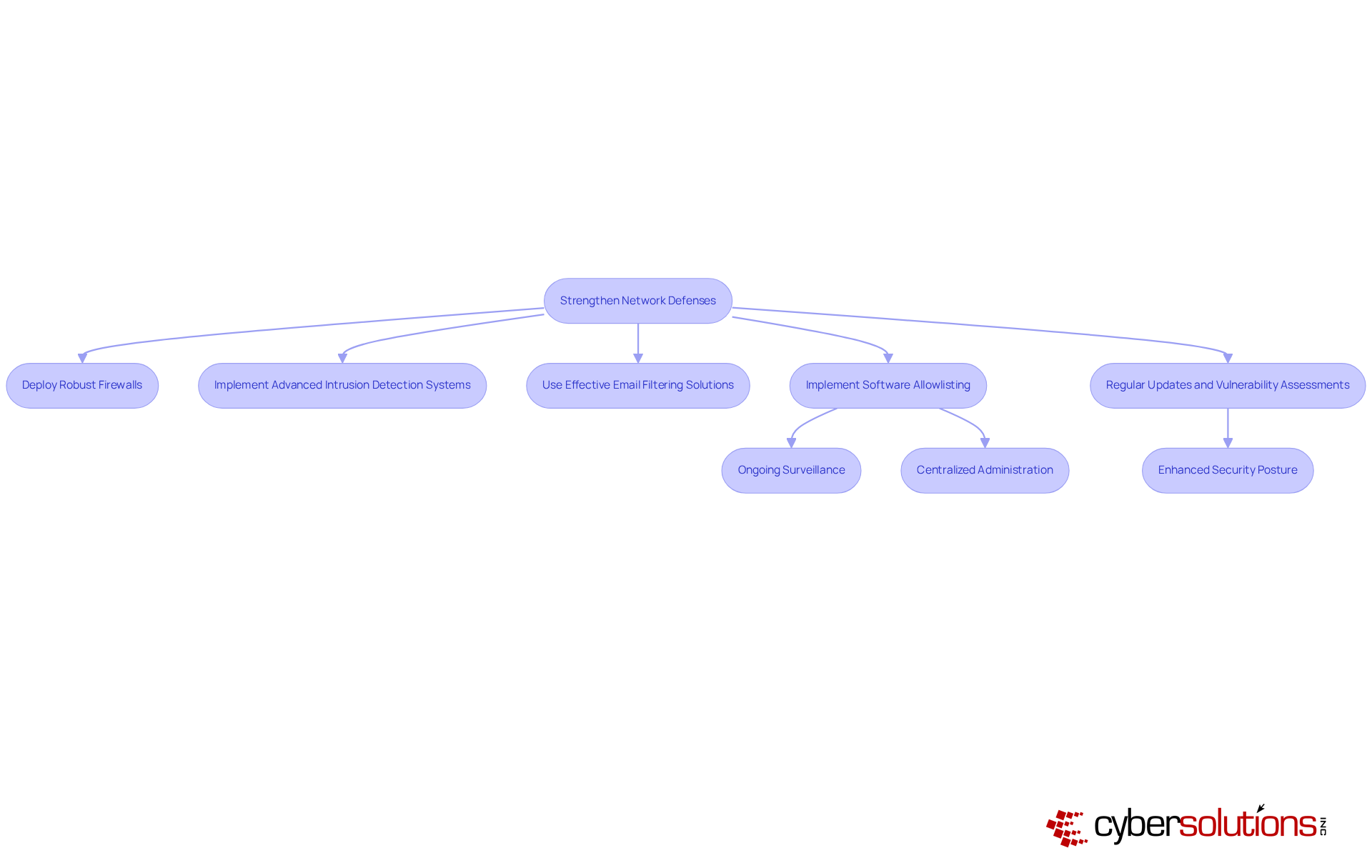
In today's digital landscape, the importance of cybersecurity cannot be overstated, especially for organizations in the healthcare sector. To combat the ever-evolving threats posed by harmful software, it is imperative that organizations adopt measures to enhance their network protections. This involves:
Moreover, implementing security protocols is not just beneficial; it is essential. This proactive measure prevents unauthorized programs from executing and is an essential part of a comprehensive security strategy, significantly reducing the risk of data breaches. The functionalities of allowlisting provide:
Implementing best practices, including regular updates to these defenses and thorough training, can further bolster protection against malware.
By ensuring that only authorized programs can operate, organizations not only enhance their security posture but also meet compliance requirements such as HIPAA. This minimizes vulnerabilities and complicates the efforts of attackers seeking to exploit systems. In a world where cyber threats are increasingly sophisticated, taking these steps is not just a recommendation; it is a necessity for safeguarding sensitive information and maintaining trust.
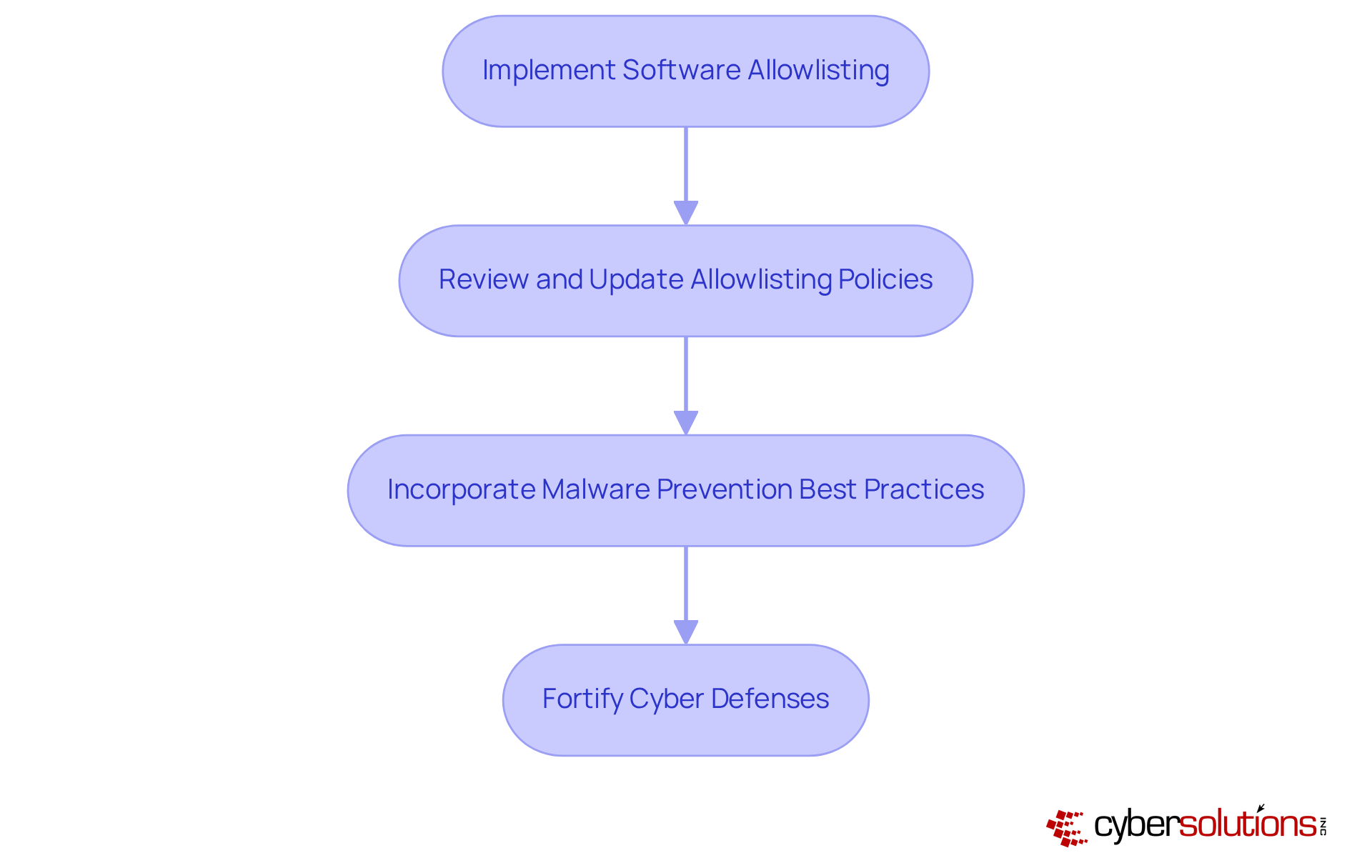
In today's digital landscape, the importance of cybersecurity in healthcare cannot be overstated. With the rise of cyber threats, organizations face unprecedented challenges that threaten patient data and operational integrity. This is where malware prevention comes into play, regarded as the gold standard in cybersecurity. By implementing this proactive approach alongside endpoint protection, healthcare entities can ensure that only authorized programs run on their devices, significantly reducing the risk of malware, ransomware, and zero-day attacks.
Consider the implications: by restricting the applications that can execute, organizations not only reduce vulnerabilities but also enhance their systems' defenses against exploitation. Regularly reviewing and updating allowlisting policies is essential to adapt to evolving threats and ensure security. Are your current defenses robust enough to withstand the latest threats?
Incorporating malware prevention is not just a recommendation; it's a necessity for healthcare organizations. Cyber Solutions can help healthcare organizations navigate these complexities effectively, ensuring that they remain one step ahead of cybercriminals. Don't wait for a breach to occur - take action now to protect your data and secure your systems.
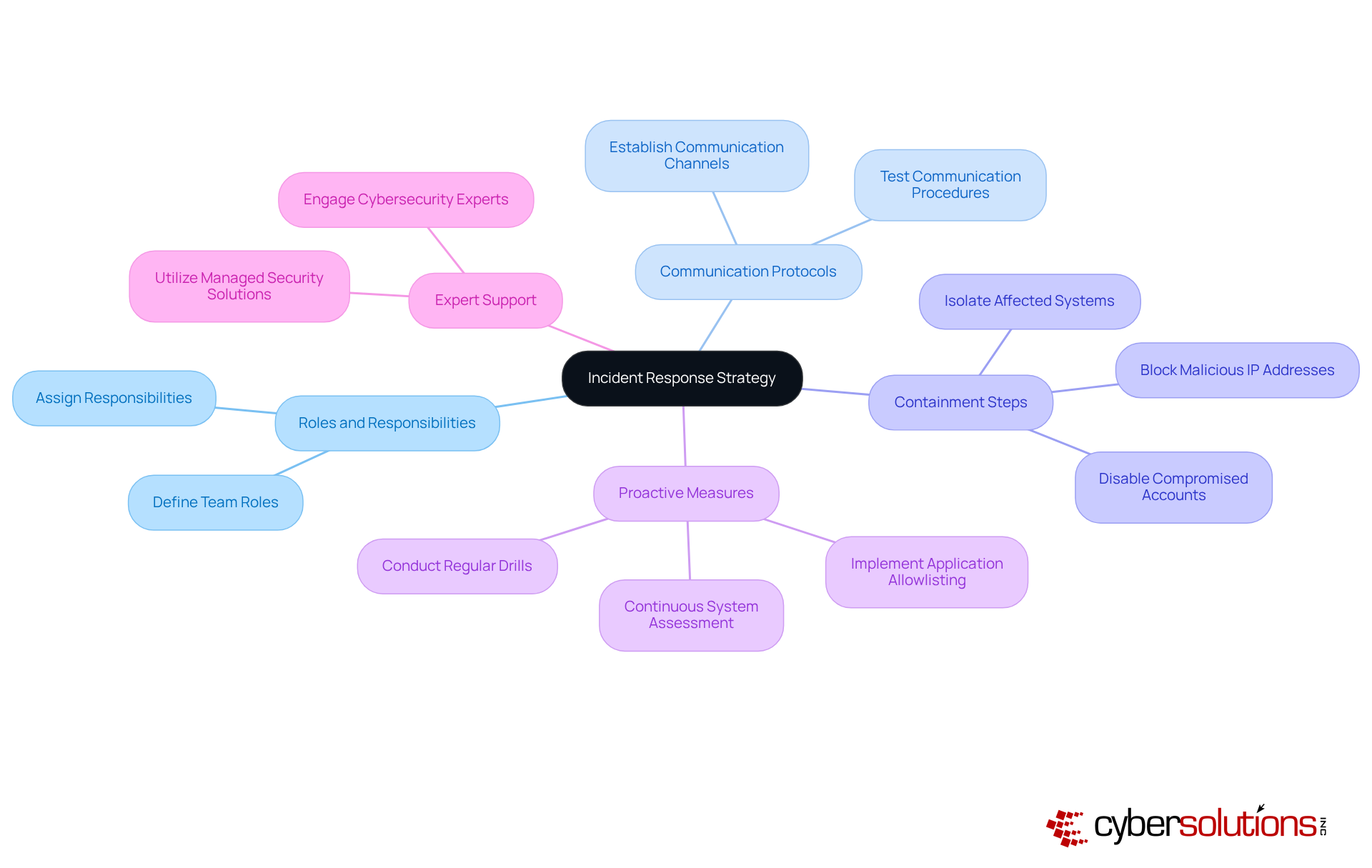
Creating a strong response plan based on best practices is essential for organizations to efficiently handle incidents. This plan should outline clear roles, communication protocols, and responsibilities.
In today’s landscape, cybersecurity threats are more prevalent than ever, particularly in sectors like healthcare. CFOs face unique challenges as they navigate these risks, making it crucial to have a strategy in place. Incorporating recovery and system reconstruction services, such as those provided by Cyber Solutions, can significantly enhance preparedness. Regular drills and updates to the plan will ensure that all team members are prepared to act swiftly in the event of an attack.
But how can organizations proactively protect themselves? Implementing application allowlisting as part of your cybersecurity strategy is one of the best practices that provides an additional layer of security, further minimizing vulnerabilities and ensuring safety. By taking these steps, organizations not only safeguard their assets but also foster trust among stakeholders.
In conclusion, a well-defined response plan, combined with expert support and proactive measures, is vital for navigating the complex cybersecurity landscape. Don’t wait for an incident to occur; take action now to fortify your organization’s defenses.
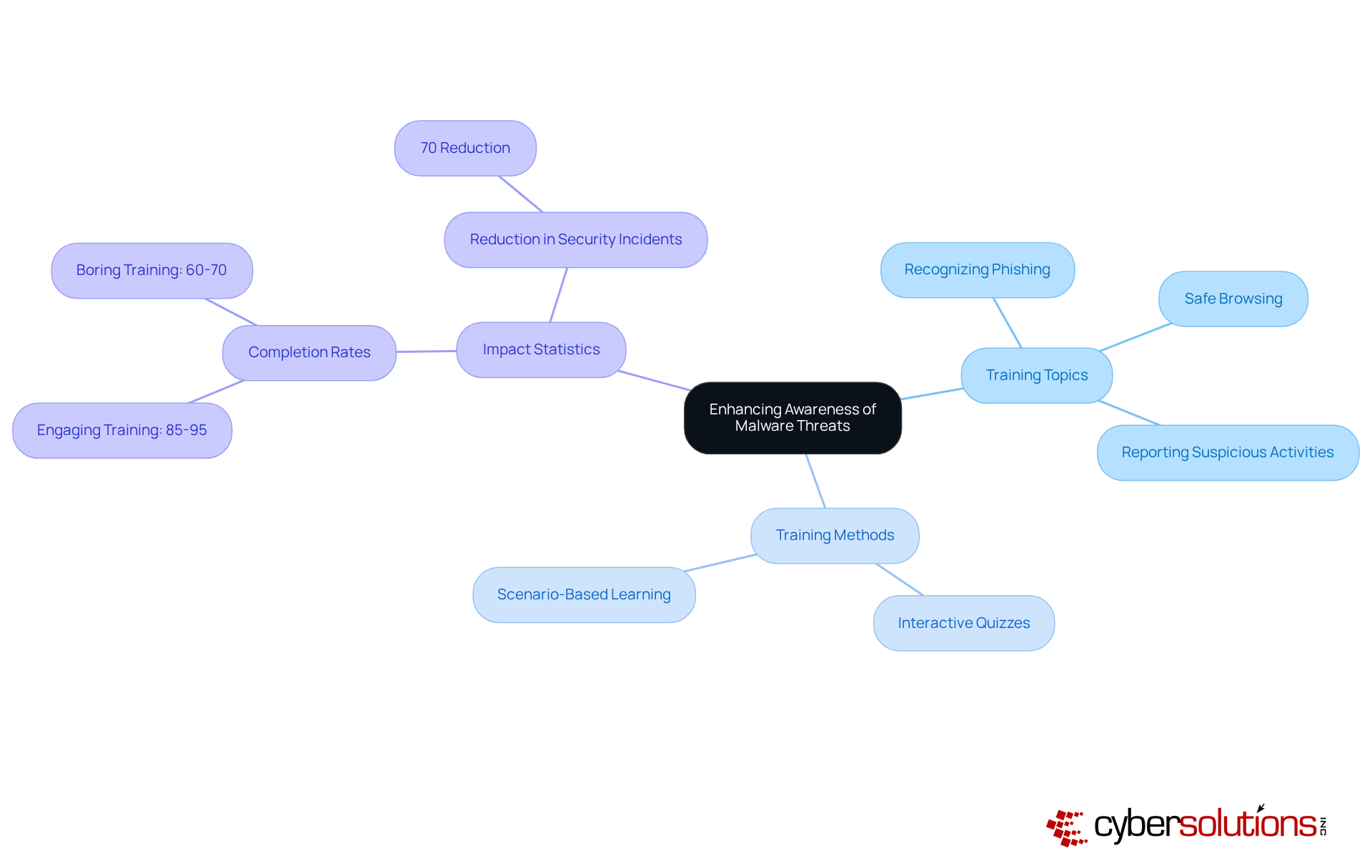
Educating staff about harmful software risks is essential for enhancing organizational safety and is a key component of cybersecurity strategy. In today’s landscape, where cybersecurity threats are rampant, regular training sessions are vital. These sessions should encompass:
Consider this: training that incorporates real-world scenarios can significantly boost engagement. Completion rates soar from 60-70% for mundane training to an impressive 85-95% when the training is interactive and relevant. Research shows that companies committed to ongoing education see a staggering 70% reduction in security incidents. This statistic underscores the undeniable value of investing in employee education.
Moreover, with a staggering 95% of security breaches involving human error, it’s clear that effective training methods are imperative. Interactive quizzes and scenario-based learning are not just beneficial; they are necessary. As harmful software risks evolve, continuous education and frequent training sessions on cybersecurity best practices become crucial to ensure employees remain vigilant and capable of identifying potential threats.
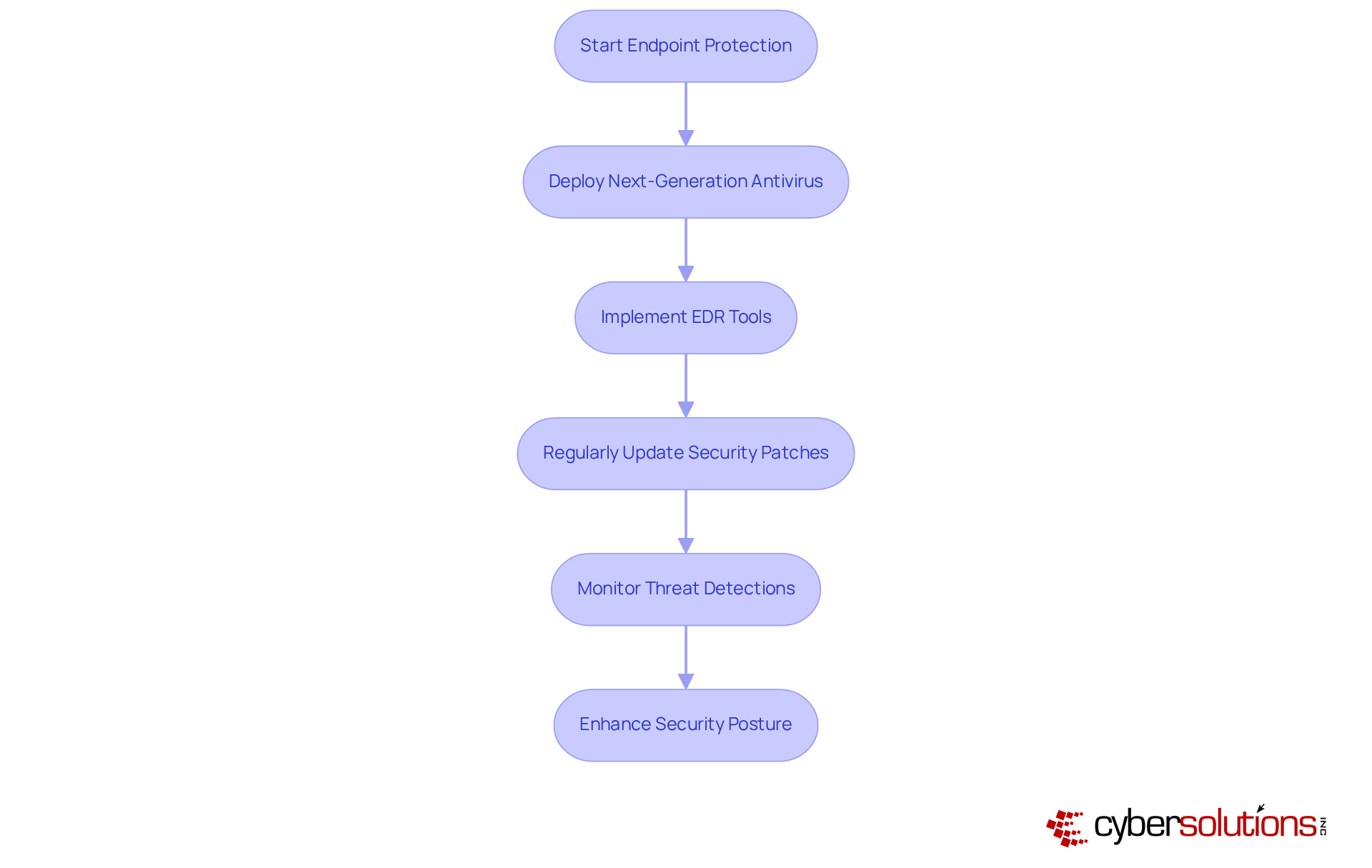
In today’s digital landscape, deploying robust endpoint protection is essential for safeguarding devices against harmful software and implementing security measures. Organizations must prioritize the implementation of endpoint detection and response solutions. Regular updates with the latest security patches are crucial to ensure that all devices remain protected. This not only enhances the security posture but also mitigates potential threats before they escalate into significant incidents.
As we look ahead to 2025, EDR tools are increasingly recognized for their vital role in cybersecurity. Numerous organizations are reporting improved risk detection capabilities, underscoring the necessity of these solutions. For instance, a recent study revealed that companies utilizing EDR solutions experienced a staggering reduction in breach incidents. This statistic highlights the effectiveness of EDR in identifying and responding to advanced attacks.
Experts assert that without EDR solutions, organizations expose themselves to heightened risks from sophisticated threats. By embracing these technologies and incorporating best practices, businesses can significantly bolster their defenses against malicious software, fostering a more secure operational environment. The time to act is now—don’t let your organization fall prey to avoidable vulnerabilities.
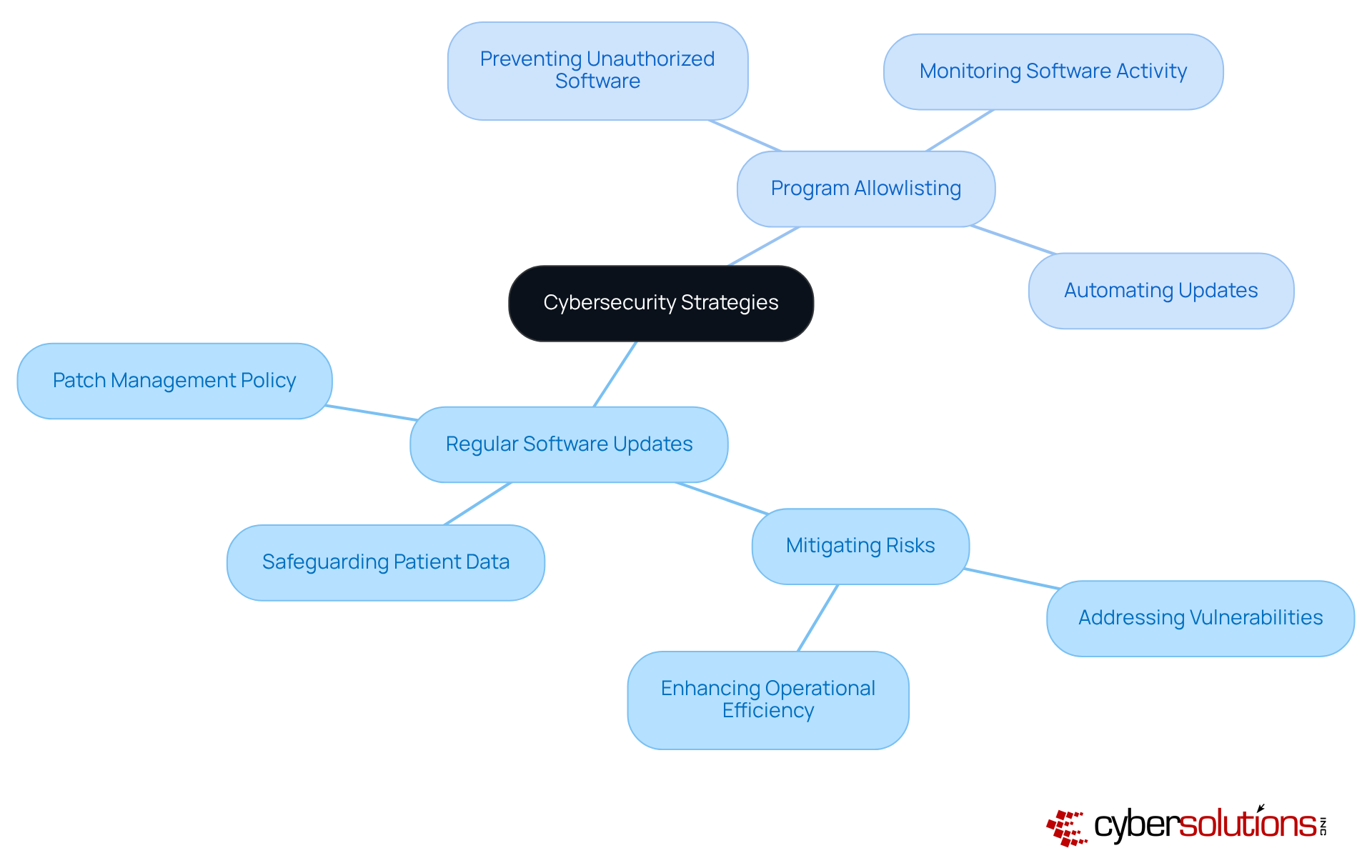
In today's digital landscape, the importance of software updates cannot be overstated, especially in healthcare. It is vital for organizations to implement strategies to address vulnerabilities that harmful programs can exploit. Organizations must establish a robust process to ensure that all software, including operating systems and applications, is updated swiftly. This not only mitigates risks but also enhances overall security.
Moreover, endpoint protection serves as a critical layer of protection. By ensuring that only authorized programs can run on your systems, it effectively prevents unapproved software from executing, thereby blocking the installation of harmful software and ransomware attacks. Have you considered how much unapproved software could be lurking in your systems? Automating updates whenever feasible can help maintain security without the burden of ongoing manual supervision.
Allowlisting consistently monitors software activity, identifying and thwarting any unauthorized attempts to execute harmful programs. This dual approach - regular updates and allowlisting - creates a formidable defense against the ever-evolving landscape of cybersecurity threats by implementing comprehensive security measures. In a world where healthcare organizations face increasing cyber threats, implementing these strategies is not just advisable; it’s essential for protecting both your organization and the patients you serve.
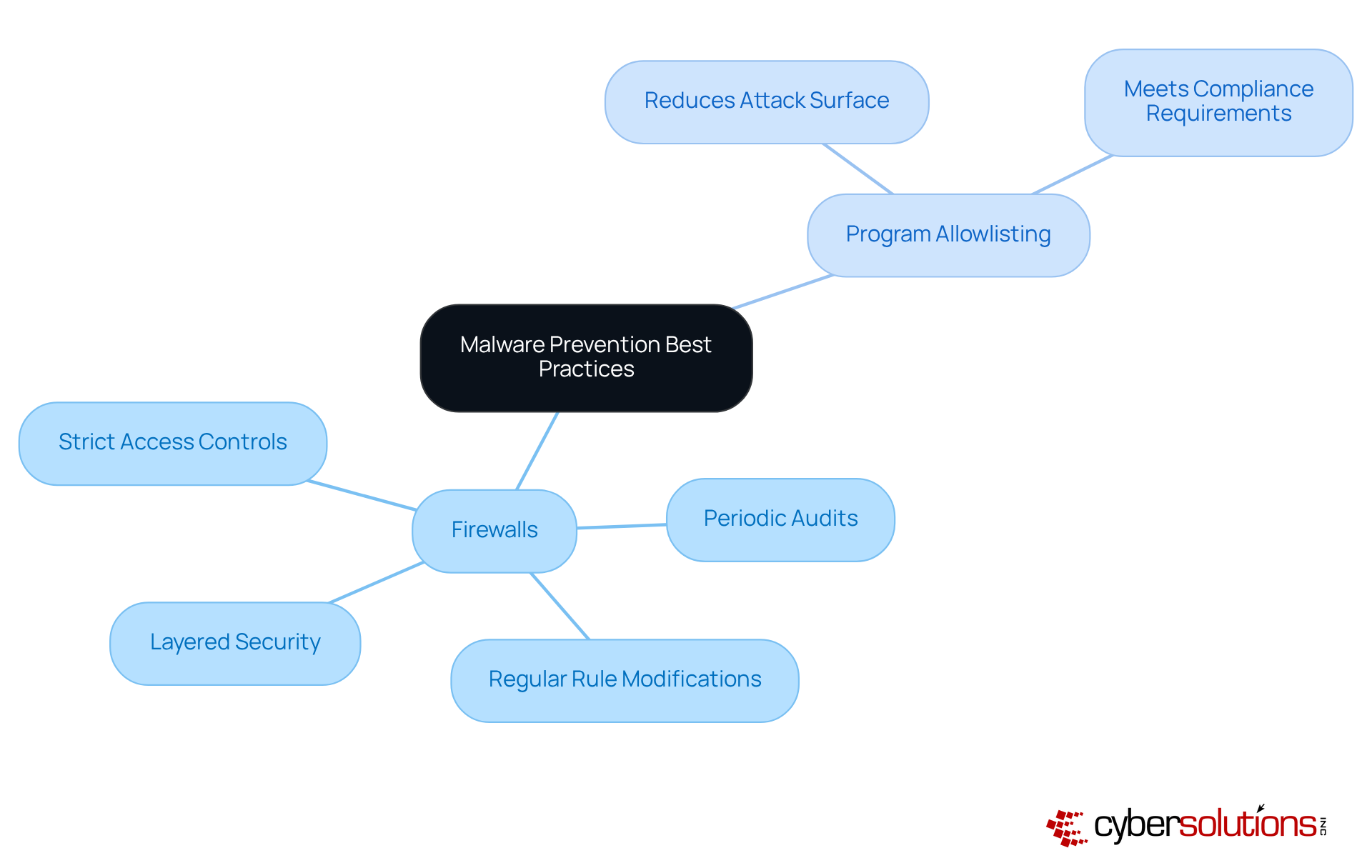
Firewalls are not just a recommendation; it’s a necessity for adhering to best practices to establish a robust defense against harmful software. Organizations must utilize both network and application firewalls to effectively monitor and control incoming and outgoing traffic. Implementing firewalls, such as a well-configured firewall, significantly reduces the risk of malware infiltration by scrutinizing traffic for recognized threats and unusual patterns. Regular reviews and updates of firewall rules are crucial to incorporate new threats, ensuring that security measures remain effective in adapting to the ever-evolving threat landscape.
Alongside firewalls, program allowlisting stands out as the gold standard in cybersecurity. This practice prevents unauthorized applications from executing, thereby reducing the attack surface and minimizing vulnerabilities. By permitting only authorized applications to run, companies can effectively thwart harmful software, ransomware, and zero-day attacks before they can inflict damage. This approach is particularly vital for meeting compliance requirements, ensuring that organizations adhere to stringent data protection protocols.
Best practices include:
By viewing cybersecurity as a continuous process, businesses can fortify their defenses against malicious software and various cyber risks. This proactive stance ultimately protects their operations and confidential information.
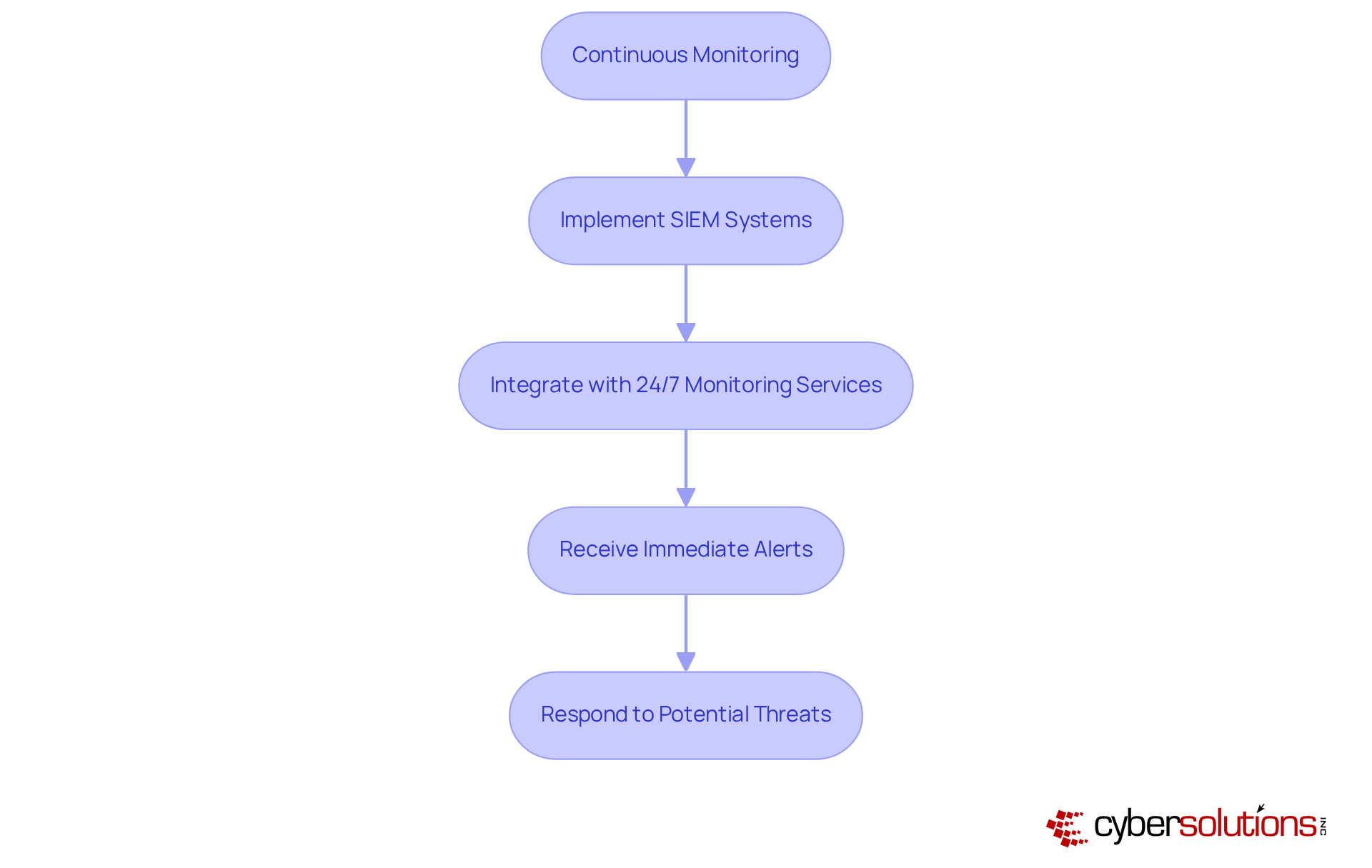
Continuous monitoring of network traffic and endpoint activities is not just important; it's essential for cybersecurity. In 2025, approximately 65% of enterprises will have implemented security information and event management systems, recognizing their critical role in detecting and mitigating risks. These systems, combined with real-time analytics, provide immediate alerts and real-time insights, enabling organizations to respond swiftly to potential threats and prevent downtime or breaches.
Consider this: companies that utilize SIEM systems alongside ongoing network monitoring have successfully identified vulnerabilities, significantly enhancing their overall security posture. Regular analysis of monitoring data not only bolsters security strategies but also fortifies resilience against evolving threats. Cybersecurity experts emphasize that integrating SIEM systems with threat intelligence is a cornerstone of effective malware prevention best practices. This integration ensures organizations remain vigilant in an increasingly complex landscape.
In today's world, where cybersecurity threats are more pronounced than ever, understanding and implementing effective malware prevention strategies is not just important - it's essential for organizational resilience. Executives must recognize the urgent need for a multifaceted approach that includes proactive measures, continuous monitoring, and robust incident response plans to protect their organizations from the pervasive risks of malware.
Key insights reveal that:
are critical components of a strong defense. Additionally, fostering a culture of security awareness through employee training and leveraging advanced endpoint protection tools are vital steps in mitigating risks. By adopting these best practices, organizations can significantly bolster their defenses against malware while ensuring compliance with industry regulations.
Ultimately, the message is clear: proactive measures and continuous vigilance form the bedrock of effective malware prevention. Executives must prioritize these strategies - not only to safeguard sensitive data but also to cultivate trust and resilience within their organizations. Taking decisive action today will fortify defenses and prepare them for the ever-evolving landscape of cyber threats.
Why is cybersecurity critical for organizations today?
Cybersecurity is essential for organizational resilience due to the increasing frequency of cyber attacks, which occur every 39 seconds, and the high costs associated with ransomware attacks, averaging $4.54 million.
What comprehensive strategies does Cyber Solutions Inc. offer for malware prevention?
Cyber Solutions Inc. provides a suite of strategies including proactive monitoring, incident response, and compliance measures to protect organizations from cyber threats and ensure adherence to industry regulations.
What best practices should organizations implement to prevent malware?
Organizations should implement multi-factor authentication (MFA), conduct regular vulnerability assessments, perform consistent software updates, and utilize automated backup solutions to enhance their defenses against malware.
How does regular testing of backups contribute to malware prevention?
Regular testing of backups ensures that data can be reliably restored in an emergency, enhancing recovery confidence and protecting against data loss from malware attacks.
What specific measures can organizations take to strengthen their network defenses against malware?
Organizations can deploy robust firewalls, advanced intrusion detection systems, and effective email filtering solutions to block malicious content. Additionally, implementing software allowlisting is crucial to prevent unauthorized programs from executing.
How does software allowlisting enhance malware prevention?
Software allowlisting enhances security by allowing only authorized programs to operate, providing ongoing surveillance of software activity and centralized administration to promptly detect and prevent potential risks.
What compliance requirements can be met by implementing malware prevention best practices?
Implementing malware prevention best practices helps organizations meet compliance requirements such as HIPAA, PCI-DSS, and GDPR, which minimizes vulnerabilities and complicates attackers' efforts to exploit systems.
What impact can effective incident response plans have on organizations during cyber incidents?
Companies with comprehensive incident response plans report significantly reduced downtime and financial losses during cyber incidents, allowing them to recover more swiftly.
Managed IT Service Provider | Cyber Security | Incident Response | Compliance As A Service | Hosted Phone Service | Managed Security Service Provider | AI As A Service