


Understanding the nuances between backup and disaster recovery is crucial for any organization aiming to protect its data and ensure operational continuity. Backup primarily focuses on preserving data, while disaster recovery encompasses a broader strategy designed to restore entire IT systems following catastrophic events. As cyber threats escalate - an alarming number of organizations are now facing ransomware attacks - the urgency for C-suite leaders to implement robust data protection strategies becomes increasingly evident.
How can organizations effectively navigate the complexities of these two critical functions to safeguard their assets and ensure resilience in the face of adversity? This question is not just a matter of operational efficiency; it’s about securing the very foundation of your organization’s future.
The distinction between backup and disaster recovery is critical, as both processes involve creating copies of information to safeguard against loss, corruption, or accidental deletion. By saving data in a distinct location, organizations ensure that it can be retrieved when necessary. However, disaster recovery encompasses a broader strategy that not only includes data restoration but also the recovery of entire IT systems and infrastructure following catastrophic events. This comprehensive approach requires meticulous planning for various scenarios, such as natural disasters, cyberattacks, or hardware failures, to guarantee that organizations can respond swiftly and effectively.
In 2025, the significance of backup and disaster recovery management in cybersecurity is paramount. A staggering 88% of organizations faced at least one ransomware attack in the past year, underscoring the urgent need for robust security measures. Furthermore, 26% of small enterprises that encountered ransomware attacks suffered losses ranging from $250,000 to $500,000, illustrating the financial repercussions of inadequate response strategies. Alarmingly, only 50% of companies review their contingency plans annually, revealing a substantial gap in preparedness. Additionally, a report indicates that 93% of organizations experiencing prolonged information loss lasting 10 days or more face bankruptcy within the following year.
The distinctions between backup and disaster recovery are evident in their scope and objectives. The comparison of backup and disaster recovery shows that backup focuses on data preservation, while disaster recovery aims to reinstate complete systems and operations. Projections for 2025 suggest that only 39% of organizations will have a comprehensive disaster recovery plan, emphasizing the need for C-suite leaders to prioritize these initiatives. As noted by Nutanix, "In 2025, disaster recovery isn’t optional anymore."
Practical applications of backup and disaster recovery highlight their importance. For example, organizations that have implemented hybrid cloud solutions report significant cost savings by eliminating the necessity for a second physical facility, thereby converting capital expenses into operational expenses. This strategic shift not only enhances resilience but also optimizes resource allocation, providing a competitive edge in today’s landscape.
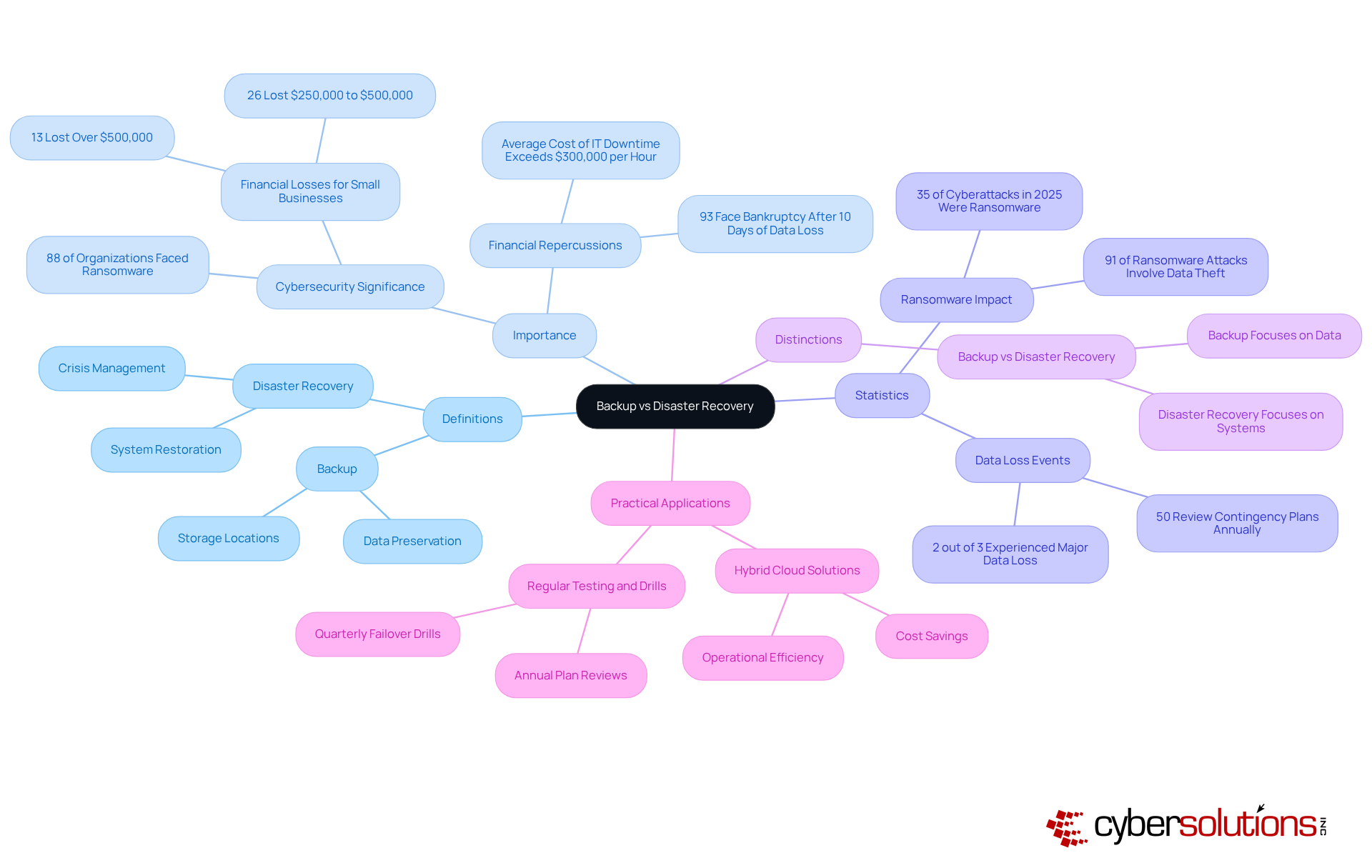
In today's digital landscape, ensuring data security is paramount for organizations. A secondary system plays a crucial role in this by creating duplicates that can be swiftly recovered, illustrating the concept of backup in the event of data loss. Typically automated and scheduled at regular intervals, this process aligns with industry standards that advocate for data protection to mitigate risks.
However, disaster recovery involves more than just the concepts of backup. It encompasses a comprehensive approach to reinstating full operational capability after a disruption. This includes not only recovering information but also restoring applications, systems, and network functionality, ensuring that every essential element of the IT ecosystem is back online. While these copies serve as a safety net for information, effective disaster recovery is a holistic strategy that safeguards all business functions, thereby ensuring continuity.
As organizations increasingly recognize the importance of resilience, robust strategies have become vital in defending against the complexities of modern threats, such as cyberattacks and natural disasters. For instance, companies that implement strong disaster recovery plans often report improved recovery times and reduced downtime. This underscores the importance of integrating both redundancy and disaster recovery into their operational frameworks.
In today's digital landscape, the importance of effective backup solutions cannot be overstated. Organizations have access to a range of options, including:
Each serving distinct purposes. Full backups provide a thorough snapshot of all data, ensuring comprehensive protection but demanding significant storage resources. On the other hand, incremental backups only preserve changes made since the last backup, conserving storage space but complicating the restoration process. Differential backups offer a balanced approach, capturing all changes since the last full backup, optimizing both storage efficiency and recovery speed.
The rise of cloud computing has transformed data management, delivering off-site storage that enhances security and accessibility, particularly for organizations with remote workforces. As of 2024, cloud storage adoption has surged to 74% among organizations, nearly double the rate from previous years. This reflects a growing confidence in cloud solutions, especially crucial as 97% of contemporary ransomware incidents target both primary systems and secondary repositories. The necessity for robust backup strategies has never been clearer.
Looking ahead to 2025, IT leaders validate the effectiveness of these alternative methods, emphasizing the importance of selecting the right strategy when considering backup solutions. Organizations utilizing cloud backups benefit from straightforward restoration procedures, while those adopting incremental backups can significantly reduce storage costs. Differential backups are increasingly favored for their ability to balance efficiency with rapid restoration capabilities. As businesses navigate the complexities of data management, understanding the concepts of backup solutions is essential for ensuring robust data protection and operational resilience.

A thorough disaster recovery plan is crucial for any organization. It should encompass several components:
Additionally, the plan must outline recovery time objectives (RTO) and recovery point objectives (RPO) to set expectations for recovery efforts. Updates to the plan are essential to ensure its effectiveness. Training for staff is also vital, ensuring everyone understands their roles during a disaster.
By integrating these elements, organizations can create a framework that supports resilience.
Understanding the differences between backup and disaster recovery is crucial for C-suite leaders who seek to shield their organizations from potential data loss and operational disruptions. Both processes are vital to data management, yet they serve distinct purposes:
The urgency of implementing robust data protection strategies cannot be overstated. Staggering statistics surrounding ransomware attacks and their financial repercussions on organizations highlight the necessity for comprehensive disaster recovery plans. Furthermore, exploring various backup solutions underscores the importance of selecting the right strategy to optimize both data protection and recovery efficiency.
Integrating backup and disaster recovery into an organization's operational framework is essential. As threats evolve, proactive measures and well-defined strategies are vital for safeguarding assets and maintaining resilience. C-suite leaders must prioritize these initiatives, ensuring their organizations are equipped to tackle the complexities of modern challenges while securing a competitive edge in their respective industries.
What is the difference between backup and disaster recovery?
Backup focuses on preserving data by creating copies to safeguard against loss, corruption, or accidental deletion. In contrast, disaster recovery encompasses a broader strategy that includes restoring entire IT systems and infrastructure after catastrophic events.
Why is backup and disaster recovery important in cybersecurity?
Backup and disaster recovery are critical in cybersecurity because a significant number of organizations face ransomware attacks, with 88% reporting at least one attack in the past year. Inadequate response strategies can lead to substantial financial losses, with small enterprises experiencing losses between $250,000 to $500,000.
How often do organizations review their contingency plans?
Alarmingly, only 50% of companies review their contingency plans annually, indicating a substantial gap in preparedness for potential crises.
What are the consequences of prolonged information loss?
A report indicates that 93% of organizations experiencing information loss lasting 10 days or more face bankruptcy within the following year.
What is the projected status of organizations' data recovery strategies by 2025?
Projections suggest that only 39% of organizations will have a comprehensive data recovery strategy by 2025, highlighting the need for C-suite leaders to prioritize these initiatives.
What are the benefits of hybrid cloud disaster recovery solutions?
Organizations that implement hybrid cloud disaster recovery solutions can achieve significant cost savings by eliminating the need for a second physical facility, thus converting capital expenses into operational expenses. This enhances resilience and optimizes resource allocation.
Managed IT Service Provider | Cyber Security | Incident Response | Compliance As A Service | Hosted Phone Service | Managed Security Service Provider | AI As A Service