


A failover system is not just a backup; it’s a critical safety net for organizations, especially in sectors like healthcare and finance, where operational continuity is non-negotiable. In these industries, the stakes are high. A seamless transition to backup systems during unexpected outages can mean the difference between safeguarding sensitive data and facing significant financial losses. But as organizations increasingly depend on these systems, a pressing question emerges: how can they effectively choose between active-active and active-passive configurations? This decision is pivotal in maximizing resilience while keeping costs in check.
Exploring this dilemma reveals the intricate balance between performance and reliability in the quest for uninterrupted service. Organizations must navigate a landscape filled with cybersecurity threats and operational challenges. The implications are profound: a misstep could lead to not only financial repercussions but also damage to reputation and trust. Therefore, understanding the nuances of these configurations is essential for any organization aiming to thrive in today’s demanding environment.
As we delve deeper into this topic, it becomes clear that the right choice can enhance operational efficiency and bolster security. Organizations need to weigh their options carefully, considering both immediate needs and long-term goals. By doing so, they can ensure that their failover systems not only protect against outages but also support their overall mission.
A failover system is essential for any organization, particularly in the healthcare sector, where cybersecurity threats loom large. When the primary setup fails or becomes inaccessible, an organization seamlessly shifts operations to a secondary setup, ensuring continuity. This is not just a technical necessity; it’s a strategic imperative that protects organizations from operational and financial fallout.
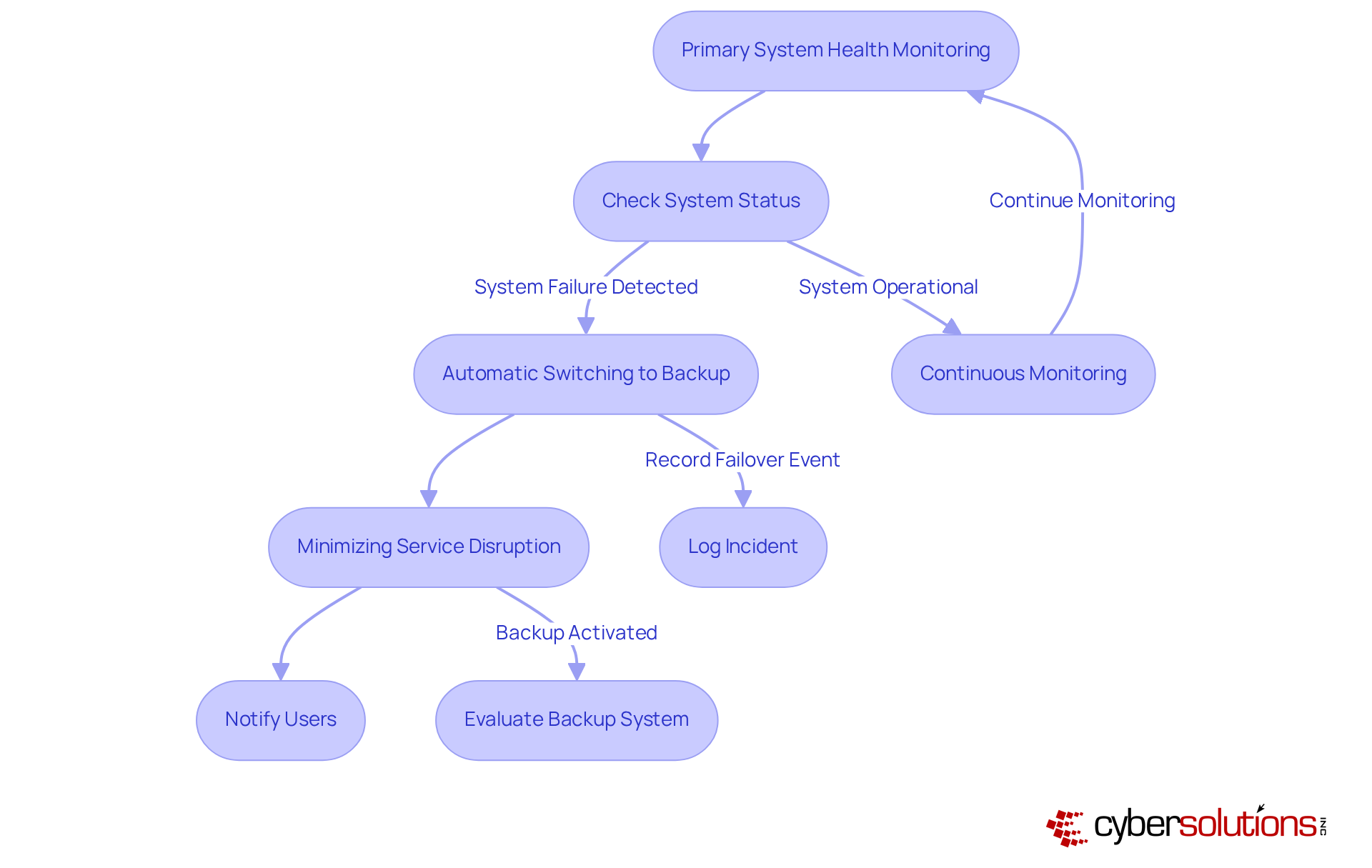
Failover configurations can be arranged in various ways, such as active-active and active-passive setups, which dictate how resources are allocated during normal operations and in the event of a failure. The core functionality of a failover system involves:
This capability is particularly crucial for organizations that rely on uninterrupted access to applications and data. Did you know that in healthcare, technical failures account for 66% of downtime events? One hour of downtime can cost a medical practice between $25,000 to $35,000, underscoring the importance of robust failover systems.
Real-world examples further illustrate the effectiveness of these systems. During a cyberattack that compromised a database, a financial institution successfully employed database redundancy to transfer operations to a replica database, ensuring real-time access to critical data. Similarly, during a recent ransomware incident, Cyber Solutions assembled a specialized team within 24 hours, effectively restoring 4,500 endpoints and minimizing disruption to medical operations. Their around-the-clock efforts included:
These actions demonstrate how swift responses can enhance the reliability of systems in essential sectors.
Automated backup solutions in healthcare have proven to decrease downtime from hours to minutes, significantly improving patient safety and aiding recovery efforts. The importance of enhancing infrastructure before a crisis cannot be overstated, as emphasized by industry experts.
In summary, a failover system represents more than just a technical upgrade; it is a strategic investment in business continuity. Regular evaluation of these frameworks and a structured governance approach are crucial for sustaining their reliability and effectiveness. Are you ready to protect your organization against the operational and financial consequences of failures?
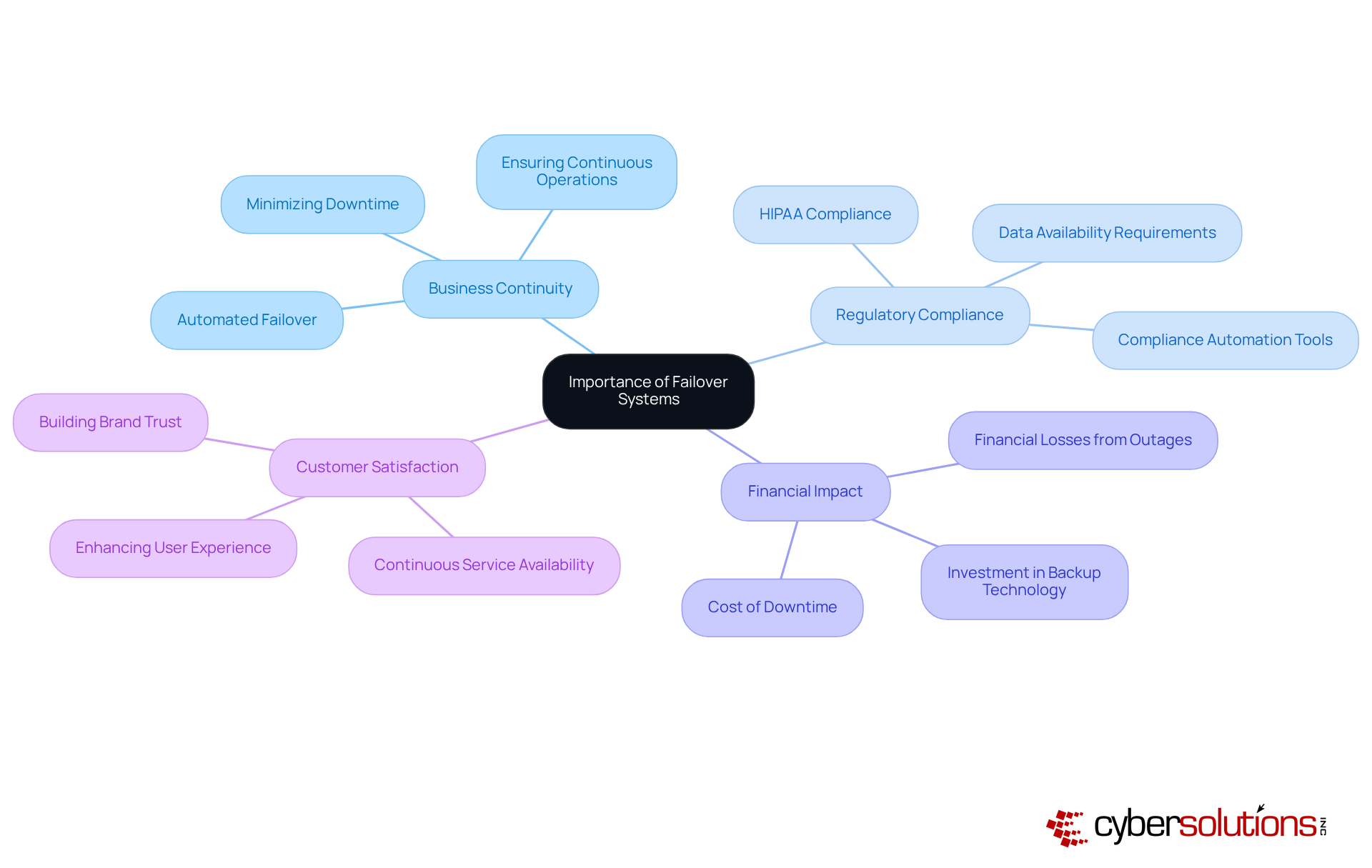
A failover system is essential for ensuring reliability and minimizing downtime in IT operations. They guarantee that services remain accessible during unexpected outages, protecting against data loss and operational disruptions. The significance of failover systems becomes particularly evident in their ability to meet critical needs, especially in sectors like medical services and finance, where reliability is paramount.
Consider this: medical entities lacking failover systems not only face operational challenges but also legal repercussions due to non-compliance with regulations such as HIPAA. In fact, nearly 96% of medical organizations have experienced unexpected electronic health record (EHR) outages, underscoring the urgent need for robust failover solutions to avert operational interruptions that could jeopardize patient care.
Moreover, backup solutions enhance customer satisfaction by ensuring continuous service, which is vital for companies dependent on online transactions or real-time data access. The financial impact of downtime is staggering; healthcare facilities can incur costs averaging $7,500 per minute during outages, emphasizing the critical need for effective backup solutions.
By implementing these frameworks, organizations not only safeguard their reputation but also improve their financial performance, making investment in backup technology a strategic necessity for operational resilience. Integrating compliance as a service (CaaS) into failover system strategies can further bolster this resilience, as CaaS offers comprehensive solutions for compliance, including audit preparation and continuous monitoring, ensuring that organizations stay aligned with regulatory requirements.
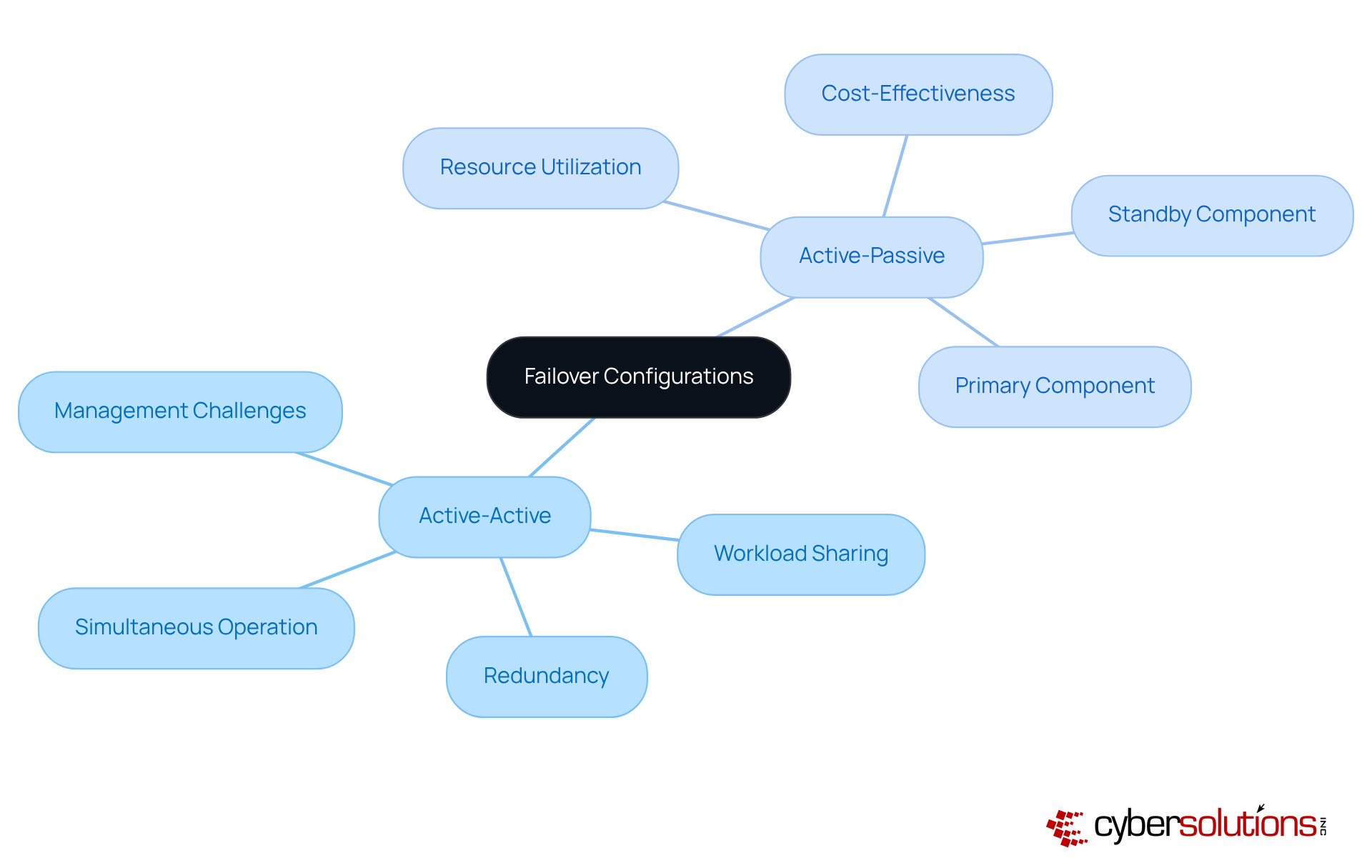
The failover system is crucial for ensuring system reliability and can be categorized into two main configurations:
In an active-active configuration, all nodes operate simultaneously, sharing the workload and providing redundancy. This setup not only enhances performance but also significantly improves system availability, as traffic can be rerouted seamlessly among active nodes. However, it demands careful management to prevent resource overutilization.
On the other hand, a active-passive configuration consists of one primary component actively managing requests, while a secondary component remains on standby, ready to take control in the event of a failure. This approach is simpler to manage and can be more cost-effective, yet it may lead to underutilization of resources.
Organizations must thoroughly assess their operational needs, including performance requirements and budget constraints, to determine the most suitable configuration for their IT infrastructure. By understanding these configurations, decision-makers can better safeguard their systems against downtime.
Failover systems are essential for addressing common challenges like hardware failures, software crashes, and network outages. Consider the scenario: a failure of the server can halt access to patient records, putting patient care at risk. An effective backup mechanism seamlessly reroutes operations to a secondary server, allowing healthcare professionals to access vital information without interruption.
In the financial industry, the constant availability of trading platforms is crucial to prevent losses during market fluctuations. Failover systems ensure these platforms remain operational, even in the face of unexpected disruptions. Moreover, these systems support maintenance activities, enabling organizations to implement necessary updates without compromising service availability.
By proactively establishing robust failover strategies, organizations can significantly mitigate the impact of downtime, preserving and enhancing overall resilience. Did you know that downtime can cost medical facilities approximately $7,900 per minute? This statistic underscores the importance of failover systems.
The AWS outage, which lasted seven hours, disrupted critical healthcare systems and exposed the vulnerabilities of relying solely on a single cloud provider. This incident reinforces the necessity for a comprehensive failover plan, ensuring that organizations are prepared for any eventuality.
A failover system is not just a technical enhancement; it’s a strategic commitment to operational resilience that organizations must prioritize. In today’s landscape, where cyber threats loom large, ensuring uninterrupted service and safeguarding critical operations is paramount. This is especially true in high-stakes environments like healthcare and finance, where the stakes are incredibly high.
The necessity of failover systems in maintaining business continuity cannot be overstated. Various configurations - active-active and active-passive - highlight the importance of tailoring solutions to meet specific operational needs. Real-world examples demonstrate how these systems can mitigate significant financial losses and protect against data breaches, reinforcing their critical role in modern IT infrastructure.
Ultimately, the significance of failover systems extends beyond mere technical requirements; it’s a vital investment in an organization’s future. As industries face increasing threats from cyberattacks and system failures, the call to action is clear: organizations must prioritize the development and maintenance of robust failover strategies. This proactive approach not only enhances operational reliability but also fortifies an organization’s reputation and financial health in an unpredictable landscape.
What is a failover system?
A failover system is a backup solution that automatically shifts operations to a secondary setup when the primary setup fails or becomes inaccessible, ensuring high availability and reliability.
Why is a failover system important, particularly in healthcare?
In healthcare, a failover system is crucial due to the high stakes of cybersecurity threats and the need for uninterrupted access to applications and data. Technical failures account for 66% of downtime events in this sector, which can lead to significant operational and financial losses.
What are the different configurations of failover systems?
Failover systems can be arranged in various configurations, including active-active and active-passive setups, which determine how resources are allocated during normal operations and in the event of a failure.
What are the core functionalities of a failover system?
The core functionalities of a failover system include continuous monitoring of the primary system's health, automatic switching to the backup system, and ensuring minimal disruption to services.
How can downtime impact healthcare organizations financially?
One hour of downtime can cost a medical practice between $25,000 to $35,000, highlighting the importance of having robust backup mechanisms in place.
Can you provide examples of failover systems in action?
Yes, during a cyberattack, a financial institution used database redundancy to switch operations to a replica database, maintaining real-time access to critical data. In another instance, Cyber Solutions quickly restored 4,500 endpoints following a ransomware incident, demonstrating effective incident response.
What role do automated backup solutions play in healthcare?
Automated backup solutions in healthcare have been shown to reduce downtime from hours to minutes, significantly improving patient safety and aiding compliance with regulations such as HIPAA.
Why is it important to enhance disaster recovery infrastructure before a crisis?
Enhancing disaster recovery infrastructure before a crisis is crucial to ensure readiness and effectiveness in responding to potential operational failures, as emphasized by industry experts.
How should organizations approach the evaluation of their failover systems?
Organizations should regularly evaluate their failover frameworks and maintain a structured governance approach to ensure the reliability and effectiveness of these systems.
Managed IT Service Provider | Cyber Security | Incident Response | Compliance As A Service | Hosted Phone Service | Managed Security Service Provider | AI As A Service