Introduction
In an era where data breaches and cyber threats are more prevalent than ever, organizations are confronted with the urgent challenge of protecting their critical information. Effective backup and continuity strategies are not merely optional; they are vital for ensuring resilience against potential disasters. This article explores best practices that empower businesses to establish robust backup systems, conduct comprehensive risk assessments, and cultivate a culture of preparedness among employees.
How can organizations effectively navigate the complexities of data protection while minimizing vulnerabilities and ensuring compliance? The stakes are high, and the consequences of inaction can be severe. By understanding the unique challenges they face, organizations can take proactive steps to safeguard their data and maintain operational integrity.
Establish Core Components of Backup and Continuity Strategies
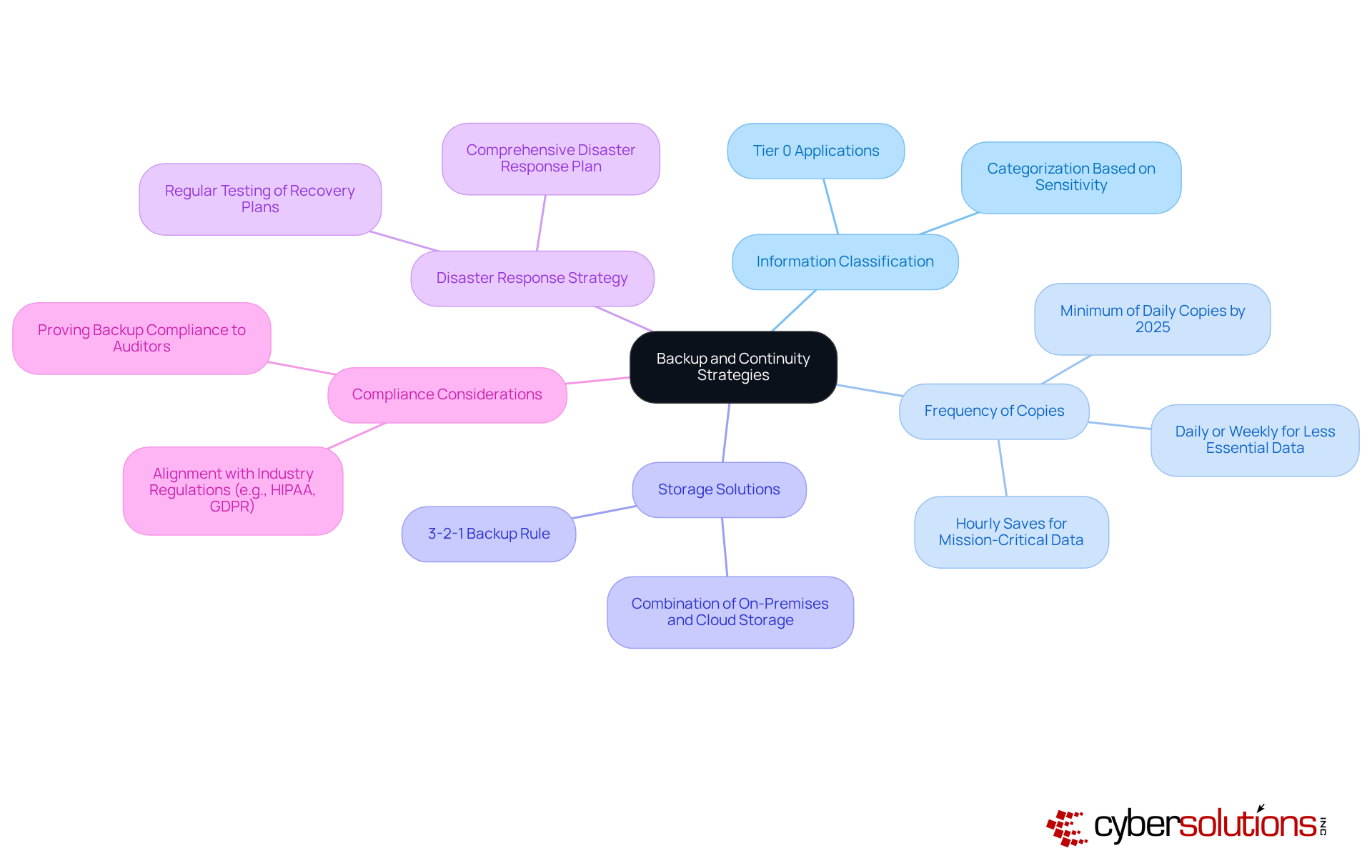
To establish a solid strategy, organizations must prioritize several core components:
- Data Classification: Identifying and categorizing information based on its importance and sensitivity is crucial. This prioritization ensures that mission-critical information is backed up first, significantly reducing the risk of loss. For example, organizations managing sensitive information often categorize it into tiers, with Tier 0 applications like Active Directory requiring the highest level of protection.
- Frequency of Copies: Determining how often copies are made is essential and should reflect the importance of the information. Statistics indicate that increasing the frequency of backups to multiple times daily can greatly mitigate information loss. For instance, mission-critical data may necessitate hourly saves, while less essential information can be saved daily or weekly. By 2025, optimal methods suggest that organizations should aim for at least daily copies to bolster information resilience.
- Backup Solutions: Employing a combination of on-premises and cloud solutions guarantees redundancy and accessibility. The 3-2-1 backup rule-maintaining three copies of information on two different media, with one copy stored off-site-serves as a guiding principle for effective backup strategies. This approach not only protects against information loss but also enhances restoration capabilities during incidents.
- Recovery Plan: Developing a comprehensive recovery plan is vital. This plan should detail procedures for restoration and ensure backup and continuity in the event of a data loss incident. Regular testing of recovery plans is necessary to ensure readiness and identify potential weaknesses, with quarterly tests recommended to improve preparedness.
- Compliance Measures: Aligning the data protection strategy with industry regulations and standards, such as HIPAA or GDPR, is essential to avoid legal repercussions. Organizations must ensure that their data recovery processes comply with these regulations, as non-compliance can lead to significant penalties and reputational damage. As Andrew Evers, CTO at Infrascale, emphasizes, "Ransomware isn’t going away-it’s evolving. The sole genuine defense is preparation: thorough backups, testing, and measures that guarantee information can be restored without paying a ransom.
Conduct Comprehensive Risk Assessments to Identify Vulnerabilities
A risk assessment is crucial for identifying and addressing vulnerabilities that could lead to data breaches, especially in the healthcare sector where patient information is sensitive.
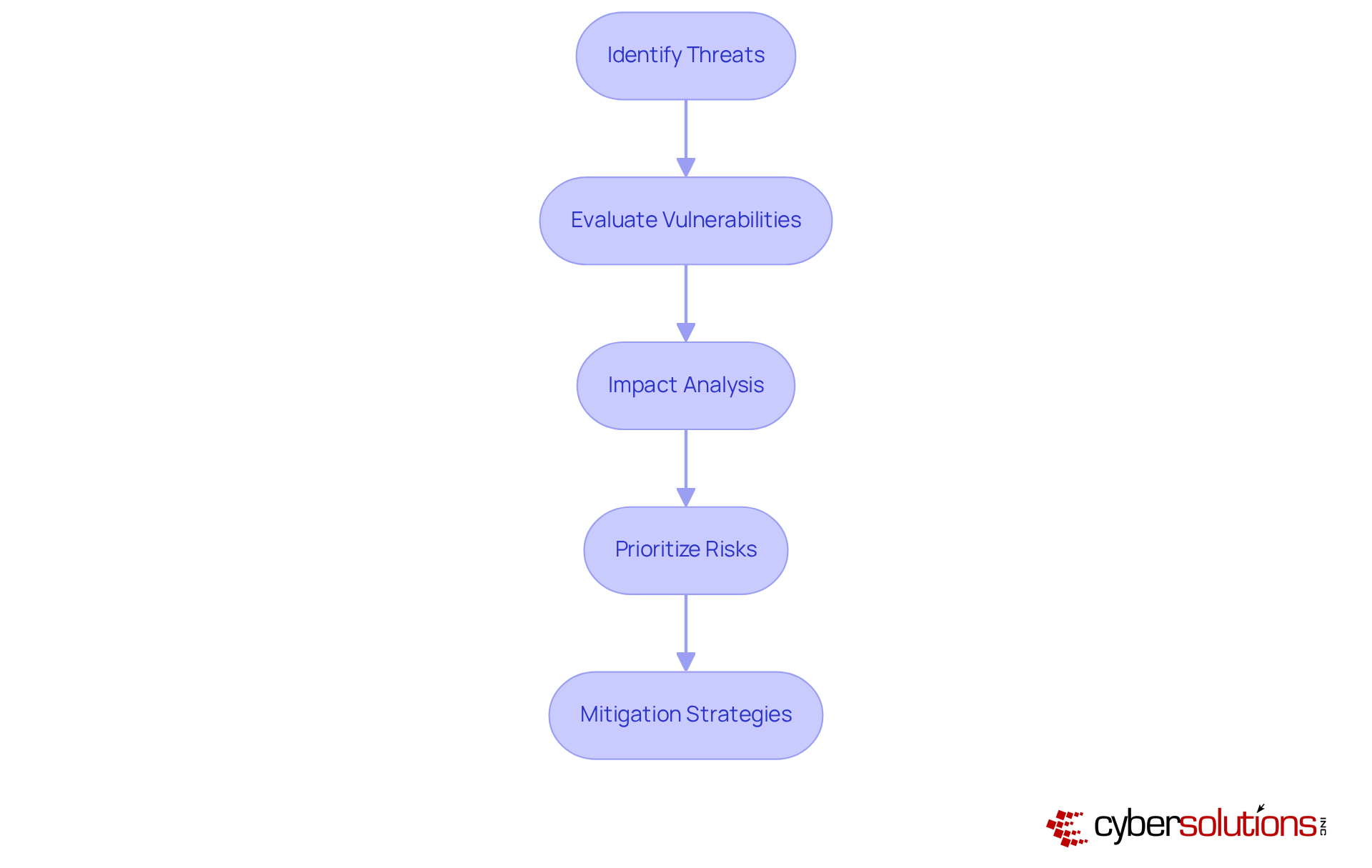
- Identify Threats: Start by cataloging potential threats such as cyberattacks that can result in information loss. For instance, phishing remains the leading method for credential theft, involved in over 30% of incidents. This statistic underscores the need for vigilance against cyber threats.
- Evaluate Vulnerabilities: Next, conduct a thorough assessment of your IT infrastructure to pinpoint weaknesses that could be exploited. This evaluation should encompass software, hardware, and personnel practices. Notably, 68% of breaches involve a human element, highlighting the critical importance of training and awareness.
- Impact Analysis: Analyze the potential repercussions of each identified threat on business operations. Consider financial losses, reputational damage, and operational disruptions. For example, the average cost of a data breach has soared to $4.88 million, with recovery taking an average of 258 days. This data emphasizes the urgency of proactive measures.
- Prioritize Risks: Rank the identified risks based on their likelihood and potential impact. This prioritization allows organizations to focus on the most critical vulnerabilities first, ensuring that resources are allocated effectively to mitigate the highest risks.
- Mitigation Strategies: Finally, formulate strategies to address identified risks. This may include implementing robust security measures, enhancing employee training, and ensuring regular system updates. Organizations with a tested plan can save an average of $248,000 in breach costs, demonstrating the financial benefits of preparedness.
In conclusion, a comprehensive risk assessment not only safeguards sensitive data but also fortifies the organization against potential threats, making it an essential component of any cybersecurity strategy.
Implement Regular Testing and Updates of Backup Systems
To ensure the effectiveness of backup systems, organizations must recognize their vulnerabilities.
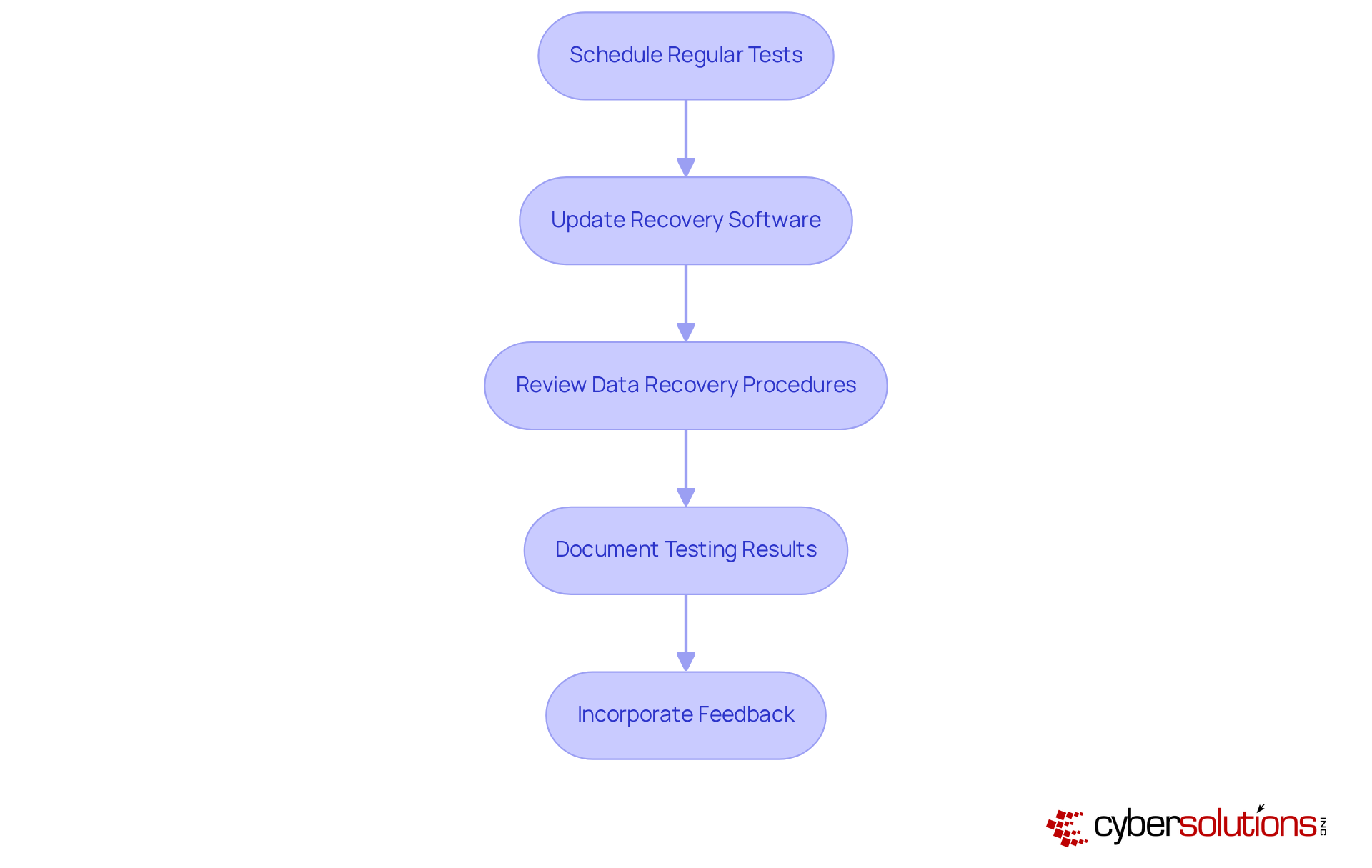
- Performing routine assessments of recovery systems is essential to confirm that information can be restored successfully. This includes both full system restores and partial recoveries of data.
- Keeping recovery software current is vital to protect against vulnerabilities and ensure compatibility with the latest technologies.
- Review: Regularly assessing and revising backup plans is necessary to reflect changes in business operations, data types, and compliance requirements.
- Maintaining detailed records of testing outcomes, including any issues encountered and resolutions implemented, is crucial for improving future testing processes.
- Utilizing input from testing can significantly enhance recovery strategies and address any identified weaknesses in the recovery process.
By following these steps, organizations can improve their backup strategies and ensure resilience against potential threats.
Train Employees on Backup Protocols and Recovery Procedures
To effectively train employees on backup protocols and recovery procedures, organizations must recognize the critical importance of training. In today’s digital landscape, where threats are ever-evolving, ensuring that your workforce is well-prepared is not just beneficial - it's essential.
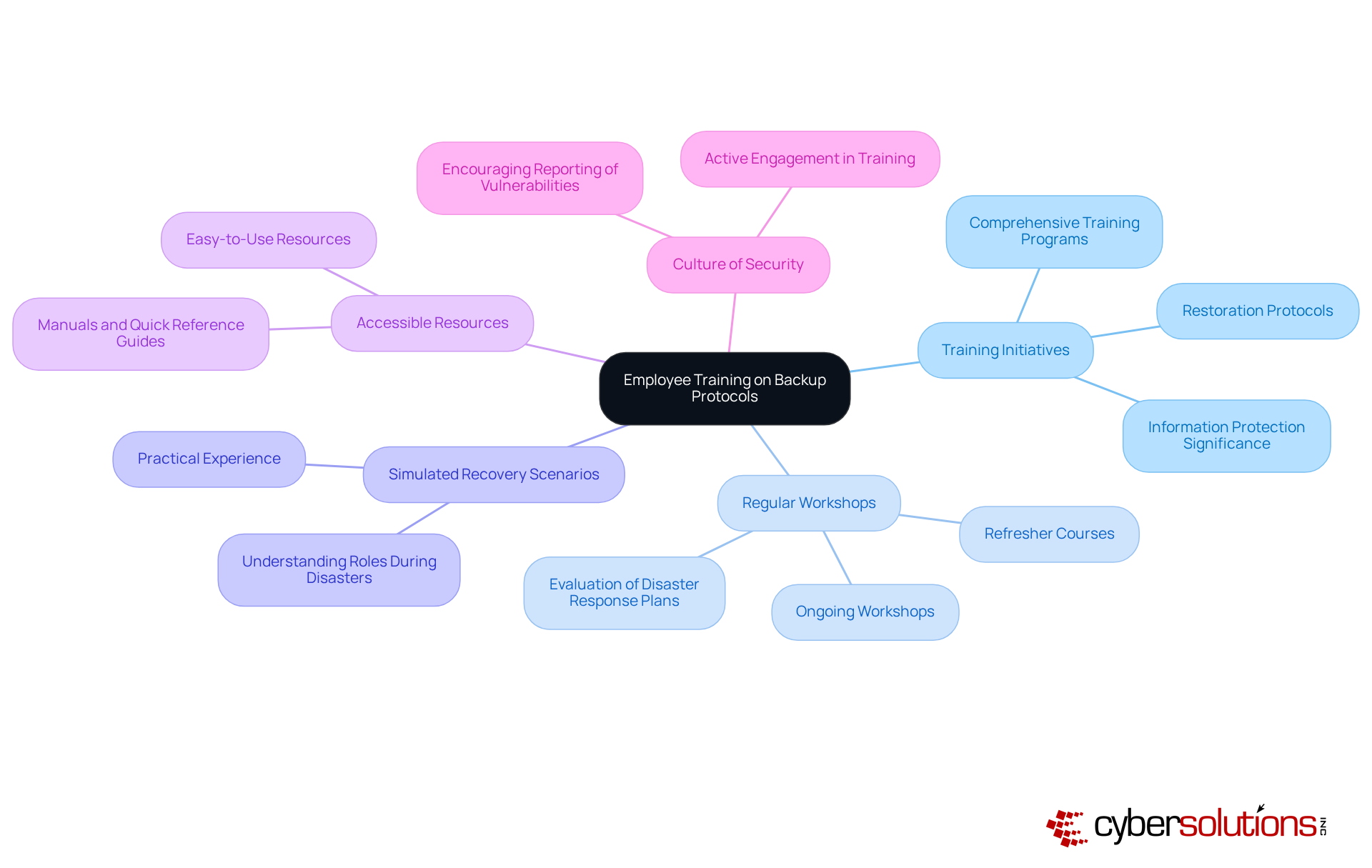
- Develop Extensive Training Programs: Create comprehensive training programs that thoroughly address restoration protocols, retrieval procedures, and the vital significance of information protection. This foundational knowledge is crucial for all employees, as it lays the groundwork for a secure environment.
- Conduct Regular Workshops: Schedule ongoing workshops and refresher courses to keep employees informed about updates and any changes to procedures. Consistent involvement strengthens the importance of information security. As Yuman Chau highlights, 'Consistently evaluating your processes, particularly your backup and continuity processes, is not merely a task to complete, but a strategic necessity that entities must prioritize.'
- Simulate Recovery Scenarios: Organize simulated recovery exercises that provide employees with practical experience in restoring data and understanding their specific roles during a disaster. These hands-on experiences are invaluable for building confidence and competence.
- Provide Resources: Equip employees with easy-to-use resources, such as manuals and quick reference guides, to aid in recalling procedures and protocols during critical moments. This accessibility can significantly enhance response times during incidents.
- Encourage a Security Culture: Foster a security culture within the organization by motivating employees to report potential vulnerabilities and actively engage in ongoing training. This proactive approach not only boosts individual accountability but also fortifies the overall security stance of the entity.
By prioritizing these practices, companies can significantly enhance their resilience against information loss and ensure readiness for a workforce that is well-prepared to respond effectively to any incidents. Furthermore, it is essential to acknowledge that 95% of organizations have training programs in place, underscoring the necessity of training employees on these protocols. Implementing the 3-2-1-1 rule - maintaining three copies of data on two different media types, with one copy offsite and one offline - can further bolster strategies for data protection.
Conclusion
Establishing effective backup and continuity strategies is not just important; it’s essential for organizations that want to protect their critical data and minimize the impact of potential disruptions. By focusing on core components like:
- Information classification
- Backup frequency
- Storage solutions
- Disaster response strategies
- Compliance considerations
businesses can build a robust framework that safeguards sensitive information and enhances overall resilience.
Key insights emphasize the necessity of conducting comprehensive risk assessments to pinpoint vulnerabilities. Regular testing and updates of backup systems are crucial, as is prioritizing employee training on backup protocols and recovery procedures. Each of these practices is vital in strengthening an organization’s defenses against data loss, ensuring that recovery processes are both efficient and effective.
The significance of these strategies cannot be overstated. As cyber threats evolve, organizations must adopt a proactive approach to data protection. By implementing best practices for backup and continuity strategies, businesses can mitigate risks and foster a culture of security that empowers employees to remain vigilant and prepared. Taking action now will pave the way for a more secure and resilient future, safeguarding valuable information against unforeseen challenges.
Frequently Asked Questions
What are the core components of a backup and continuity strategy?
The core components include information classification, frequency of copies, storage solutions, a disaster response strategy, and compliance considerations.
Why is information classification important in backup strategies?
Information classification is crucial because it helps organizations identify and categorize information based on its importance and sensitivity, ensuring that mission-critical information is prioritized for backup, thereby reducing the risk of loss.
How often should backups be made according to the article?
The frequency of backups should reflect the importance of the information. For mission-critical data, hourly backups may be necessary, while less essential information can be saved daily or weekly. By 2025, organizations should aim for at least daily copies to enhance information resilience.
What is the 3-2-1 backup rule?
The 3-2-1 backup rule suggests maintaining three copies of information on two different media, with one copy stored off-site. This approach ensures redundancy and accessibility, enhancing protection against information loss.
What should a disaster response strategy include?
A disaster response strategy should detail procedures for data restoration and ensure backup and continuity in the event of a data loss incident. Regular testing of recovery plans is necessary to ensure readiness, with quarterly tests recommended to identify potential weaknesses.
Why are compliance considerations important in data protection strategies?
Compliance considerations are essential to align data protection strategies with industry regulations and standards, such as HIPAA or GDPR. This alignment helps avoid legal repercussions, as non-compliance can lead to significant penalties and reputational damage.
What does Andrew Evers emphasize regarding ransomware and data protection?
Andrew Evers emphasizes that ransomware is evolving and that the best defense is thorough preparation, which includes implementing effective backups, endpoint protection, and disaster recovery solutions to ensure information can be restored without paying a ransom.
List of Sources
- Establish Core Components of Backup and Continuity Strategies
- 6 Data Backup Best Practices for Disaster Recovery (https://agileit.com/news/data-backup-best-practices)
- What Every CEO Should Know About Business Continuity in 2025 (https://formationtech.co.uk/blog/what-every-ceo-should-know-about-business-continuity-in-2025)
- Key Elements of Business Continuity and Disaster Recovery for Healthcare (https://healthtechmagazine.net/article/2025/09/key-elements-business-continuity-and-disaster-recovery-healthcare)
- Data Loss Statistics In The US In 2025 / Infrascale (https://infrascale.com/data-loss-statistics-usa)
- connectwise.com (https://connectwise.com/blog/backup-strategy-best-practices)
- Conduct Comprehensive Risk Assessments to Identify Vulnerabilities
- National Cyber Security Centre Launches 2025 National Cyber Risk Assessment revealing Escalating Threat Landscape (https://gov.ie/en/department-of-justice-home-affairs-and-migration/press-releases/national-cyber-security-centre-launches-2025-national-cyber-risk-assessment-revealing-escalating-threat-landscape)
- Data Breach Statistics 2025–2026: Trends & Insights (https://deepstrike.io/blog/data-breach-statistics-2025)
- 2025 Risk Reality Check: Cybersecurity at a Crossroads (https://secureworld.io/industry-news/2025-cyber-risk-reality-check)
- 205 Cybersecurity Stats and Facts for 2026 (https://vikingcloud.com/blog/cybersecurity-statistics)
- Implement Regular Testing and Updates of Backup Systems
- The Importance of Regular Disaster Recovery Testing and Updates - VAST (https://vastitservices.com/blog/the-importance-of-regular-disaster-recovery-testing-and-updates)
- System Updates In Disaster Recovery Statistics: USA | Infrascale (https://infrascale.com/system-updates-disaster-recovery-statistics-usa)
- Researchers urge vigilance as Veeam releases patch to address critical flaw (https://cybersecuritydive.com/news/veeam-patch-critical-flaw-backup/751052)
- Backups Alone Aren’t Enough: Testing is Essential (https://penntech-it.com/2025/09/10/backups-alone-arent-enough-testing-is-essential)
- From Backup to Cyber Resilience: Why IT Leaders Must Rethink Backup in the Age of Ransomware (https://thehackernews.com/2025/07/how-cyber-resilience-helps-it-defend-against-ransomwa.html)
- Train Employees on Backup Protocols and Recovery Procedures
- Best Practices for Data Recovery – Future IT Services (https://futureitservices.au/news/data-recovery-best-practices)
- isaca.org (https://isaca.org/resources/news-and-trends/industry-news/2024/ensuring-data-security-the-importance-of-cloud-backups-and-drill-testing)
- Data Backup: Best Practices for 2025 (https://ais-now.com/blog/data-backup-best-practices-2024)
- 7 Backup Mistakes Companies still making in 2025 | Catalogic Software (https://catalogicsoftware.com/blog/7-backup-mistakes-companies-still-making-in-2025)
- Why Businesses Needsa Backup and Disaster Recovery Strategy| Northern Technologies Group (https://ntgit.com/why-every-business-needs-a-smart-backup-and-disaster-recovery-strategy-in-2025)