


In today’s digital landscape, cloud backup and disaster recovery stand as crucial pillars of risk management for organizations. As businesses increasingly rely on data integrity and operational continuity, grasping the intricacies of effective backup strategies is essential. But amidst this growing dependence on technology, many organizations face a pressing question: How can they guarantee that their data is not only secure but also recoverable when unforeseen disruptions occur? This article explores best practices for mastering cloud backup and disaster recovery, empowering businesses with the knowledge needed to bolster resilience and protect their vital assets.
is not just a technical necessity; it’s a cornerstone of effective risk management for organizations today. As we move into 2025, the significance of robust disaster management capabilities is undeniable. These capabilities are as vital to organizational operations as accounting or legal compliance. To navigate the complexities of today’s digital landscape, organizations must invest in reliable backup solutions that not only protect data but also ensure a swift recovery from data loss or system failures.
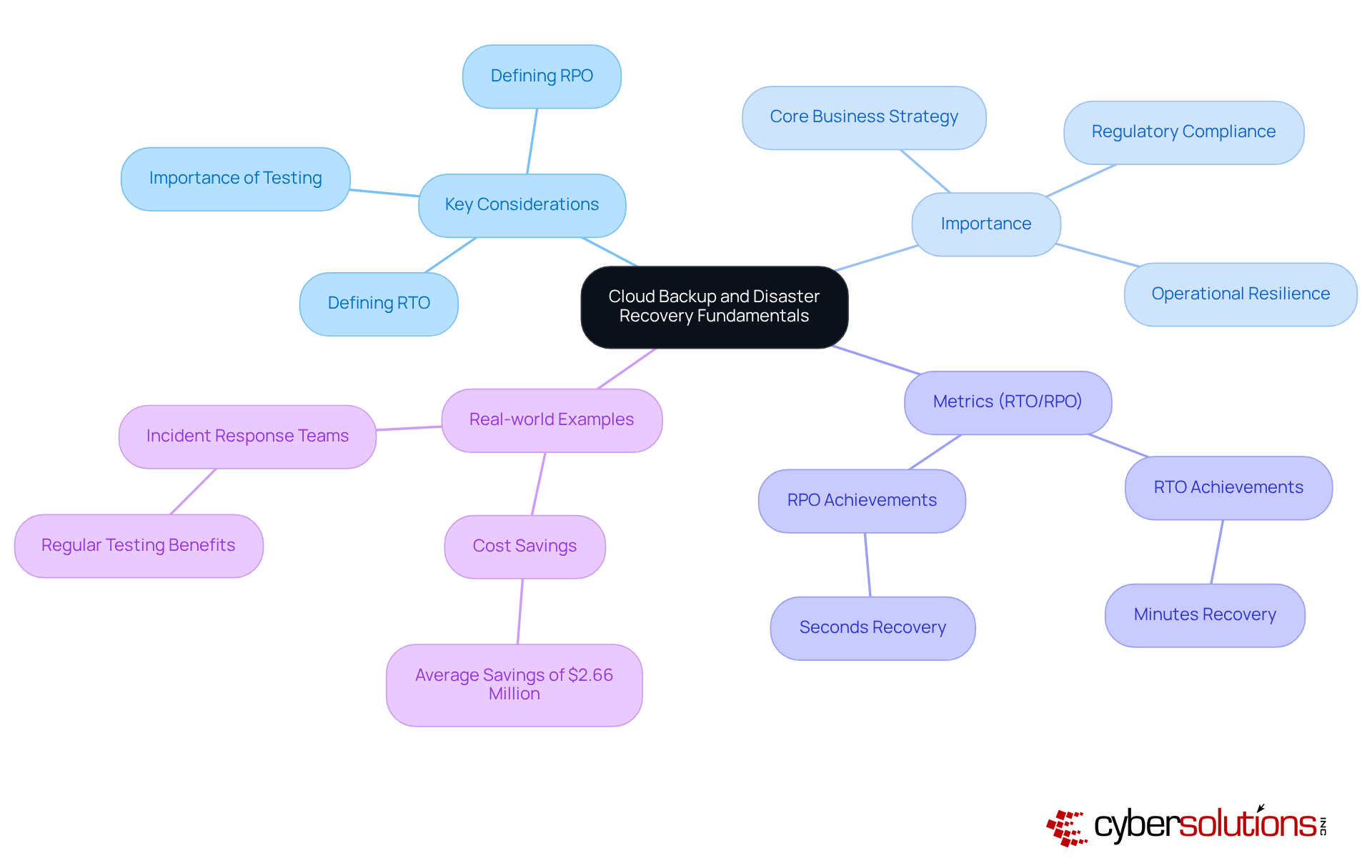
Key considerations in this realm include:
These metrics help businesses determine how quickly they need to resume operations and how much data they can afford to lose. For instance, modern solutions for cloud backup can achieve RPOs of mere seconds and RTOs of just minutes, significantly enhancing business continuity. As Caitlin Harris aptly notes, "Neglecting to test your disaster recovery plan may produce a false sense of safety and render you susceptible to attacks."
Real-world examples further underscore the effectiveness of strategies for disaster recovery. Organizations that have implemented comprehensive backup strategies report significant improvements. Those that consistently test their plans save an average of $2.66 million when disasters strike. Moreover, as David Cackowski highlights, "Cloud DR minimizes vulnerability to ransomware, cloud provider issues, and regional disruptions, while also assisting in compliance with quantifiable service level agreements (SLAs)."
In summary, prioritizing disaster recovery planning is crucial for organizations aiming to effectively mitigate risks and thrive in today’s challenging environment. By embracing these strategies, businesses can not only safeguard their data but also enhance their overall resilience.
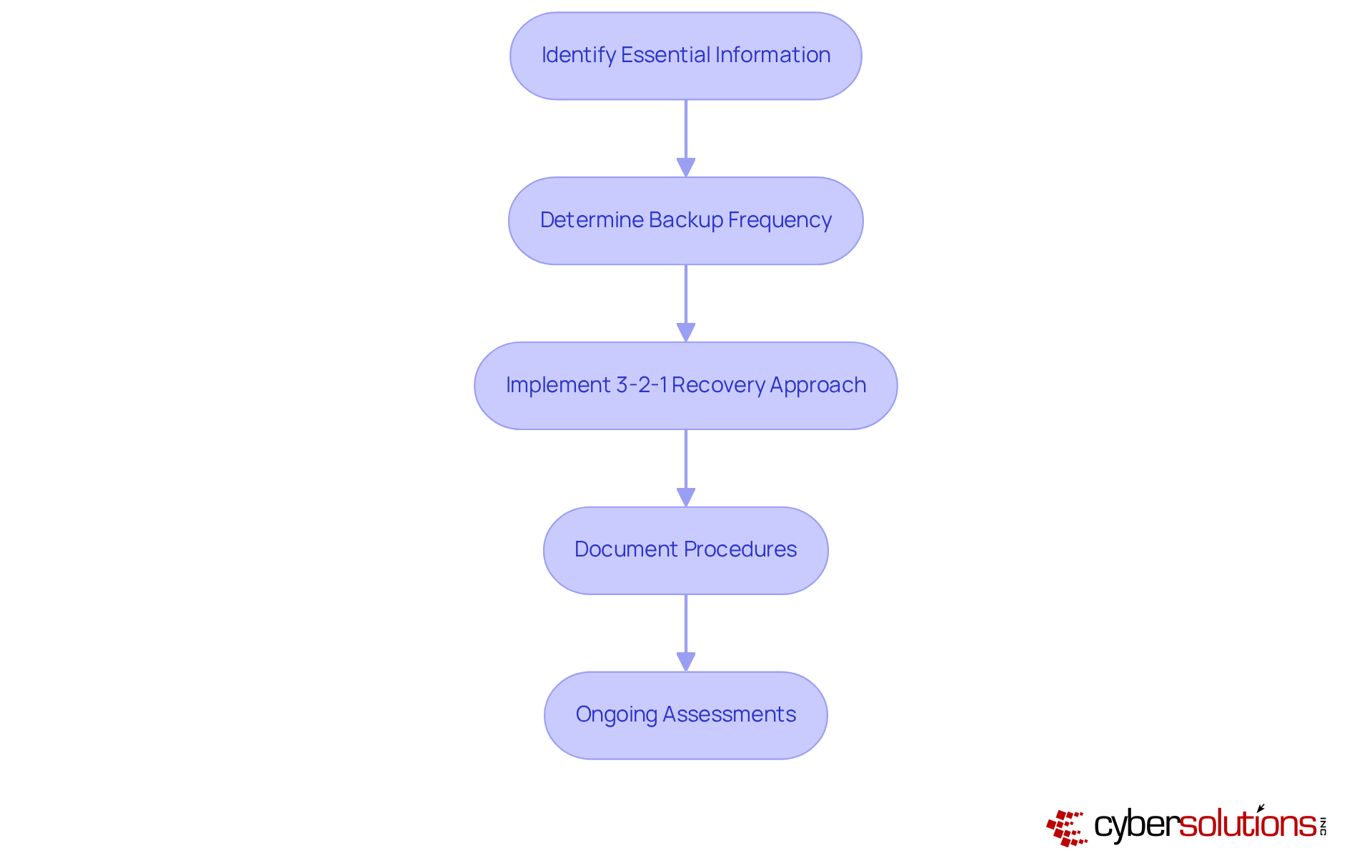
In today’s digital landscape, the importance of a robust backup plan, including disaster recovery strategies, cannot be overstated, especially in the healthcare sector. Organizations must first identify the essential information that requires safeguarding, classifying it based on its significance and sensitivity. This foundational step ensures that the most critical data is prioritized, setting the stage for effective recovery.
Next, businesses should determine how often they need to utilize backups for their data—whether daily, weekly, or in real-time—tailored to their Recovery Time Objective (RTO) and Recovery Point Objective (RPO) requirements. Applying the 3-2-1 rule is crucial: keep three copies of information on two distinct forms of storage media, with one copy stored offsite. This strategy significantly enhances resilience against potential threats by utilizing diverse storage solutions.
Moreover, organizations should meticulously document their data preservation procedures and conduct regular assessments to adapt to evolving business needs and technological advancements. Consider the case of a healthcare organization that successfully recovered from a ransomware attack due to its well-structured response and prompt training on identifying suspicious emails. This efficient response allowed critical healthcare operations to continue with minimal downtime.
Following the incident, the organization embraced ongoing training and adopted a Zero Trust approach, highlighting the necessity of security measures along with continuous monitoring to safeguard against future threats. Are you prepared to implement a similar strategy in your organization? The time to act is now—ensure your data is protected and your backup plan is robust.
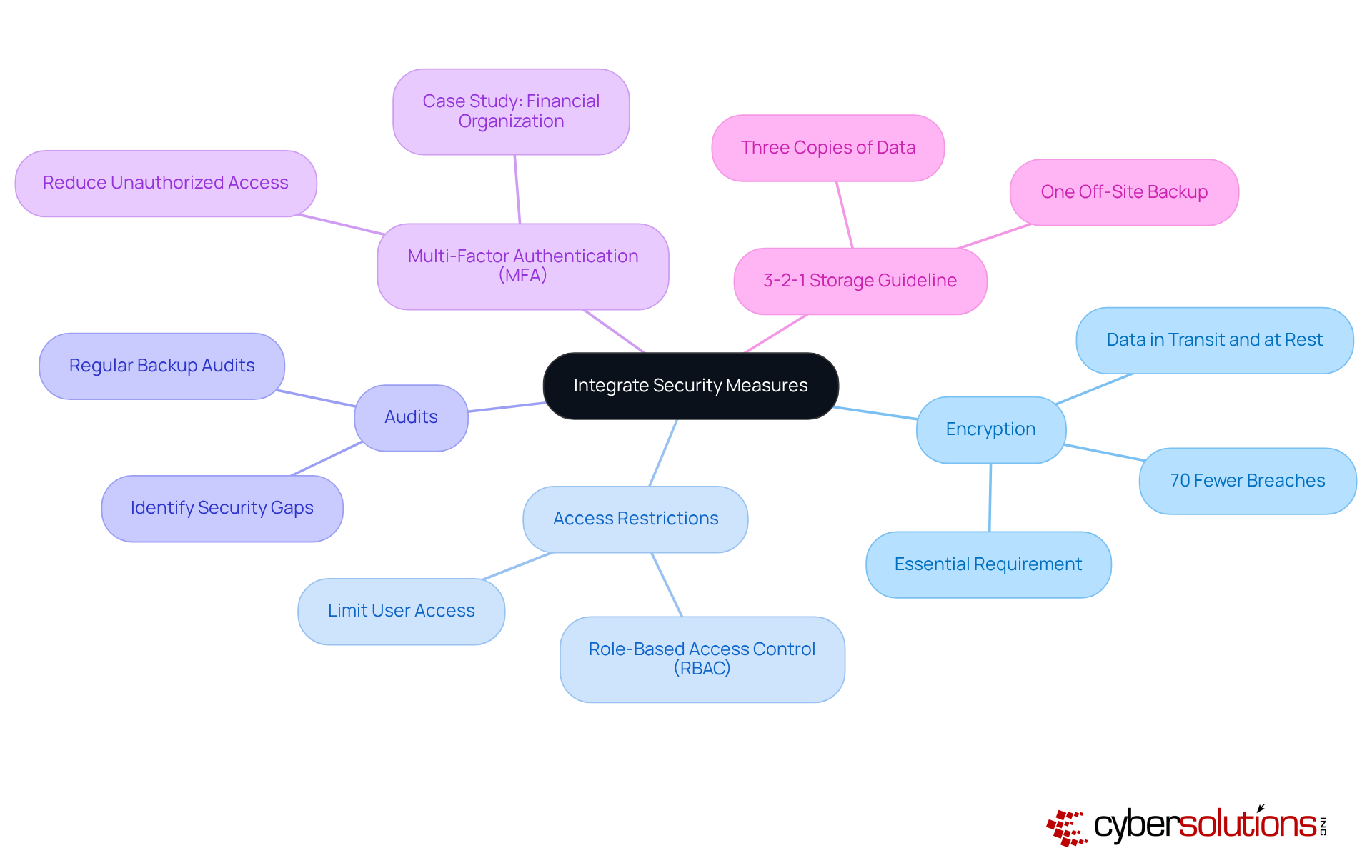
In today's digital landscape, organizations, especially in healthcare, must prioritize security measures to safeguard stored information. To achieve this, encryption methods must be applied both during data transfer and when information is idle. This practice ensures that intercepted data remains unreadable to unauthorized users, significantly enhancing security.
Moreover, implementing stringent access restrictions is crucial. By limiting who can access storage systems and sensitive information, organizations can further reduce risks. Regular audits and assessments play a vital role in identifying potential security gaps. Additionally, multi-factor authentication serves as an effective measure to bolster security. For instance, a financial organization that integrated MFA into its recovery systems reported a notable decrease in unauthorized access incidents, underscoring the effectiveness of combining security strategies.
Statistics from 2025 reveal that organizations employing robust security measures experience up to 70% fewer breaches compared to those without such measures. Cybersecurity leaders emphasize that encryption is not just a best practice; it is an essential requirement in today’s threat environment, where attackers increasingly target storage systems as a final line of defense.
Furthermore, adhering to the principle of data redundancy, with one backup stored off-site or utilizing cloud solutions, enhances protection strategies. By implementing these measures, organizations can significantly strengthen their cybersecurity posture and better protect their data.
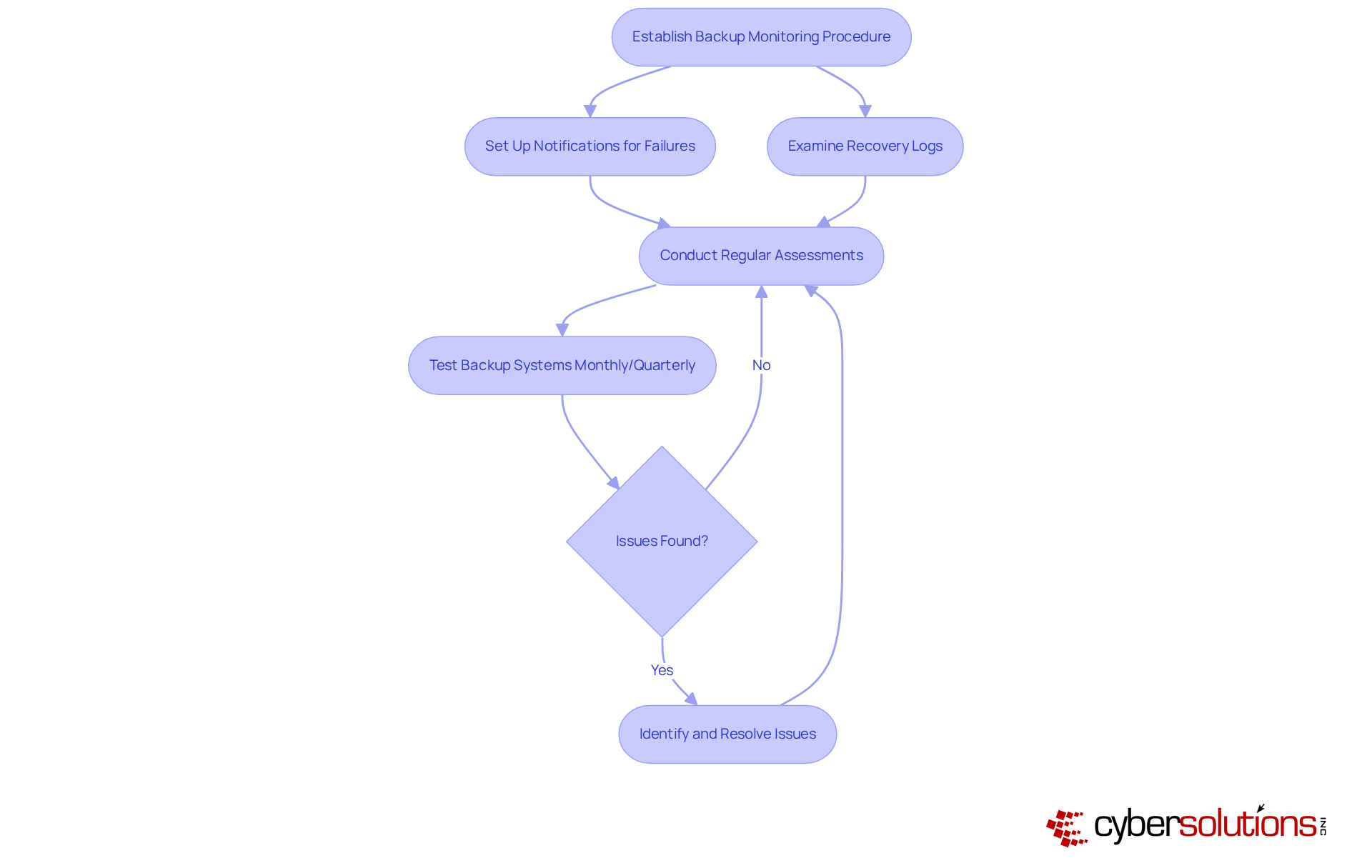
Organizations must establish a robust procedure for overseeing their backup systems to ensure successful recovery and the ability to restore information when necessary. This involves setting up notifications for failures and routinely examining recovery logs. These logs are crucial to confirm that information can be restored quickly and accurately.
Consider the case of a manufacturing firm that regularly tested its backup systems; it successfully reinstated operations within hours after a system failure. This stands in stark contrast to the 73% of small businesses that were unable to recover when it was most critical in 2025. Experts recommend that organizations conduct tests—ideally on a monthly or quarterly basis—to identify potential issues and ensure that recovery processes are effective.
By implementing these practices, businesses can significantly enhance their resilience against data loss with effective recovery strategies. As a cloud expert aptly stated, "Your backup is merely a false sense of security if it hasn’t been tested." Additionally, common pitfalls, such as neglecting the need for regular updates to backup configurations and failing to monitor for errors, which can lead to failures.
Prioritizing cloud backup and disaster recovery is not just essential; it’s a non-negotiable strategy for organizations aiming to bolster their resilience against data loss and operational disruptions. In a landscape where digital threats are constantly evolving, adopting comprehensive strategies in these areas has become a fundamental requirement for maintaining business continuity and protecting sensitive information.
Consider this: organizations that implement effective cloud backup and disaster recovery strategies not only safeguard their data but also enhance their operational resilience. Key aspects of these strategies include:
Real-world examples reveal that organizations with well-structured recovery plans save significant amounts during incidents while ensuring compliance and operational continuity amidst challenges.
Reflecting on these insights, it’s evident that organizations must take proactive steps to implement and regularly test their backup systems. Continuous monitoring, thorough documentation, and adaptive strategies are crucial for ensuring that data remains protected and recoverable. By embracing these best practices, businesses can fortify their defenses against potential threats and secure a resilient future.
The time to act is now. Invest in cloud backup and disaster recovery solutions to protect your organization’s data and enhance its operational resilience.
What is the importance of cloud backup and disaster recovery for organizations?
Cloud backup and disaster recovery are essential for effective risk management, helping organizations protect data and ensure a swift recovery from data loss or system failures.
What are restoration time objectives (RTO) and restoration point objectives (RPO)?
RTO defines how quickly an organization needs to resume operations after a disruption, while RPO determines how much data can be lost before it impacts the organization.
What are the benefits of modern cloud backup and disaster recovery solutions?
Modern solutions can achieve RPOs of mere seconds and RTOs of just minutes, significantly enhancing operational resilience.
Why is it important to test disaster management plans?
Testing disaster management plans is crucial to avoid a false sense of safety and to ensure that organizations are prepared for potential attacks or disruptions.
What financial benefits do organizations experience from comprehensive disaster management plans?
Organizations that implement and consistently test their disaster management plans report substantial savings, averaging $2.66 million during incidents.
How does cloud disaster recovery (DR) minimize vulnerabilities?
Cloud DR reduces vulnerabilities to ransomware, cloud provider issues, and regional disruptions, while also aiding in compliance and operational continuity through quantifiable service level agreements (SLAs).
What should organizations prioritize to thrive in today's environment?
Organizations should prioritize cloud backup and disaster recovery strategies to effectively mitigate risks and enhance overall operational resilience.
Managed IT Service Provider | Cyber Security | Incident Response | Compliance As A Service | Hosted Phone Service | Managed Security Service Provider | AI As A Service