Navigating Compliance Challenges

Master IT Security Alerts: Essential Insights for C-Suite Leaders

Overview

The article underscores the critical importance of IT security alerts for C-suite leaders, asserting their pivotal role in proactive risk management and incident response within organizations. In an era where cybersecurity threats are ever-evolving, the effective management of these alerts emerges as a crucial strategy that can significantly mitigate cybersecurity incidents and bolster organizational resilience.

Statistics reveal that:

  1. 84% of C-suite leaders have encountered cybersecurity incidents.
  2. Organizations equipped with robust alert systems consistently report fewer breaches.

This highlights the necessity for leaders to prioritize the establishment of effective IT security frameworks.

Introduction

In an age where cyber threats loom larger than ever, the significance of IT security alerts has become paramount for organizations striving to protect their digital assets. These alerts serve as critical indicators of potential vulnerabilities, enabling swift responses that can prevent devastating breaches and financial losses. However, with the overwhelming volume of notifications, how can C-suite leaders effectively prioritize and respond to these alerts to ensure their organizations remain resilient against evolving threats?

This article delves into the essential insights that executives need to master IT security alerts, transforming them from mere notifications into powerful tools for proactive risk management.

Understanding the current landscape of cybersecurity threats is crucial. Organizations face a barrage of potential risks that can jeopardize their operations and reputation. The implications of these threats are profound, particularly for those in leadership positions who must navigate these challenges while safeguarding their assets. By mastering the art of interpreting and responding to IT security alerts, executives can not only mitigate risks but also foster a culture of security within their organizations.

As we explore the intricacies of IT security alerts, we will uncover how these notifications can be leveraged effectively, ensuring that organizations are not just reactive but proactive in their approach to cybersecurity.

Define IT Security Alerts and Their Importance

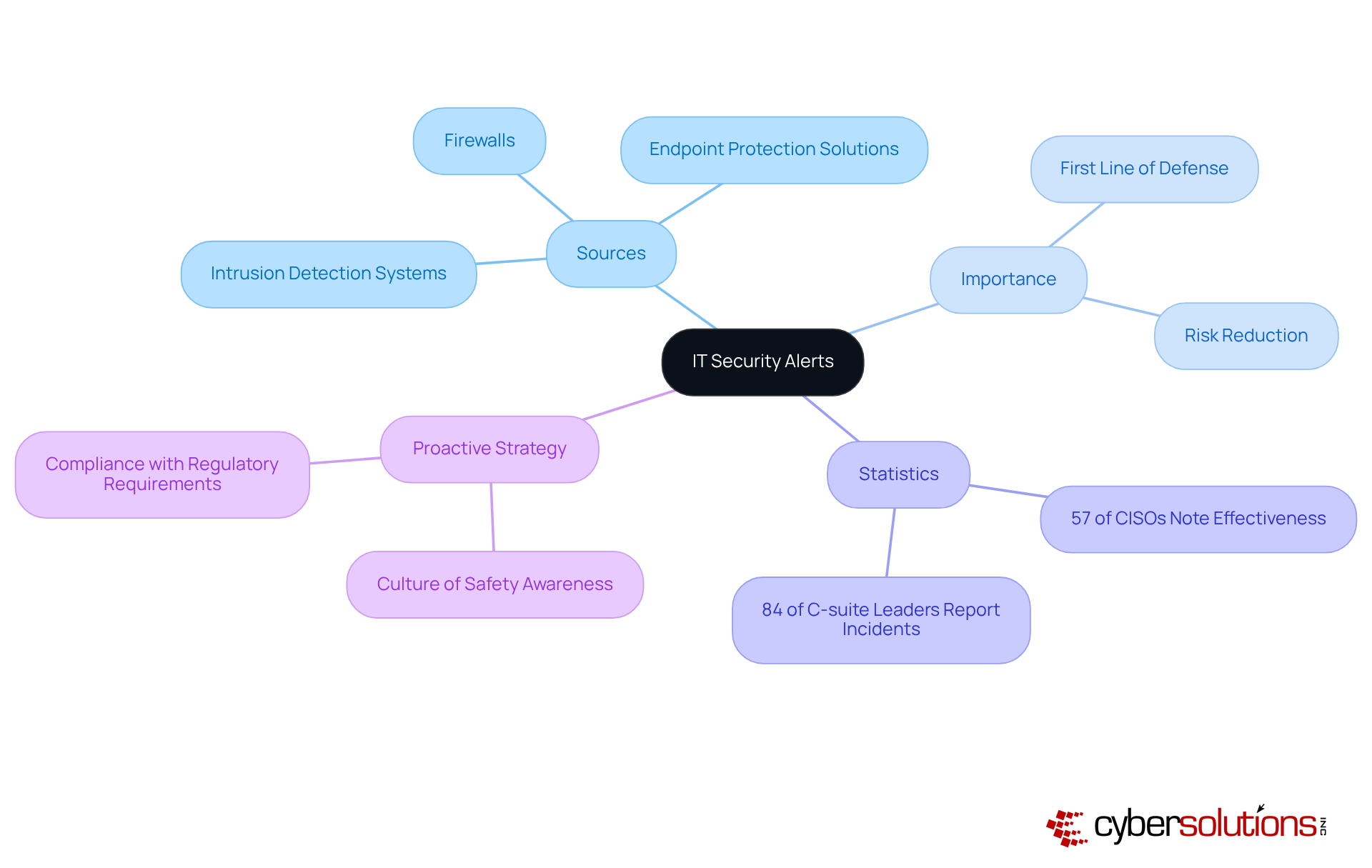
IT security alerts are essential messages generated by security systems to indicate potential security incidents or vulnerabilities within an entity's IT infrastructure. These notifications originate from various sources, including intrusion detection systems, firewalls, and endpoint protection solutions. Their significance cannot be overstated; they represent the first line of defense against cyber threats, allowing organizations to respond swiftly to incidents that could generate IT security alerts, data breaches, financial losses, or reputational damage.

Recent statistics reveal that 84% of C-suite leaders have reported experiencing a cybersecurity incident in the past three years, underscoring the urgent need for effective incident management. Additionally, organizations that prioritize IT security alerts can significantly reduce their risk exposure; firms with robust IT security alerts systems often witness a decrease in incidents associated with cybercriminals, with 57% of CISOs acknowledging this correlation.

Experts assert that IT security alerts are not merely reactive tools but vital components of a proactive risk management strategy. By fostering a culture of safety awareness and ensuring timely responses to notifications, executives can bolster their organizations' resilience against emerging threats. This proactive approach not only aids in compliance with regulatory requirements but also strengthens the overall defense posture, making it imperative for C-suite executives to prioritize the management of IT risk notifications.

Begin from the center with 'IT Security Alerts' and explore the branches to see where alerts come from, why they're important, data supporting their effectiveness, and how they fit into a proactive risk management approach.

Categorize Types of IT Security Alerts

IT security alerts can be categorized into various types, each indicating different levels of threat and urgency. Understanding these classifications is essential for effective incident response, particularly in enhancing cybersecurity confidence and implementing proactive protective strategies, including responding to IT security alerts. Here are some common types of IT security alerts:

  1. Informational Notifications: These notifications provide updates on system behavior and do not indicate malicious activity. They are useful for monitoring normal operations and identifying trends over time.

  2. Warning Notifications: These notifications signal potential issues that may require attention but do not necessarily indicate an immediate threat. For example, a warning notification might indicate unusual login attempts that could precede a more serious incident.

  3. Critical Notifications: These notifications indicate a confirmed security incident that requires immediate action. For instance, a discovered malware infection or a successful unauthorized access attempt would prompt a critical notification, necessitating a swift response to mitigate harm. Notably, research indicates that a significant portion of organizations report facing IT security alerts, underscoring the necessity of readiness. Rapid incident response strategies, including an incident response team on-site within 24 hours, can substantially enhance recovery efforts and minimize damage, particularly in addressing IT security alerts.

  4. False Positives: Alerts that are triggered by benign activities but are mistakenly identified as threats. While they can clutter notification systems, understanding their nature is crucial for refining warning parameters and reducing notification fatigue, which can lead to genuine threats being overlooked. Experts recommend utilizing advanced filtering methods to diminish false positives and enhance notification accuracy.

  5. Compliance Notifications: These notifications are generated to ensure adherence to regulatory requirements, such as data protection laws. They assist entities in maintaining compliance and avoiding potential legal repercussions, which is increasingly vital in today’s regulatory landscape. For example, entities in the healthcare sector frequently encounter compliance notifications related to HIPAA regulations.

By classifying notifications, including IT security alerts, C-suite leaders can prioritize their responses based on the severity and potential impact of each notification type, ensuring that resources are allocated effectively to address the most pressing threats. Furthermore, organizations such as Cyber Solutions have successfully established structured notification management systems that feature 24/7 monitoring, significantly enhancing their incident response times and minimizing notification fatigue, ultimately fortifying their overall cybersecurity posture.
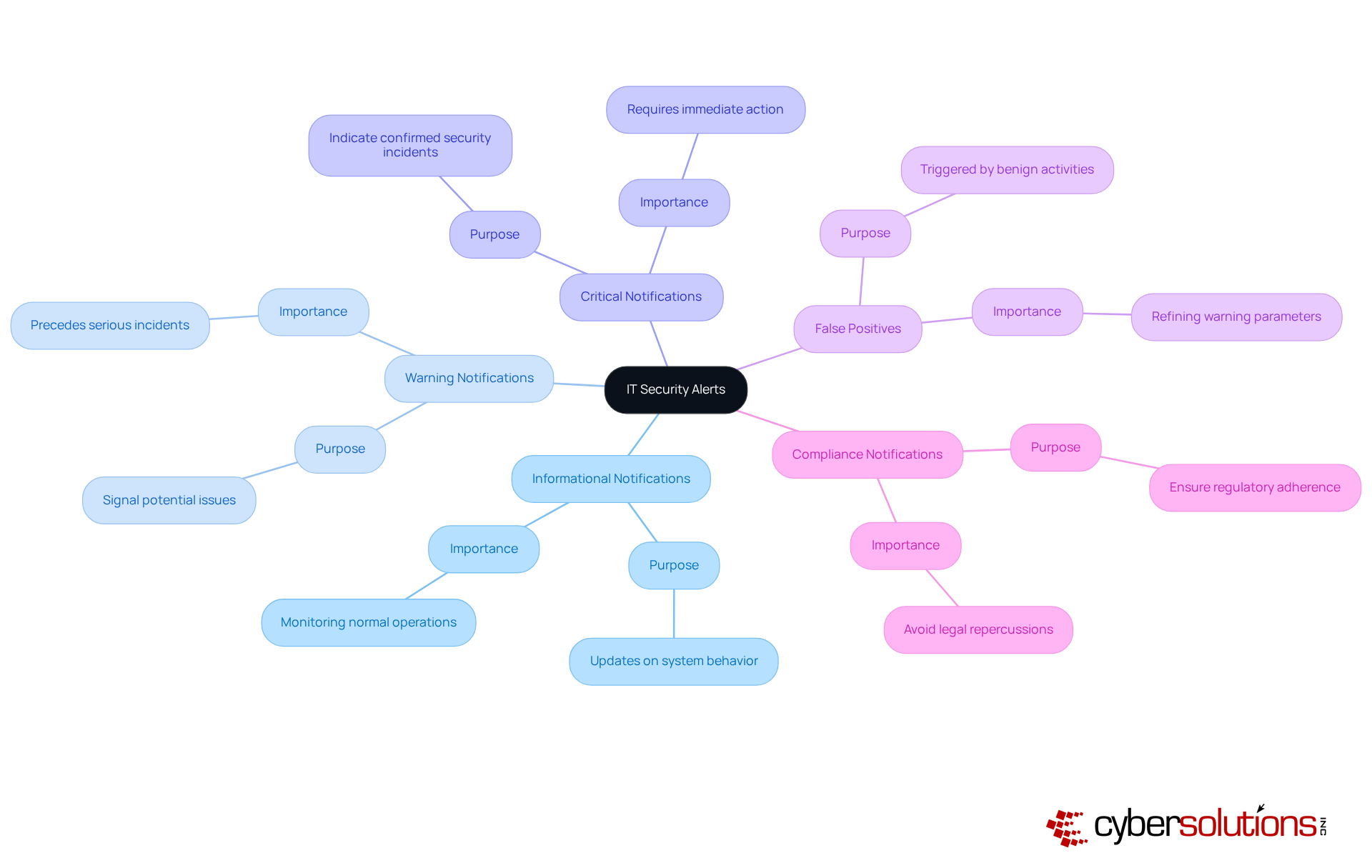
This mindmap shows different types of IT security alerts. Each branch represents a category, with its description highlighting its role in cybersecurity. The central node is the main topic, while the branches help you explore each type and understand its significance.

Best Practices for Responding to IT Security Alerts

In today's digital landscape, the importance of cybersecurity cannot be overstated, especially for organizations navigating the complex realm of IT security. To effectively respond to IT security alerts, organizations must adopt best practices that not only safeguard their assets but also enhance their operational resilience.

  • Establish a Response Plan: A comprehensive incident response plan (CSIRP) is essential. This plan should clearly define roles, responsibilities, and procedures for managing various types of notifications. Alarmingly, 45% of entities lack a documented plan. Regular updates and testing of this plan are crucial to ensure its effectiveness and compliance with evolving regulations.

  • Prioritize Notifications: Implementing a robust system for prioritizing notifications based on severity and potential impact is vital. This approach minimizes notification fatigue, ensuring that IT security alerts for critical incidents are addressed swiftly. Organizations with structured response plans can effectively manage IT security alerts, reducing the average breach lifecycle from 258 days to 189 days and underscoring the importance of prioritization.

  • Training staff is paramount, with continuous education for IT and safety personnel on understanding and reacting appropriately to IT security alerts. Organizations that conduct monthly safety training can reduce breach likelihood by 60%. Additionally, simulations of potential incidents prepare teams for real-world scenarios, significantly enhancing their readiness.

  • Utilize Automation: Leveraging automation tools can streamline the management process for IT security alerts. Automated systems substantially decrease response times, with companies employing AI-driven protection solutions addressing risks 40% faster than those relying on manual methods. This allows protection teams to focus on genuine threats rather than false positives.

  • Conduct Post-Incident Reviews: After addressing a notification, it is essential to perform comprehensive evaluations to identify lessons learned and opportunities for improvement. High-performing teams that engage in detailed post-mortem analyses can refine their response strategies and bolster their overall defensive posture.

By adopting these best practices, C-suite leaders can ensure their organizations are well-prepared to respond to IT threats, thereby mitigating potential risks and enhancing operational resilience.

The central node represents the main theme, while the branches highlight key practices and their supporting details. This layout helps visualize how each practice contributes to better IT security management.

The Role of Technology in Managing IT Security Alerts

In today's digital landscape, technology is crucial for effectively managing it security alerts related to IT risk notifications. The following key technologies significantly enhance alert management:

  1. Security Information and Event Management (SIEM): SIEM solutions play a vital role by collecting and analyzing security data across the organization. They provide immediate notifications and insights into potential risks, including it security alerts, which enable security teams to correlate events and identify patterns indicative of security incidents. Adoption rates of SIEM solutions have surged as organizations recognize their effectiveness in managing it security alerts, with many reporting improved incident response times and a decrease in notification fatigue.

  2. Intrusion Detection Systems (IDS): IDS continuously monitor network traffic for suspicious activities, generating alerts when potential threats are detected. These systems empower organizations to identify and respond to it security alerts in real-time, thereby enhancing their overall security posture. Cyber Solutions offers 24/7 monitoring of your network to detect anomalies and vulnerabilities, ensuring that questionable actions are intercepted before they escalate into threats.

  3. Endpoint Detection and Response (EDR): EDR solutions focus on monitoring and securing endpoints, such as laptops and servers. They provide comprehensive visibility into endpoint activities and generate it security alerts for unusual behavior, enabling swift responses to potential threats. The integration of EDR with SIEM solutions has proven effective in streamlining the management of it security alerts.

  4. Risk Intelligence Platforms: These platforms deliver actionable insights regarding emerging threats and vulnerabilities. By incorporating risk intelligence into notification management and leveraging it security alerts, organizations can enhance their capabilities to identify and respond to sophisticated threats, ensuring they stay ahead of cybercriminals. Cyber Solutions utilizes advanced attack intelligence to protect businesses from ransomware, phishing, and other malware attacks.

  5. Automation and Orchestration Tools: Automation tools streamline the response process by automating routine tasks, such as triaging notifications and incident reporting. This reduces the burden on security teams, enabling them to concentrate on addressing more complex threats associated with it security alerts. Recent advancements in automation technologies have significantly improved the efficiency of notification management for it security alerts, facilitating faster and more accurate responses.

As Jim Peterson, an expert in IT and cybersecurity, notes, 'SIEM solutions enhance compliance by providing detailed reporting and audit trails, ensuring that security measures align with regulatory standards such as GDPR, HIPAA, and PCI-DSS.' By leveraging these technologies, alongside the comprehensive firewall and network protection solutions offered by Cyber Solutions, C-suite leaders can bolster their organizations' capabilities in effectively managing it security alerts. This proactive approach to cybersecurity is essential in today's threat landscape. Furthermore, case studies like "Enhancing Threat Detection with Behavioral Analysis" demonstrate how organizations have successfully implemented these technologies to strengthen their security posture.
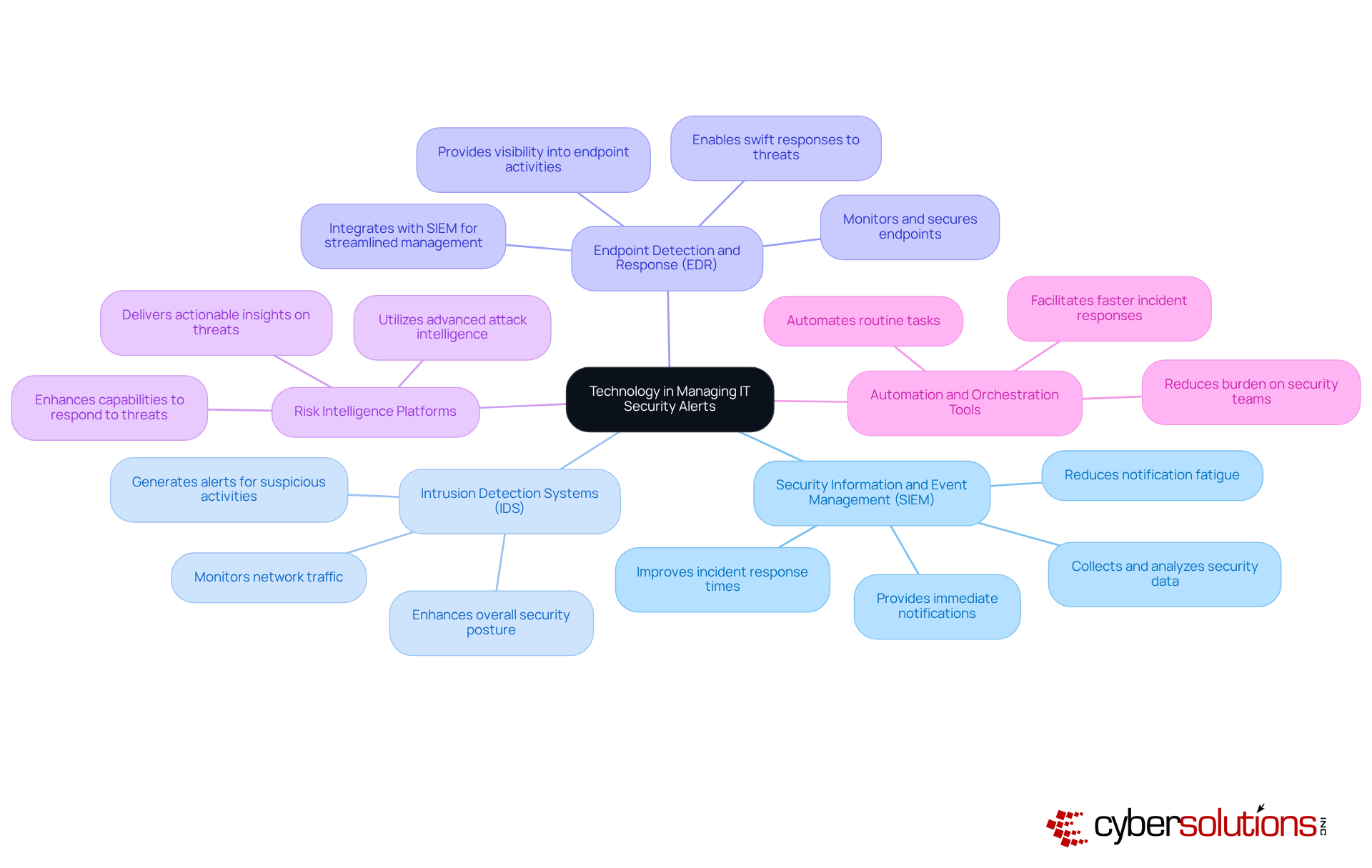
The central node shows the main topic, and each branch represents a key technology. The sub-branches provide insights into how each technology helps manage security alerts. The colors make it easier to differentiate between the technologies, helping you understand their unique contributions.

Conclusion

IT security alerts are not merely notifications; they serve as critical indicators of potential threats that necessitate immediate attention from C-suite leaders. Understanding and managing these alerts is essential for safeguarding an organization's digital assets and ensuring operational resilience. By prioritizing IT security alerts, executives can bolster their organizations' defenses against cyber threats, thereby reinforcing their commitment to a secure business environment.

Throughout this article, key insights have been shared regarding the significance of IT security alerts, their various types, and best practices for effective response. The necessity of establishing a structured incident response plan, along with leveraging advanced technologies such as SIEM and automation tools, underscores the importance of a proactive approach in managing these alerts. Furthermore, the correlation between prioritizing IT security alerts and reducing the risk of cyber incidents highlights the strategic advantage that organizations can gain through diligent alert management.

Ultimately, the landscape of cybersecurity is continually evolving, and the role of IT security alerts in risk management cannot be understated. C-suite leaders are encouraged to cultivate a culture of awareness and responsiveness within their organizations, ensuring they are equipped to tackle the complexities of modern cyber threats. By embracing these insights and implementing robust alert management strategies, organizations can not only protect their assets but also enhance their overall governance and compliance frameworks.

Frequently Asked Questions

What are IT security alerts?

IT security alerts are messages generated by security systems to indicate potential security incidents or vulnerabilities within an entity's IT infrastructure.

Where do IT security alerts originate from?

IT security alerts can originate from various sources, including intrusion detection systems, firewalls, and endpoint protection solutions.

Why are IT security alerts important?

IT security alerts are crucial as they represent the first line of defense against cyber threats, allowing organizations to respond swiftly to incidents that could lead to data breaches, financial losses, or reputational damage.

What recent statistics highlight the need for effective incident management?

Recent statistics indicate that 84% of C-suite leaders have reported experiencing a cybersecurity incident in the past three years, emphasizing the urgent need for effective incident management.

How do organizations benefit from prioritizing IT security alerts?

Organizations that prioritize IT security alerts can significantly reduce their risk exposure, with 57% of Chief Information Security Officers (CISOs) acknowledging a decrease in incidents associated with cybercriminals when robust IT security alert systems are in place.

Are IT security alerts reactive or proactive tools?

IT security alerts are considered vital components of a proactive risk management strategy, not merely reactive tools.

How can executives enhance their organizations' resilience against threats?

Executives can enhance their organizations' resilience by fostering a culture of safety awareness and ensuring timely responses to IT security alerts.

What additional benefits come from managing IT security alerts effectively?

Effective management of IT security alerts aids in compliance with regulatory requirements and strengthens the overall defense posture of the organization.

Recent Posts
Penetration Test vs Vulnerability Assessment: Key Differences Explained
Understanding Cyber Assessment Services: Importance and Key Features
Which Backup Method Best Protects Your Critical Data?
Essential Proactive Security Measures for C-Suite Leaders
Effective HIPAA HITECH Compliance Solutions for C-Suite Leaders
Best Practices for Choosing IT Services in Concord
Create an Effective Acceptable Use Policy for Employees
4 Essential IT Budget Examples for C-Suite Leaders
5 Steps to Stay Compliant with Ontario's Employment Standards Act
Understanding the Benefits of Vulnerability Scanning for Leaders
Choose Wisely: MSP or MSSP for Your Business Needs
Understanding the IT Managed Services Model: Definition and Benefits
Master Firewall Management Services: Best Practices for C-Suite Leaders
Best Practices for a Successful Managed IT Helpdesk
Master Backup and Disaster Recovery BDR Solutions for Business Resilience
10 Key Steps to Meet CMMC 2.0 Level 2 Requirements
Maximize Impact with Cyber Security Simulation Exercises Best Practices
Maximize Security with Offsite Data Backup Services Best Practices
4 Best Practices for Effective Computer Security Awareness Training
Why C-Suite Leaders Need Managed Hosting Cloud Solutions Now
4 Multi-Factor Authentication Options to Enhance Security for Leaders
Master Cloud Hosting Managed: Best Practices for C-Suite Leaders
Essential Cyber Security Measures for Businesses in 2026
Master CMMC Regulations: Essential Steps for Compliance Success
Why Staff Security Awareness Training is Crucial for Your Organization
Understanding Cloud Hosting Management: Importance, Evolution, and Key Features
Master CMMC Standards: Essential Steps for Compliance and Success
Maximize ROI with Your Information Technology MSP: 4 Best Practices
4 Best Practices to Maximize Uptime in Cloud Infrastructure
10 Key Benefits of Partnering with IT MSPs for Your Business
What is Cyber Intelligence? Key Insights for C-Suite Leaders
5 Best Practices to Prevent Ransomware for C-Suite Leaders
Master Data Storage Disaster Recovery: Key Strategies for C-Suite Leaders
5 Best Practices for Using SIEM in Security Management
Understanding EDR Meaning in Security for Executive Strategy
CMMC Overview: Key Features and Compliance Insights for Leaders
Understanding Managed Services Technology: Definition and Key Insights
Ransomware History: Key Milestones Every C-Suite Leader Must Know
Create an Effective Cyber Attack Response Plan in 6 Steps
Why the Importance of Backing Up Data Cannot Be Overlooked
10 Essential Defense in Depth Examples for C-Suite Leaders
Master Disaster Backup: Essential Strategies for C-Suite Leaders
4 Best Practices for MSP Backup and Recovery Success
Master Backup and Disaster Recovery for Business Resilience
Which Firewall Should I Use? A Step-by-Step Guide for Leaders
Master Dark Web Protection Services to Safeguard Your Business
Maximize Cybersecurity with Managed Service Provider Strategies
Master USB Thumb Drive Hacks: Prevention and Response Strategies
Enhance Cybersecurity with Deep Packet Inspection and SSL Best Practices
What Is a Digital Certificate Used For in Cybersecurity?
Master CMMC Compliance Before the Deadline: Key Steps to Follow
What Is Managed Cloud Hosting and Why It Matters for Your Business
Why C-Suite Leaders Choose Managed Services Hosting for Success
Understanding Vulnerability Scanning in Cyber Security for Leaders
Why SSL Deep Packet Inspection is Essential for Cybersecurity Leaders
Protect Your Business: Best Practices Against USB Flash Drive Hacks
Protect Your Business from Thumb Drive Hacks: Essential Security Steps
Maximize Managed Service Provider Security: Best Practices for C-Suite Leaders
Understanding Threat Vector Meaning: Importance for Business Leaders
Understanding LOTL Attacks: Mechanisms, Prevention, and Impact
4 Best Practices for Effective Managed Web Security Strategies
Understanding the Consequences of Not Backing Up Your Information
Why Your Systems Should Be Scanned Monthly for Optimal Security
3 Best Practices for Effective Cyber Assessments in 2026
4 Key Benefits of Desktop Managed Services for C-Suite Leaders
6 Steps for C-Suite Leaders to Implement a Managed Services Helpdesk
Office vs 365: Key Differences, Features, and Costs for Leaders
Maximize Business Resilience with Co-Managed IT Solutions
Create Your CMMC SSP Template: A Step-by-Step Approach
What Is the Benefit of a Defense in Depth Approach for Organizations?
4 Essential Cloud App Security Best Practices for C-Suite Leaders
8 Best IT Support Services for C-Suite Leaders in 2026
4 Key Steps to Evaluate IT Security Outsourcing Companies
Master Change Management in Cyber Security: A Step-by-Step Guide
4 Steps to Comply with Regulations for C-Suite Leaders
Maximize Business Resilience with IT Security as a Service Best Practices
Achieve NIST 800-171 Certification: A Step-by-Step Guide for Leaders
What Are the Benefits of a Defense-in-Depth Approach in Cybersecurity?
10 Benefits of IT Department Outsourcing for C-Suite Leaders
5 Key Steps: When Is CMMC Compliance Required for Your Business?
How Does a Vulnerability Scanner Work? Key Insights for Leaders
Enhance Security with Information Security as a Service Best Practices
Why Choosing a Local IT Service Provider Boosts Business Success
Master CMMC Implementation: Steps for C-Suite Leaders to Succeed
CMMC vs. NIST 800-171: Key Similarities and Compliance Strategies
Master IT Support Price: Key Strategies for C-Suite Leaders
Crafting Effective Password Security Infographics: Best Practices
Understanding Desktop as a Service Cost for C-Suite Leaders
Master CMMC 2.0 Level 1 Requirements for Business Success
Understanding CMMC Level 3 Requirements for Defense Contractors
Why Are Logs Important for Cybersecurity and Compliance Success?
Malware vs Spyware: Key Differences Every C-Suite Leader Should Know
7 Steps for Effective HIPAA Disaster Recovery Planning
Achieve CMMC Compliance: Essential Services for Your Organization
Why Your Business Needs an IT Security Provider Now
What to Do with Phishing Emails: 4 Steps to Protect Your Business
Maximize Cloud Hosting Support: Best Practices for C-Suite Leaders
4 Best Practices for Effective Company Security Training
Why Hosting and Cloud Services Are Essential for Business Resilience
Maximize SIEM Events: Best Practices for Cybersecurity Success

Join our newsletter

Sign up for the latest industry news.
We care about your data in our privacy policy.
Thank you! Your submission has been received!
Oops! Something went wrong while submitting the form.