Introduction
In today’s digital landscape, understanding network security is more crucial than ever. Cyber threats are evolving at an alarming rate, and the implications for individuals and organizations alike are significant. This article explores essential steps anyone can take to assess and strengthen their network defenses - from evaluating WiFi encryption types to updating router credentials.
However, with many users neglecting basic security practices, how can you ensure your network remains impervious to attacks? Discover the strategies that can transform a vulnerable setup into a fortress of security. By taking proactive measures, you can safeguard your digital environment against the ever-present threat of cybercrime.
Evaluate Your WiFi Encryption Type
Evaluating your WiFi encryption type is crucial for maintaining robust cybersecurity. Start by accessing your device's configurations; simply enter its IP address in a web browser - typically 192.168.1.1 or 192.168.0.1. Log in using your admin credentials, which are often printed on the router itself. Once logged in, navigate to the wireless configuration area to check the protection settings. Here, you can identify the encryption type currently in use, which may include WEP, WPA, WPA2, or WPA3.
If your system is still utilizing WEP or WPA, it’s imperative to upgrade to WPA2 or WPA3 for enhanced security. As of 2026, approximately 61 percent of assessed networks are securely safeguarded with WPA2 or WPA3 encryption. However, the adoption of WPA3 is becoming increasingly vital due to its superior protective features. WPA3 not only introduces stronger encryption but also introduces stronger authentication methods, making it the most secure option available.
Businesses that transition to WPA3 can effectively reduce the risk of cyberattacks and data breaches. Furthermore, implementing a firewall can greatly enhance your WiFi safety. This proactive approach identifies anomalies and potential vulnerabilities, offering a defense against threats such as ransomware and phishing. Are you ready to take your WiFi security to the next level?

Update Your Router Login Credentials
- Start by accessing your device's configuration. Enter its IP address in a web browser and log in using your current admin credentials. This initial step is crucial for securing your network.
- Next, navigate to the section dedicated to login credentials, typically found under 'Administration' or 'Settings'. This is where you can take control of your device's security.
- Now, formulate a strong password. Combine uppercase letters, lowercase letters, numbers, and special characters, ensuring it is at least 12 characters long. This is vital to protecting your network. Remember, weak passwords are responsible for security breaches. This statistic underscores the importance of creating a strong password.
- After saving the changes, log out of the network settings. Keep your new credentials safe, as they will be essential for future access. Consider using a password manager to store complex passwords safely. Two-factor authentication can further safeguard your system from unauthorized access. Notably, remote access can present a significant risk to safety.

Change Your WiFi Name and Password
Enhancing your network security is not just a precaution; it’s a necessity in today’s digital landscape, particularly when you need to know your network is safe. Here are essential steps to follow:
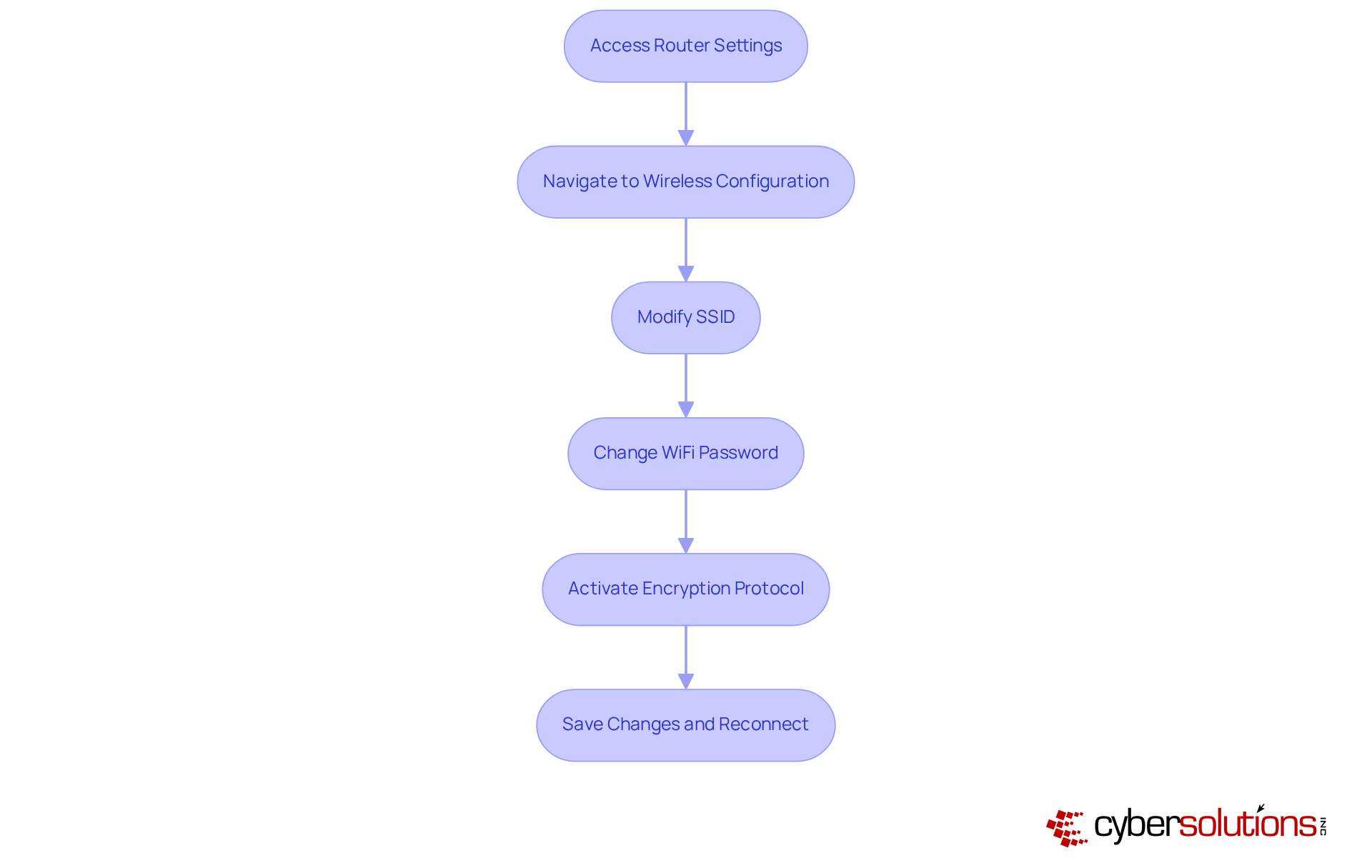
- Access your router using its IP address. This is your gateway to securing your network.
- Navigate to the wireless configuration area. Here, you can make critical adjustments to your network settings.
- Modify the SSID (name) of your network. Choose a distinctive title that doesn’t reveal personal information. This simple practice can help protect you from potential attackers. In fact, a staggering 89% of users have never altered their default identifiers, leaving them vulnerable.
- Create a password of at least 12 characters. Current trends show that many consumers still use weak passwords; 72% of respondents have never changed their Wi-Fi password, making them easy targets for cybercriminals.
- Activate the encryption for your device-ideally WPA3 or, at a minimum, WPA2. This step is crucial for safeguarding data transmitted over your network.
- Save the changes and reconnect your devices using the new SSID and password. Reconnecting is a best practice that significantly reduces the risk of unauthorized access. Alarmingly, 75% of users have never checked who is connected to their network, which can compromise overall security.
By following these steps, you can understand your network's security while also enhancing your protection and protecting sensitive information from potential threats.
Enable Firewall Protection
- Safeguarding your network starts with accessing your router's configurations. Simply enter its IP address in a web browser - this information is usually found on the device itself or in the user manual.
- Next, navigate to the firewall settings, typically located under 'Security' or 'Advanced Settings.' This section is vital for fortifying your system's defenses, especially when considering tools like endpoint protection and firewalls from various vendors.
- Ensure that the firewall is enabled. If your device offers various firewall modes, select the most secure option available. This choice can significantly enhance your security posture. In 2026, small and medium-sized enterprises in Ireland are prime targets for cybercriminals, making this step essential. Firewalls provide protection, which work in tandem with your firewall to strengthen your defenses.
- After making your changes, save them and exit the network interface. Regularly revisit these settings to confirm that the firewall settings are properly configured. Remember, human error is the biggest threat, so meticulous configuration is crucial. Leveraging expert knowledge can help mitigate these risks effectively.
- Stay informed about the latest advancements in firewall technology. Improvements in security protocols and adaptive protective measures are becoming increasingly important for maintaining robust system integrity in 2026. Additionally, consider implementing multi-factor authentication (MFA) as a foundational security control to further enhance your network's defenses - a practice supported by leading advanced cybersecurity offerings.

Disable Remote Access to Your Router
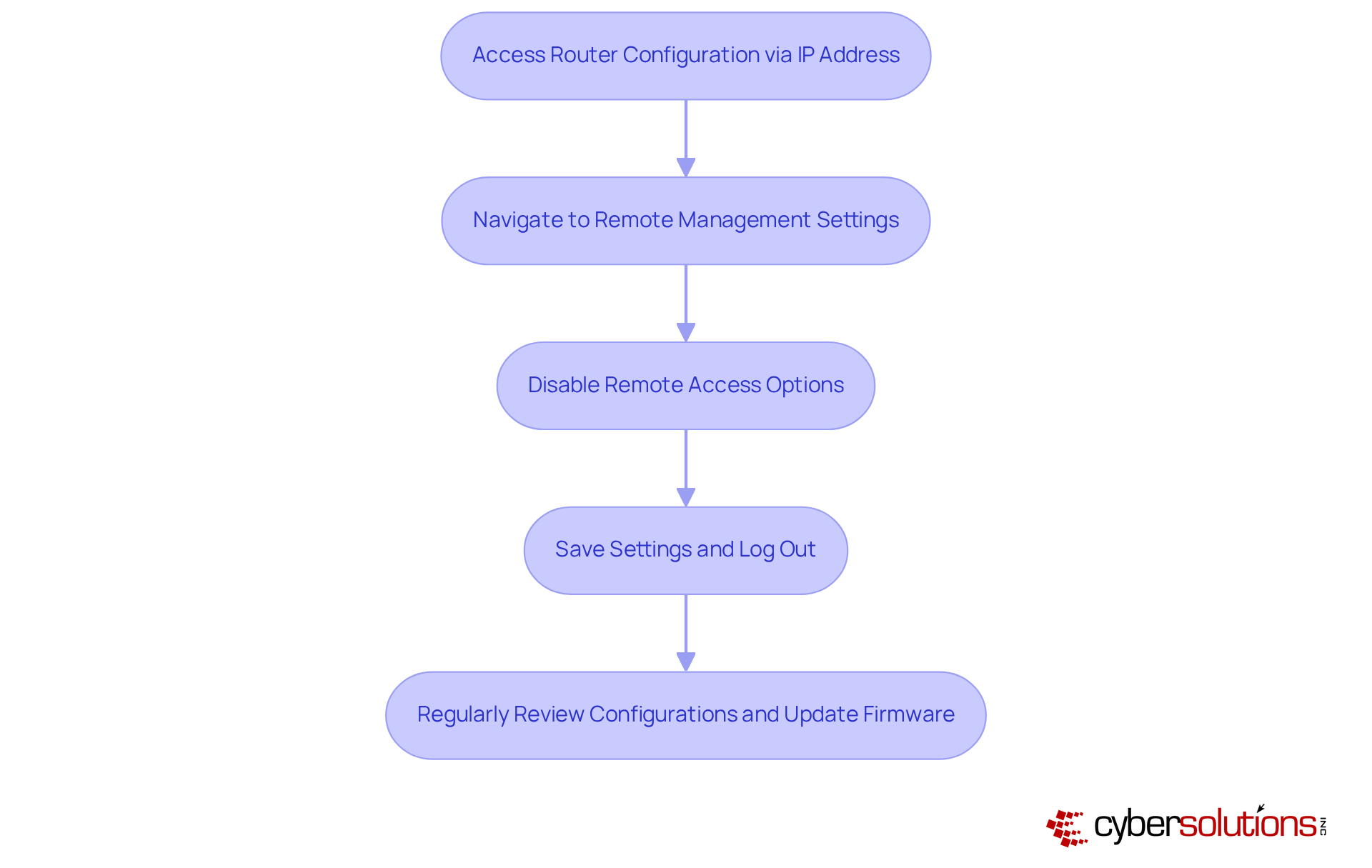
- Begin by accessing your device's configuration through its IP address in a web browser. This address is typically found on the device itself or within the user manual.
- Next, navigate to the remote management settings, usually located under 'Administration' or 'Remote Access'.
- It’s crucial to disable remote access to the device. Many routers come with remote access enabled by default, which can expose them to significant risks. Did you know that 75% of users have never learned about this security feature? This oversight raises questions about preparedness against unauthorized access. Organizations that have proactively disabled remote access, like those supported by Cyber Solutions, have effectively mitigated risks associated with cyberattacks, underscoring the necessity of this practice in today’s digital landscape.
- After making these changes, save your settings and log out. Regularly reviewing these configurations is essential to ensure remote access remains disabled, as vulnerabilities can emerge from outdated settings. The FBI has issued warnings about cyber threats, highlighting the importance of taking steps to prevent exploitation.
- Employee training is vital for safeguarding against vulnerabilities, as emphasized by cybersecurity experts. Additionally, training staff to recognize suspicious emails and adhere to security protocols, as implemented by Cyber Solutions, significantly enhances overall system security. Cyber Solutions has successfully equipped staff to identify threats and uphold robust cybersecurity measures, ensuring a comprehensive approach to network safety.
Conclusion
In today’s digital landscape, securing your network is not just important; it’s essential. Understanding and implementing key security measures can make all the difference in protecting against cyber threats. This guide outlines crucial steps - from evaluating your WiFi encryption type to disabling remote access on your router - designed to fortify your network. By taking these proactive measures, both individuals and organizations can significantly enhance their cybersecurity posture.
Consider upgrading to WPA3 encryption, updating your router login credentials, and regularly changing your WiFi names and passwords. These actions not only safeguard sensitive information but also minimize the risk of unauthorized access. Enabling firewall protection and disabling remote access further solidify your defenses, creating a robust barrier against potential cyberattacks. The alarming statistics regarding user negligence underscore the necessity of vigilance and regular maintenance in network security.
Ultimately, the responsibility for securing a network rests with you. By adopting best practices, staying informed about cybersecurity advancements, and utilizing professional services, you can make a substantial difference in safeguarding against threats. Taking these steps today not only protects your personal and organizational data but also contributes to a safer digital environment for everyone.
Frequently Asked Questions
Why is it important to evaluate your WiFi encryption type?
Evaluating your WiFi encryption type is crucial for maintaining robust cybersecurity and ensuring your network is protected against potential threats.
How can I check my WiFi encryption type?
You can check your WiFi encryption type by accessing your device's configurations. Enter the device's IP address (typically 192.168.1.1 or 192.168.0.1) in a web browser, log in with your admin credentials, and navigate to the wireless configuration area to view the protection settings.
What are the different types of WiFi encryption?
The different types of WiFi encryption include WEP, WPA, WPA2, and WPA3.
What should I do if my network is using WEP or WPA?
If your network is still using WEP or WPA, it is imperative to upgrade to WPA2 or WPA3 for enhanced protection against cyber threats.
What is the significance of WPA3?
WPA3 offers superior protective features compared to WPA2, addressing vulnerabilities and introducing individualized data encryption and stronger authentication methods, making it the most secure option available.
How does transitioning to WPA3 benefit businesses?
Transitioning to WPA3 significantly bolsters WiFi protection, reducing the risk of cyberattacks and data breaches for businesses.
What additional measures can enhance WiFi safety?
Integrating 24/7 monitoring and alert services can enhance WiFi safety by identifying anomalies and potential vulnerabilities, providing defense against threats like ransomware and phishing.
How do I update my router login credentials?
To update your router login credentials, access your device's configuration by entering its IP address in a web browser, log in with your current admin credentials, and navigate to the section for changing the admin password.
What constitutes a strong password for my router?
A strong password should combine uppercase letters, lowercase letters, numbers, and special characters, and be at least 12 characters long to enhance security against brute force attacks.
How often should I update my router password?
It is recommended to regularly update your router password every 60 to 90 days to safeguard your system from unauthorized access.
What percentage of data breaches are caused by weak passwords?
Weak passwords are responsible for 81% of data breaches in organizations, highlighting the importance of creating strong passwords.
What should I do with my new router password after changing it?
After changing your router password, document the new credentials securely and consider using a password manager to store complex passwords safely.
List of Sources
- Evaluate Your WiFi Encryption Type
- stationx.net (https://stationx.net/wpa2-vs-wpa3)
- news.ucr.edu (https://news.ucr.edu/articles/2026/02/24/ucr-computer-scientists-reveal-wi-fi-security-flaws)
- foxnews.com (https://foxnews.com/tech/10-simple-cybersecurity-resolutions-safer-2026)
- bitdefender.com (https://bitdefender.com/en-us/blog/hotforsecurity/25-percent-of-wireless-networks-are-highly-vulnerable-to-hacking-attacks-wi-fi-security-survey-reveals)
- Update Your Router Login Credentials
- krontech.com (https://krontech.com/33-password-statistics-you-need-to-know-for-your-cyber-safety)
- 70+ Password Statistics 2026: What the Numbers Really Say (https://deepstrike.io/blog/password-statistics-2025)
- fibreserve.co.uk (https://fibreserve.co.uk/why-you-should-change-the-password-on-your-wifi-router)
- securitybrief.co.uk (https://securitybrief.co.uk/story/most-homes-never-change-router-passwords-guide-warns)
- ibm.com (https://ibm.com/think/insights/router-reality-check-86-percent-default-passwords-have-never-been-changed)
- Change Your WiFi Name and Password
- cnet.com (https://cnet.com/home/internet/wi-fi-home-internet-security-network-routers-hackers)
- cloudi-fi.com (https://cloudi-fi.com/blog/wi-fi-security-guide)
- aol.com (https://aol.com/fbi-warns-americans-replace-wi-171700729.html)
- foxnews.com (https://foxnews.com/tech/ignoring-router-security-settings-puts-millions-risk-from-hidden-dangers)
- fing.com (https://fing.com/news/10-tips-to-increase-your-home-network-and-wi-fi-security)
- Enable Firewall Protection
- vbt.ie (https://vbt.ie/news/the-importance-of-cybersecurity-in-2026-protecting-your-business)
- sayers.com (https://sayers.com/blog/the-future-of-firewalls-engineering-experts-reveal-the-path-ahead)
- firewalls.com (https://firewalls.com/blog/enterprise-firewall?srsltid=AfmBOooIYd7ffnafP9ug5FvIM219ct7AqlEcu04vve49_C9fwcTrAkC7)
- Disable Remote Access to Your Router
- cnet.com (https://cnet.com/home/internet/wi-fi-home-internet-security-network-routers-hackers)
- supercarblondie.com (https://supercarblondie.com/tech/fbi-warns-against-these-older-wi-fi-routers)
- parksassociates.com (https://parksassociates.com/blogs/in-the-news/research-80-of-us-households-have-home-network-router)
- uniladtech.com (https://uniladtech.com/news/tech-news/fbi-warning-old-wifi-router-vulnerable-cyber-attack-817743-20260224)
- linuxsecurity.com (https://linuxsecurity.com/news/iot-security/the-risks-of-default-router-security-settings)


