Introduction
In an era where cybersecurity threats loom large, the management of company laptops has never been more critical for safeguarding sensitive data and ensuring operational efficiency. Leaders in organizations must navigate a landscape filled with these threats while maintaining high-performance technology. This guide will walk you through essential steps, from setting up your systems securely to maintaining them effectively, ensuring that businesses can leverage their technological investments while minimizing risks.
Are you prepared to tackle the challenges of performance, security, and user support to ensure a seamless experience for your teams?
In an era where cybersecurity threats loom large, ensuring the right technological setup is crucial for healthcare organizations to safeguard sensitive data.
- Select Appropriate Equipment: First, let’s talk about selecting the right equipment that meets your team’s needs. Consider specifications such as processor speed, RAM, and storage capacity based on the tasks they will perform.
- Install the Operating System: Next, ensure that each laptop is equipped with the latest operating system to bolster security and efficiency. This includes applying all necessary updates and patches.
- Configure User Accounts: It’s essential to configure user accounts for each employee, granting them the right permissions and access levels. A centralized management system can streamline this process.
- Install Essential Software: Don’t forget to install essential software, including productivity tools and communication applications, to ensure your team is ready to hit the ground running. Make sure all software is licensed and up to date.
- Optimize Settings: Optimizing settings is key; adjust power management options and network configurations to enhance performance. Disable unnecessary startup programs to improve boot times.
- Conduct Performance Testing: Finally, conduct performance testing to ensure everything runs smoothly before handing out the computers to your staff. Without a robust setup, healthcare organizations risk not only operational inefficiencies but also potential breaches that could compromise patient trust and safety.

Implement Security Protocols and Compliance Measures
In an era where healthcare data breaches are on the rise, the need for robust cybersecurity measures has never been more critical. Here are essential steps that CFOs must take to protect their organizations:
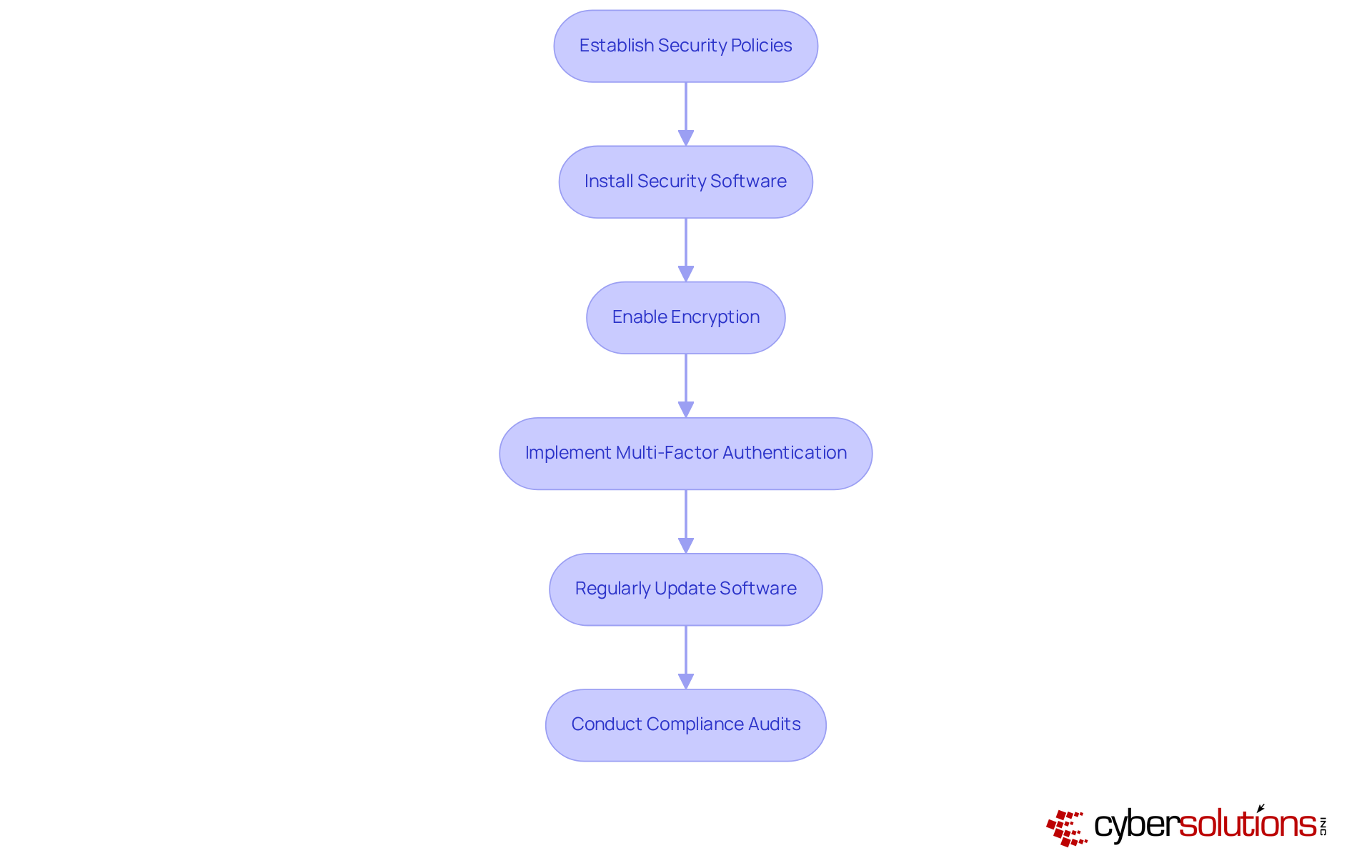
- Establish Security Policies: Develop comprehensive security policies that clearly outline acceptable use, password management, and data protection protocols. Ensure all employees receive training on these policies to foster a culture of security awareness.
- Install Security Software: Equip each device with robust antivirus and anti-malware software from leading providers. Staying ahead of the latest threats means making regular updates a top priority, as 81% of corporate data breaches stem from poor password management and inadequate security measures.
- Enable Encryption: Implement full-disk encryption to safeguard sensitive data stored on laptops. This measure ensures that even if a device is lost or stolen, the data remains secure, adhering to AES-256 encryption standards for stored information.
- Implement Multi-Factor Authentication (MFA): Mandate MFA for accessing company resources, as it blocks 99.9% of automated account compromise attacks. This additional layer of security significantly reduces the risk of unauthorized access, especially for high-priority accounts like email and cloud applications.
- Regularly Update Software: Schedule consistent updates for the operating system and all installed applications to patch vulnerabilities and enhance security. Automatic updates for security settings are crucial for maintaining a robust defense against evolving threats.
- Conduct Compliance Audits: Conducting compliance audits is crucial; it ensures adherence to industry regulations like HIPAA, PCI-DSS, and GDPR, safeguarding your organization against potential penalties. Use audits to identify gaps in security measures and implement corrective actions, ensuring that your organization remains compliant in an increasingly regulated environment.
By prioritizing these security measures, healthcare organizations can not only protect sensitive data but also build trust with patients and stakeholders alike.
Maintain and Support Laptops for Long-Term Efficiency
In an era where cybersecurity threats loom large, the importance of robust IT maintenance in healthcare cannot be overstated.
- Regular maintenance is crucial: Create a routine maintenance plan that involves cleaning hardware, verifying software updates, and conducting diagnostic tests to ensure optimal functionality.
- How effective is your technology? Utilize advanced monitoring tools to track critical effectiveness metrics such as CPU usage, memory utilization, and disk health. Address any anomalies promptly to prevent potential disruptions. Organizations that implement regular performance monitoring can significantly reduce downtime and enhance productivity, as staff waste an average of 30-60 minutes per day waiting on technology (Statista).
- User support is essential: Establish a dedicated help desk or support system where staff can report issues and receive timely assistance. Ensure that support staff are well-trained to handle common computer issues, fostering a responsive IT environment.
- Regular data backups are vital: Implement an automated backup solution that securely saves user data. Inform staff about the significance of regular backups to protect against data loss, which is essential for ensuring business continuity.
- Updating equipment is necessary: Frequently evaluate the state of computers and replace those that are obsolete or no longer fulfill efficiency criteria. A proactive hardware lifecycle strategy is essential; businesses should budget 3-5% of annual revenue for IT hardware refreshes to avoid emergency replacements and ensure smooth operations. Delaying hardware replacements creates risks including security vulnerabilities, productivity loss, compliance risks, rising repair costs, and compatibility gaps.
- User feedback is invaluable: Regularly request input from staff regarding laptop performance and usability. This information is invaluable for making informed decisions about future upgrades and support, ensuring that the technology meets the evolving needs of the workforce. Neglecting these essential practices not only jeopardizes operational efficiency but also compromises patient care and organizational integrity.

Troubleshoot Common Laptop Issues Effectively
- Identify the Problem: Encourage employees to articulate their concerns clearly, detailing any error messages or unusual behaviors. This information is crucial for effective troubleshooting, as accurate descriptions can significantly enhance the diagnostic process. Research indicates that clear explanations of problems can enhance resolution times considerably, with tickets addressed within 15 minutes to 4 hours transforming frustrated users into content ones at rates surpassing 93%. Without clear articulation of issues, troubleshooting becomes a daunting task, leading to prolonged downtime. By articulating concerns clearly, employees can transform their frustrating experiences into swift resolutions.
- Check Power and Connections: For laptops that fail to power on, verify the power source, battery status, and connections. Ensure that the charger is functional and that the battery is sufficiently charged, as these are common causes of power-related problems.
- Restart the Laptop: Rebooting the laptop is a powerful first step, often clearing temporary files and resetting processes that disrupt functionality. This step is often overlooked but can be highly effective in restoring functionality.
- Run Diagnostic Tools: Utilize built-in diagnostic tools available in most operating systems to identify hardware and software problems. Tools like Windows Memory Diagnostic and Apple Hardware Test can offer valuable insights into the laptop's functionality and assist in identifying specific issues. In 2026, these diagnostic tools have demonstrated a success rate of over 85% in accurately recognizing problems, making them essential for effective troubleshooting.
- Update Drivers: Keeping all device drivers current is essential, as outdated drivers can lead to compatibility problems and hinder performance. Regular updates can prevent many common problems and enhance overall system stability.
- Seek Professional Help: Should issues persist after these steps, it is imperative to escalate the matter to the IT support team. Provide them with all relevant information gathered during the troubleshooting process, as this will facilitate a quicker resolution. Effective communication is key; as noted by industry experts, "Clear communication in problem identification is vital for efficient troubleshooting and resolution." Ultimately, the ability to communicate problems effectively can mean the difference between prolonged frustration and swift resolution.

Conclusion
Navigating the complexities of laptop management can be daunting for organizations, yet it is essential for ensuring optimal performance and security. By implementing a structured approach, companies can enhance productivity while safeguarding sensitive data and maintaining compliance with industry regulations.
This article outlines essential steps for effectively managing company laptops, starting with selecting the right equipment and installing vital software. It emphasizes the importance of establishing robust security protocols, such as encryption and multi-factor authentication, to protect against data breaches. Regular maintenance and user support are critical components for sustaining long-term efficiency, while effective troubleshooting techniques empower employees to resolve common issues swiftly.
In the end, managing laptops goes beyond just technology; it’s about building a secure and efficient environment that boosts trust and productivity. By prioritizing these best practices, organizations can navigate the complexities of laptop management, ensuring their teams are equipped and ready to meet the challenges of today’s work landscape. By embracing these strategies, organizations not only enhance operational effectiveness but also cultivate a culture of security and accountability that is vital in today’s digital landscape.
Frequently Asked Questions
Why is it important to set up company laptops for optimal performance in healthcare organizations?
Setting up company laptops for optimal performance is crucial in healthcare organizations to safeguard sensitive data and prevent operational inefficiencies, which could lead to potential breaches that compromise patient trust and safety.
What factors should be considered when selecting equipment for company laptops?
When selecting equipment, consider specifications such as processor speed, RAM, and storage capacity based on the tasks that the team will perform.
What is the role of the operating system in laptop setup?
The operating system should be the latest version to enhance security and efficiency. It is important to apply all necessary updates and patches.
How should user accounts be configured on company laptops?
User accounts should be configured for each employee, granting them the appropriate permissions and access levels. A centralized management system can help streamline this process.
What essential software should be installed on company laptops?
Essential software includes productivity tools and communication applications. It is important to ensure that all software is licensed and up to date.
How can laptop settings be optimized for better performance?
Optimize settings by adjusting power management options and network configurations. Additionally, disabling unnecessary startup programs can improve boot times.
Why is performance testing necessary before distributing laptops to staff?
Conducting performance testing is necessary to ensure that everything runs smoothly, preventing operational issues and ensuring the laptops are ready for use by the staff.
List of Sources
- Set Up Company Laptops for Optimal Performance
- lenovo.com (https://lenovo.com/us/en/knowledgebase/understanding-the-best-laptops-in-2026-for-work-across-different-needs?srsltid=AfmBOooNxmMdMCp1srDYQjD29f_vOVxRjTEqceodyQJICotc9VsNIeq4)
- newegg.com (https://newegg.com/insider/the-perfect-balance-best-laptops-for-hybrid-work-and-learning-in-2026?srsltid=AfmBOopULXxIOkji2X9_I_fMZjANqrp_WY_KxR-YkivKY9yURgTeIGYM)
- wired.com (https://wired.com/story/best-laptops)
- rtings.com (https://rtings.com/laptop/reviews/best/by-usage/business)
- Implement Security Protocols and Compliance Measures
- ipctech.com (https://ipctech.com/cybersecurity-best-practices-2026)
- pdcsoftware.com (https://pdcsoftware.com/blog/multi-factor-authentication-business-guide-2026)
- alphacis.com (https://alphacis.com/remote-work-security-for-small-businesses-2026-guide)
- empcloud.com (https://empcloud.com/blog/secure-remote-workers)
- hungerford.tech (https://hungerford.tech/blog/how-should-you-implement-mfa-in-2026)
- Maintain and Support Laptops for Long-Term Efficiency
- computekonline.com (https://computekonline.com/2025/06/10/how-long-should-your-business-technology-hardware-last-a-guide-to-recommended-lifespans)
- techmarvels.com.bd (https://techmarvels.com.bd/what-is-the-average-lifespan-of-a-laptop)
- goleadingit.com (https://goleadingit.com/blog/how-long-should-business-laptops-really-last)
- businesspcsupport.com (https://businesspcsupport.com/the-biggest-it-problems-small-businesses-face-in-2026-and-how-to-fix-them)
- sobrii.io (https://sobrii.io/blog/computer-lifespan-real-numbers-2026)
- Troubleshoot Common Laptop Issues Effectively
- learn.microsoft.com (https://learn.microsoft.com/en-us/answers/questions/5751253/problems-with-january-2026-updates-to-windows)
- msn.com (https://msn.com/en-us/news/technology/windows-11-users-report-issues-after-feb-2026-update-how-to-fix-error/ar-AA1WtihV?apiversion=v2&domshim=1&noservercache=1&noservertelemetry=1&batchservertelemetry=1&renderwebcomponents=1&wcseo=1&bundles=feat-es2020-t)
- pirg.org (https://pirg.org/edfund/resources/failing-the-fix-2026)
- news.market.us (https://news.market.us/laptop-statistics)
- fixify.com (https://fixify.com/it-help-desk-benchmark-report-2026)


