What Is Anti-Phishing Software and Why It Matters for Your Business

What Is Anti-Phishing Software and Why It Matters for Your Business

Introduction

As cybercriminals evolve their tactics, the urgency for effective cybersecurity in healthcare has never been more pressing. This reality highlights the urgent need for businesses to implement strong anti-phishing software that not only safeguards sensitive information but also strengthens organizational integrity against escalating cyber threats.

With countless anti-phishing solutions available, how can organizations navigate this overwhelming landscape? Choosing the wrong software could leave organizations exposed to devastating breaches.

Define Anti-Phishing Software

In an era where cybercriminals are constantly devising new tactics, the need for robust anti-fraud software has never been more critical. This software actively scans incoming emails and web traffic, hunting for signs of scam attempts, like suspicious links or fraudulent sender addresses. By employing advanced detection techniques, such as machine learning algorithms and heuristic analysis, anti-phishing software can identify and block malicious content before it reaches the user, safeguarding sensitive data and maintaining organizational integrity.

With fraudulent attacks happening every 30 seconds, the stakes have never been higher for organizations to protect their sensitive data. For instance, Microsoft Defender for Office 365 offers features like Zero-hour auto purge (ZAP), which retroactively isolates harmful emails based on newly obtained intelligence, enhancing user protection.

Furthermore, organizations employing anti-fraud software have noted considerable decreases in successful scams, with financial services achieving a 74% success rate in training against such risks. Without these essential tools, organizations leave themselves vulnerable to devastating cyber threats that could compromise their very existence.
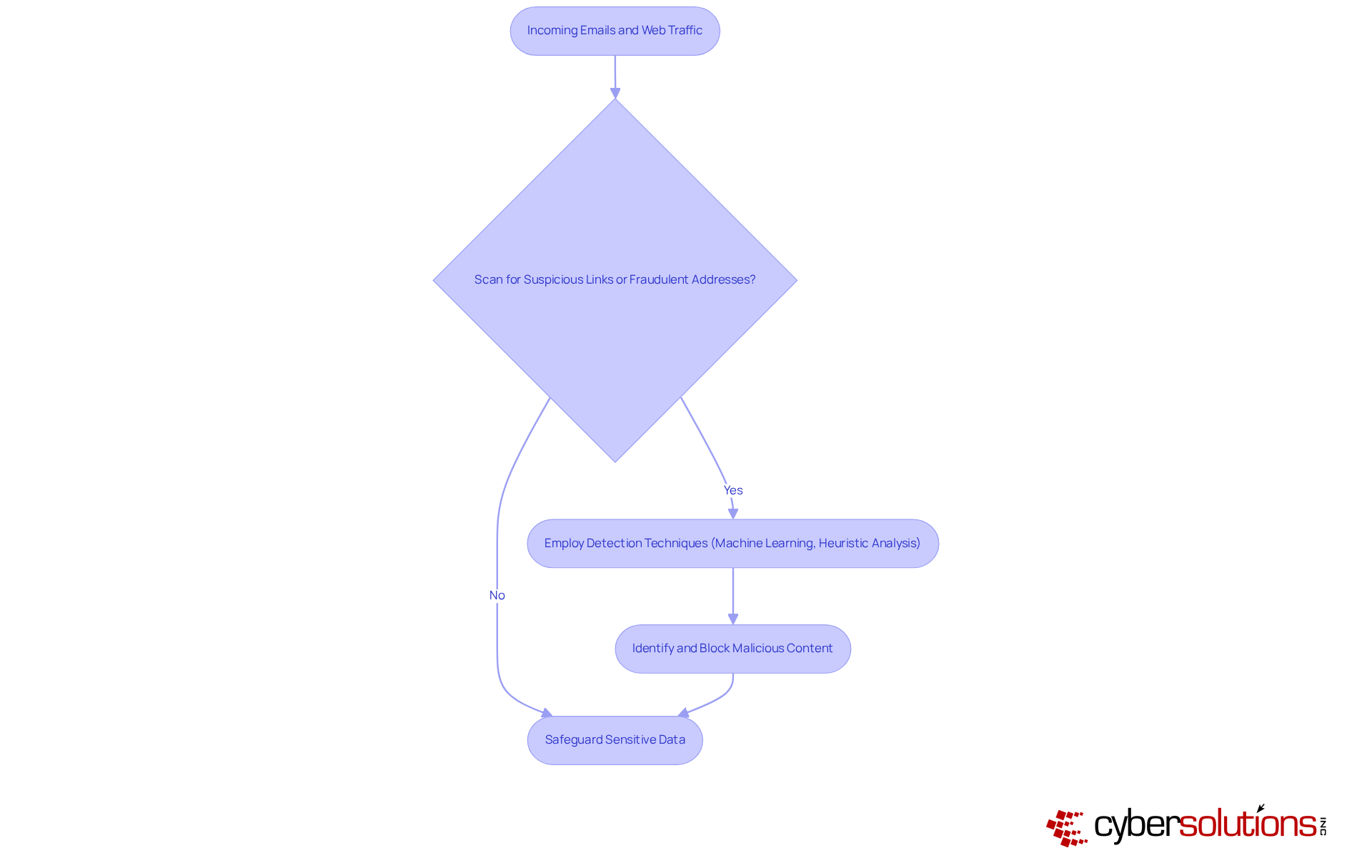
This flowchart shows the steps anti-phishing software takes to protect sensitive data. It starts with scanning incoming traffic, checks for threats, and if found, blocks them to keep your information safe.

Context and Importance of Anti-Phishing Software

As cyber threats evolve, companies risk falling victim to devastating breaches, making cybersecurity a top priority in healthcare. Deceptive email schemes have emerged as one of the most common types of cybercrime, with online scams accounting for over 90% of data breaches. This alarming statistic underscores the need for companies to establish effective defenses. At Cyber Solutions, we provide advanced cybersecurity solutions, including:

  1. Endpoint protection
  2. Email security

These solutions are essential for businesses of all sizes. They not only protect sensitive information but also help maintain compliance with industry regulations such as HIPAA and GDPR.

Our Email Support & Security services encompass:

This ensures that your email communication remains secure and efficient. By preventing data breaches, organizations can avoid significant financial losses, reputational damage, and legal repercussions. Investing in robust cybersecurity measures is not just a choice; it's a necessity for survival, complemented by our 24/7 threat monitoring to proactively safeguard against ransomware and fraud attacks.
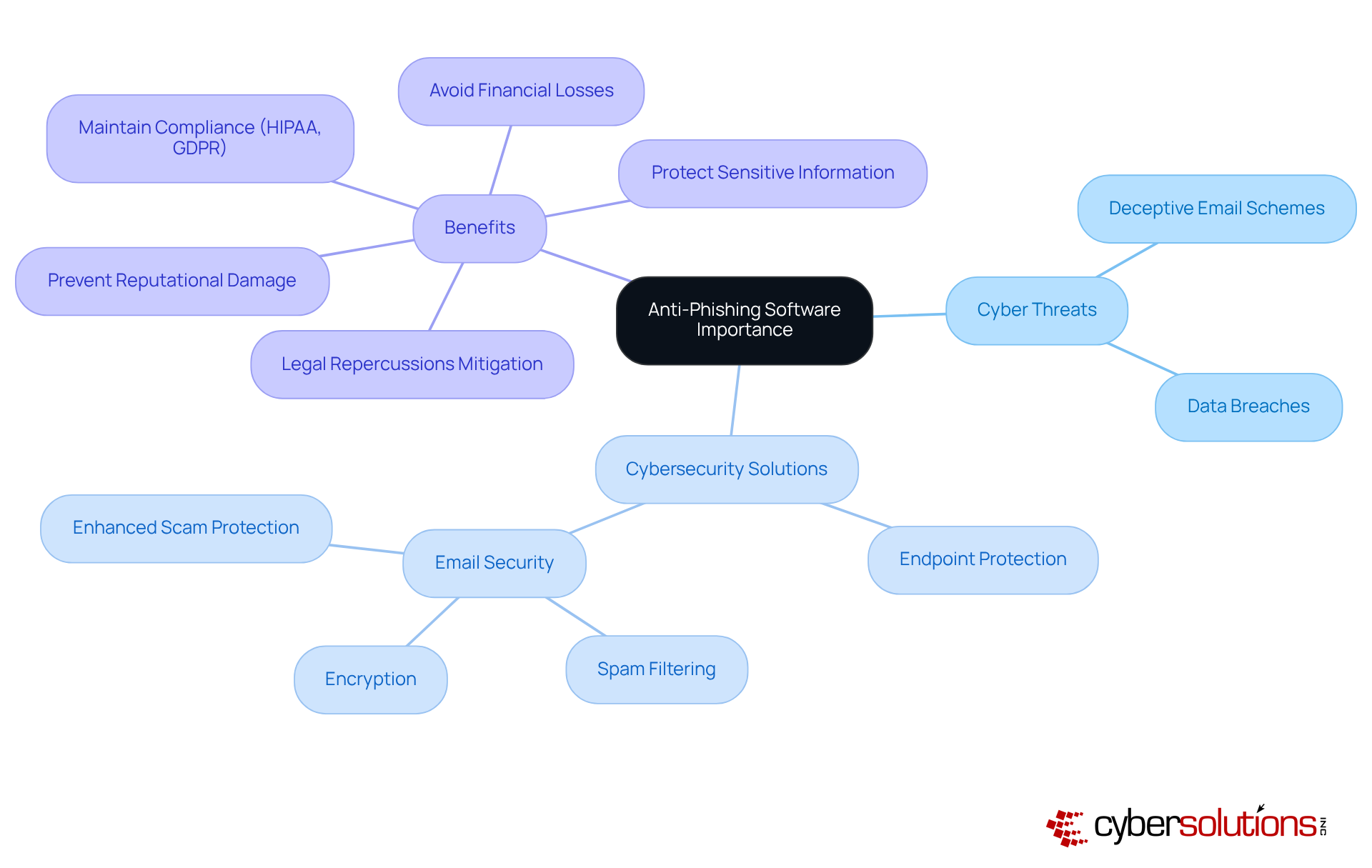
The central node represents the main topic, while the branches show related areas such as threats, solutions, and benefits. Each branch and sub-branch helps illustrate how these elements connect, making it easier to grasp the overall importance of anti-phishing measures.

Key Features and Functionality of Anti-Phishing Software

In an era where cyber threats loom large, the healthcare sector faces unprecedented challenges that demand immediate attention and robust solutions. Effective anti-phishing software encompasses several essential features that bolster an organization's defenses against cyber threats:

  1. Email Filtering: This feature examines incoming emails for recognized fraudulent signatures and questionable links, effectively blocking harmful messages before they reach users. Real-time email filtering can greatly decrease exposure to fraudulent schemes by intercepting suspicious communications.
  2. URL Protection: Anti-phishing solutions analyze URLs in emails and web pages to identify and block access to malicious sites. Tools that perform malicious link and URL analysis are crucial for preventing users from clicking on harmful links, thereby protecting against credential theft and malware delivery.
  3. User Training and Awareness: Many solutions include training modules aimed at teaching employees how to identify fraudulent attempts. Security awareness training can diminish the chances of a successful deceptive email attack by up to 90%, promoting a culture of security awareness within the company. By combining user education with ongoing surveillance, entities can improve their protections against developing fraudulent schemes.
  4. Real-Time Risk Intelligence: Utilizing current databases of known scams enhances detection capabilities. This proactive strategy enables entities to remain ahead of changing deception techniques. Furthermore, thorough 24/7 network surveillance guarantees that suspicious activities are identified and halted before they develop into dangers, offering immediate notifications and real-time insights for prompt action.
  5. Reporting and Analytics: Efficient reporting features offer insights into deceptive practices and user interactions, allowing entities to enhance their security strategies. This feature helps businesses understand what threats were blocked and what user interactions occurred, aiding in policy tuning and measuring the effectiveness of security awareness training.

By investing in comprehensive solutions, healthcare organizations can understand what anti-phishing software is, allowing them to safeguard sensitive information and fortify their overall cybersecurity posture against evolving threats.
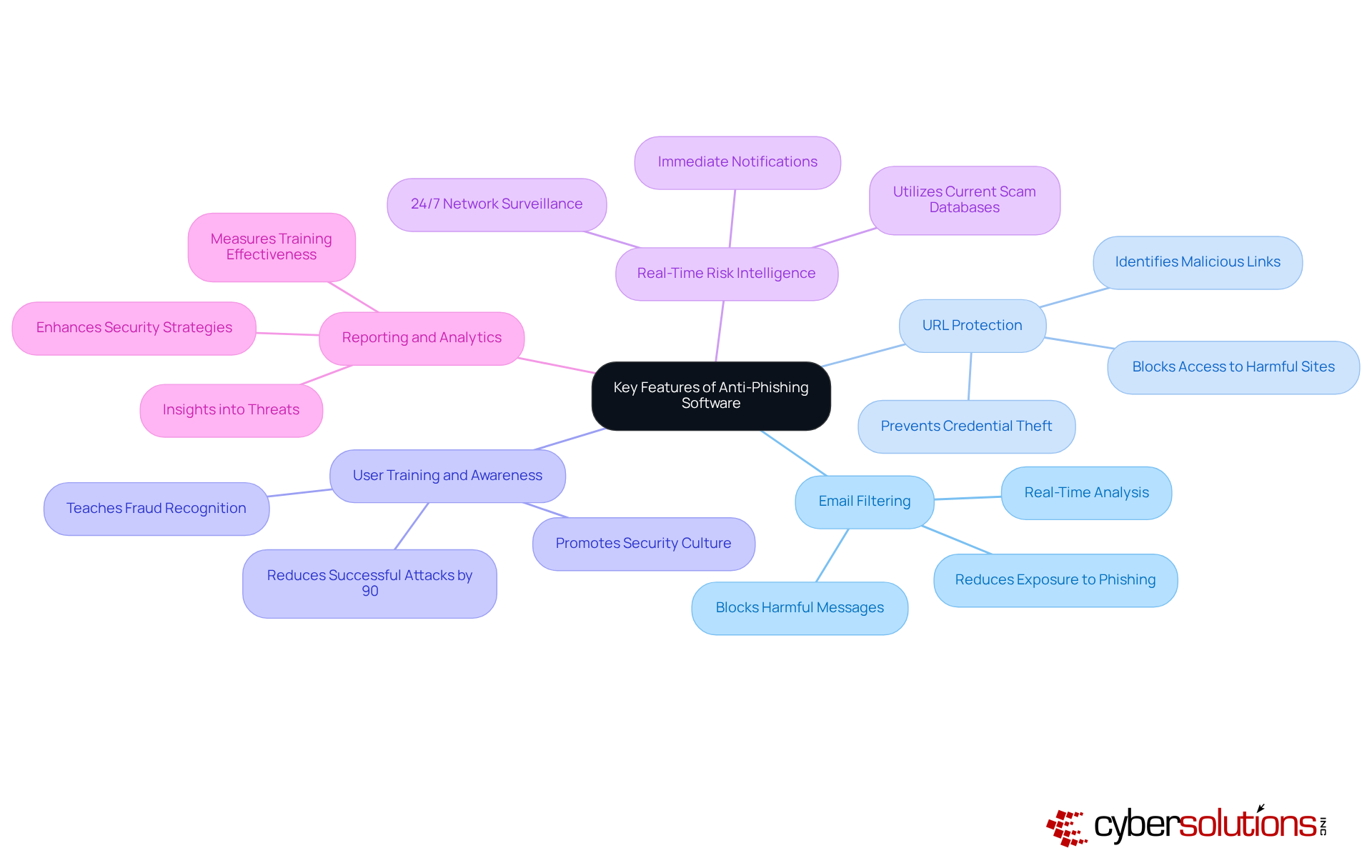
The central node represents the main topic of anti-phishing software, while each branch shows a key feature. The sub-branches provide additional details about how each feature works and its importance in protecting against cyber threats.

Evolution of Anti-Phishing Software

In an era where cyber threats are increasingly sophisticated, the healthcare sector faces unprecedented challenges in safeguarding sensitive information. The development of anti-fraud software began in the mid-1990s, coinciding with a rise in deception incidents. Initially, these attacks were straightforward, often involving generic emails sent to large user groups. However, as cybercriminals became more sophisticated, organizations struggled to keep pace with evolving threats. This evolution showcases what is anti phishing software, as it enables modern tools to recognize known threats and adapt in real-time to new phishing tactics, ensuring that organizations are prepared to defend against the ever-changing landscape of cyber risks.

Continuous monitoring is crucial; it helps catch suspicious activities before they turn into serious threats. Phishing incidents accounted for a quarter of all cybersecurity occurrences worldwide, underscoring the urgent need to understand what is anti phishing software. In 2024, more than 38 million fraudulent attempts are expected to be identified globally, emphasizing the necessity for organizations to establish strong protections. By leveraging cutting-edge threat intelligence and 24/7 threat monitoring, Cyber Solutions empowers businesses to defend against ransomware, phishing, and other malware attacks. Investing in advanced cybersecurity solutions is not just a precaution; it's a necessity for survival in today's digital landscape.
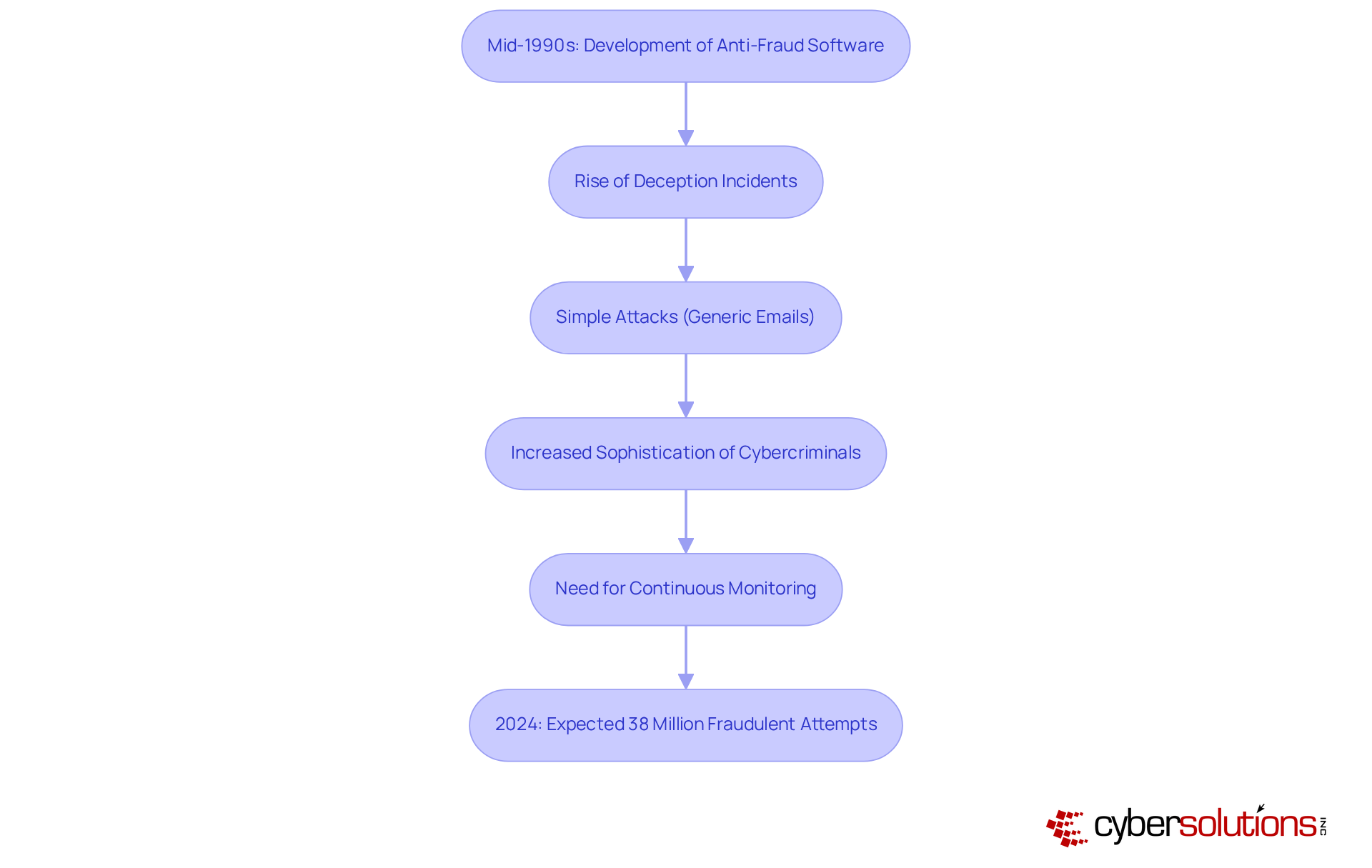
This flowchart illustrates the timeline of anti-phishing software development. Each box represents a significant milestone in the evolution of cybersecurity measures against phishing threats. Follow the arrows to see how the landscape has changed over time and the increasing need for advanced protections.

Conclusion

In an era where cyber threats are increasingly sophisticated, the importance of anti-phishing software cannot be overstated. This software acts as a crucial defense, spotting and stopping phishing attempts before they cause damage. By leveraging advanced detection techniques and real-time monitoring, businesses can protect sensitive information, ensuring both operational integrity and compliance with industry regulations.

Throughout this discussion, we’ve uncovered key insights into the functionality and benefits of anti-phishing software. Features such as email filtering, URL protection, and user training play vital roles in strengthening an organization’s defenses. With phishing attacks on the rise, businesses face an escalating threat that demands immediate attention. Organizations that adopt comprehensive anti-phishing solutions can significantly reduce their risk of falling victim to costly breaches.

Taking action now to implement anti-phishing software is crucial for protecting your organization’s future. As cyber threats continue to grow in complexity and frequency, businesses must prioritize their cybersecurity posture. Investing in robust anti-fraud measures will not only safeguard sensitive data but also foster a culture of security awareness that empowers employees and enhances overall resilience against cyber threats.

Frequently Asked Questions

What is anti-phishing software?

Anti-phishing software is a type of security tool that scans incoming emails and web traffic for signs of scam attempts, such as suspicious links or fraudulent sender addresses, to protect sensitive data.

How does anti-phishing software work?

It employs advanced detection techniques, including machine learning algorithms and heuristic analysis, to identify and block malicious content before it reaches the user.

Why is anti-phishing software important?

It is crucial because cybercriminals are constantly developing new tactics, and the software helps safeguard sensitive data and maintain organizational integrity by preventing successful phishing attacks.

How often do fraudulent attacks occur?

Fraudulent attacks happen every 30 seconds, highlighting the urgent need for organizations to protect their sensitive data.

Can you provide an example of anti-phishing software?

Microsoft Defender for Office 365 is an example, featuring capabilities like Zero-hour auto purge (ZAP), which retroactively isolates harmful emails based on newly obtained intelligence.

What impact does anti-fraud software have on organizations?

Organizations using anti-fraud software have reported significant decreases in successful scams, with financial services achieving a 74% success rate in training against phishing risks.

What risks do organizations face without anti-phishing software?

Without these tools, organizations are vulnerable to devastating cyber threats that could compromise their existence and sensitive information.

List of Sources

  1. Define Anti-Phishing Software
    • Anti-Phishing Software: Does It Really Protect Companies? (https://warrenaverett.com/insights/anti-phishing-software)
    • APWG (https://apwg.org/trendsreports)
    • Anti-Phishing Software: Your Best Defense Against Scams - VMRay (https://vmray.com/anti-phishing-guide)
    • Email threat landscape: Q1 2026 trends and insights | Microsoft Security Blog (https://microsoft.com/en-us/security/blog/2026/04/30/email-threat-landscape-q1-2026-trends-and-insights)
    • Phishing Trends Report (Updated for 2026) (https://hoxhunt.com/guide/phishing-trends-report)
  2. Context and Importance of Anti-Phishing Software
    • Insights into the United States Phishing Protection Market from 2026 to 2033: Projecting 11.5% CAGR with Regional and Segment Analysis (https://linkedin.com/pulse/insights-united-states-phishing-protection-market-from-2026-hznce)
    • Email threat landscape: Q1 2026 trends and insights | Microsoft Security Blog (https://microsoft.com/en-us/security/blog/2026/04/30/email-threat-landscape-q1-2026-trends-and-insights)
    • Why Phishing Is Still the #1 Cyber Threat in 2026 (https://info.cybertecsecurity.com/why-phishing-is-still-the-1-cyber-threat-in-2026)
    • 2026 Phishing Threat Predictions: 5 Key Takeaways (https://cofense.com/Blog/2026-Phishing-Threat-Predictions-5-Key-Takeaways)
  3. Key Features and Functionality of Anti-Phishing Software
    • Best Anti-Phishing Software in 2026: 10 Tools That Block Attacks (https://controld.com/blog/best-anti-phishing-software)
    • 5 Best Anti-Phishing Software to Safeguard Your Organization in 2026 - Trustmi | Eliminate Cyber Fraud with Behavioral AI Security (https://trustmi.ai/resource/best-anti-phishing-software)
    • 11 anti-phishing solutions that safeguard your business - Valimail (https://valimail.com/blog/anti-phishing-solutions)
    • Which anti-phishing software is right for your business? (https://sosafe-awareness.com/blog/best-anti-phishing-software)
    • 2025 Phishing Statistics: (Updated January 2026) - Keepnet (https://keepnetlabs.com/blog/top-phishing-statistics-and-trends-you-must-know)
  4. Evolution of Anti-Phishing Software
    • The evolution of phishing attacks and how to combat them (https://barracuda.com/company/news/2025/The-evolution-of-phishing-attacks-and-how-to-combat-them)
    • The History of Phishing Attacks (https://cofense.com/knowledge-center/history-of-phishing)
    • The Evolution of Phishing: A Brief History - BforeAI (https://bfore.ai/blog/the-evolution-of-phishing-a-brief-history)
    • The Evolution of Phishing Attacks: Recognizing Modern Tactics (https://blog.bio-key.com/the-evolution-of-phishing-attacks)
    • Topic: Phishing (https://statista.com/topics/8385/phishing?srsltid=AfmBOoprRzIOaPb7vEmWixAJm0zPkoTyG7Mpc6JS-QBg9yq8pr2Lv2Qs)
Recent Posts
What Is Anti-Phishing Software and Why It Matters for Your Business
4 Steps to Master the Vulnerability Scanning Process for Security
What Expense Should You Expect When Buying a New Firewall?
Master the FTC Safeguards Rule for Your Risk Assessment Template
Master NIST 800-171 Compliance Audit in 6 Essential Steps
Master Managed Services Projects: Key Strategies for C-Suite Leaders
Master FTC MFA Requirements: A Step-by-Step Guide for Leaders
Enhance Password Compliance with These 4 Essential Strategies
10 Key Factors Influencing Network Firewall Pricing for Executives
4 Best Practices for Effective Firewall Testing and Security
Master the CMMC Assessment Guide Level 2 for Effective Compliance
Why Local IT Services Providers Are Key to Business Success
10 Key Benefits of Partnering with IT MSPs for Your Business
Why Healthcare CFOs Should Choose an Outsourced IT Provider
4 Best Practices for CFOs in AI Data Security Compliance
What Is Defense in Depth? Understanding Its Importance for Healthcare CFOs
Essential Corporate Data Backup Practices for Healthcare CFOs
10 Benefits of Outsourced IT Management for Healthcare CFOs
Master Restricting Access: Best Practices for CFOs on OAuth Management
Master Living Off the Land: A CFO's Guide to Sustainability
Master Digital Security Controls for Healthcare CFOs
10 Essential IT Services for Healthcare CFOs to Enhance Security
Master Critical Security Controls for Healthcare CFOs
Best Practices for Managed Cyber Security in Healthcare CFOs
What MSPs Stand For and Why They Matter for Healthcare CFOs
Choosing the Right Managed Cybersecurity Services Provider for CFOs
What Is CMMC Compliance and Why It Matters for Healthcare CFOs
How to Reduce the Risk of Cyber Attack: 4 Essential Steps for CFOs
What Compliance Means: Key Concepts for Healthcare CFOs
5 Best Practices for Achieving CMMC 1.0 Compliance Success
Understanding Cybersecurity as a Service for Healthcare CFOs
Why MSPs in Technology Are Essential for Healthcare CFOs
10 Benefits of Data Security as a Service for Healthcare CFOs
Evaluate 4 Leading Disaster Recovery Software Vendors for Your Business
What IT Services Can Be Outsourced for Business Success?
Enhance Cyber Resilience with Effective External Vulnerability Scanning
Cyber Security Outsourcing Companies vs. In-House Solutions: Key Insights
4 Steps to Optimize Business IT Support for Healthcare CFOs
Understanding Managed Service Provider Costs: Key Factors and Models
Why Fully Managed Services Are Essential for Cybersecurity Success
Understanding the Average Cost of Cybersecurity Services for Leaders
Master Managing Firewalls: Essential Steps for C-Suite Leaders
Master HIPAA Compliant Firewall Requirements for Your Organization
How to Manage Company Laptops: A Step-by-Step Guide for Leaders
6 Best Practices for a Successful Managed Services Strategy
4 Best Practices for Choosing Your NIST Compliance Tool
10 Essential CMMC 2.0 Controls List for Compliance Success
Best Practices for Effective Data Backup Support in Your Organization
4 Essential Cybersecurity Compliance Solutions for C-Suite Leaders
Master Data Backup and Recovery: Best Practices for C-Suite Leaders
Master Two-Factor Authentication for Business: Best Practices Unveiled
Best Practices for Backing Up Your Data Effectively
Enhance Security with Best Practices for Secure Web Browsing
Master 365 Services: Best Practices for Compliance and Efficiency
4 Strong Password Guidelines for C-Suite Leaders to Enhance Security
Essential Backup Information for Compliance and Security Strategies
Business IT Providers vs. In-House IT: Key Comparison for Leaders
Compare Top Two Factor Authentication Service Providers for Your Business
Master HIPAA Compliant Infrastructure: Key Steps for Executives
What LOTL Stands for in Cybersecurity and Its Implications
4 Best Practices for Your Cyber Attack Incident Response Plan
4 Best Practices for Effective Information Technology Spending
Understanding Cyber Security Exercises: Importance and Benefits
5 Best Practices for Optimizing Your Hybrid Work Setting
Understanding Office 365 Meaning: Key Features and Implications
What Office 365 Means for Cyber Solutions Inc.: A Case Study on Transformation
Master Defence in Depth Cyber Security: 5 Steps for C-Suite Leaders
Boost Security Awareness Among Employees with Proven Best Practices
Implement the NIST Incident Response Playbook in 4 Simple Steps
What is a Managed IT Support Service Provider and Why It Matters
Why Data Backup is Important for Business Resilience and Growth
Best Practices for Effective Managed IT Security Solutions
4 Best Practices for Backup & Disaster Recovery Services Success
Best Practices for AI and Machine Learning in Cyber Security
Why USB Malware Threats Matter for C-Suite Leaders Today
What Are Vulnerability Scanners and Why They Matter for Your Business
Create a Disaster Recovery Plan Template for Your Small Business
Master USB Malware: Detect, Prevent, and Educate Your Team
Implementing a Cloud First Approach: A Step-by-Step Guide for Leaders
Compare MS Office or Office 365: Features, Pricing, and Security
Master Dark Web Security Monitoring: Key Practices for C-Suite Leaders
Master CMMC 2.0 Compliance Requirements in 5 Actionable Steps
Master IT Security Assessments: Key Practices for C-Suite Leaders
Why Companies Should Restrict Internet Access: Key Security and Compliance Reasons
10 Essential CMMC Controls List for Compliance Success
Master KPIs for IT: Drive Success with Effective Strategies
9 Essential CMMC Level 3 Controls for C-Suite Leaders
10 Essential CMMC 2.0 Controls for Cybersecurity Success
What Is a Virtual CIO? Understanding Its Role and Benefits for Leaders
Understanding IT Managed Services Contracts: Key Insights for C-Suite Leaders
4 Best Practices to Prevent Attacks on Firewall Security
10 Managed Services Provider Best Practices for C-Suite Leaders
Master Proactive Information Management for Enhanced Security and Efficiency
Enhance Organizational Security: Align Strategies and Manage Risks
Understanding IT Support Cost Per Hour: Key Factors for C-Suite Leaders
Master Cyber Drilling: Best Practices for C-Suite Leaders
Understanding All-Inclusive IT Support: Key Benefits for Leaders
Why All-Inclusive IT Support is Essential for Cybersecurity Success
4 Best Practices for Securing Network Printers Effectively
Understanding TOAD Phishing: A Comparison with Traditional Methods