Cyber Security

Understanding USB Drive Malware: Risks and Protective Measures

Understanding USB Drive Malware: Risks and Protective Measures

Introduction

In an era where data breaches are rampant, understanding the risks of USB drive malware is crucial for organizations aiming to protect sensitive information. With nearly 25% of harmful software linked to USB devices, the need for proactive measures is more important than ever. As threats evolve, organizations struggle to keep pace with the rapid rise of USB drive malware, especially in areas like Charleston and Columbia. Without immediate action, organizations risk severe data breaches and regulatory penalties, raising the question: how can they effectively mitigate these risks while ensuring compliance with stringent regulations like HIPAA and PCI-DSS?

Define USB Drive Malware and Its Prevalence

In an era where healthcare data breaches are on the rise, understanding USB drive threats is more crucial than ever. USB drive malware refers to harmful software that is specifically designed to infect computers through USB flash drives or other removable media. This type of malicious software, known as usb drive malware, poses significant risks, as it often spreads without the user's awareness. Recent statistics indicate that approximately 25% of harmful software is classified as usb drive malware, which is disseminated via USB devices, highlighting their role as a major vector for cyber threats. Attackers utilize various strategies, including preloading usb drive malware onto USB sticks and strategically leaving them in public areas to ensnare unsuspecting users.

In South Carolina, the prevalence of usb drive malware threats is particularly concerning. Reports indicate that 27% of organizations have identified usb drive malware as the source of infection incidents. This highlights why organizations in Charleston, Columbia, and Greenville must take immediate action to strengthen their security measures and educate employees about the inherent risks associated with these devices. Consider these effective strategies:

  • Disable the Autorun feature to stop automatic execution of harmful code.
  • Use application allowlisting to restrict unauthorized software.
  • Keep security software updated to combat emerging threats.

Application allowlisting is critical as it proactively prevents unauthorized applications from executing, significantly reducing the attack surface and helping organizations meet compliance requirements such as HIPAA, PCI-DSS, and GDPR.

As we approach 2026, forecasts suggest that USB drive malware will account for over half of all cyberattacks. Failing to address these threats could lead to devastating impacts on patient data security and organizational integrity. Organizations must prioritize proactive risk prevention and data defense to safeguard their digital environments against these evolving challenges. Cyber Solutions offers comprehensive firewall and network security solutions, including managed IT services that encompass application allowlisting, ensuring that only approved applications can run on your network, thus enhancing your cybersecurity posture. Organizations that ignore these USB-related risks may find themselves facing not just financial repercussions, but also a loss of trust from patients and stakeholders.
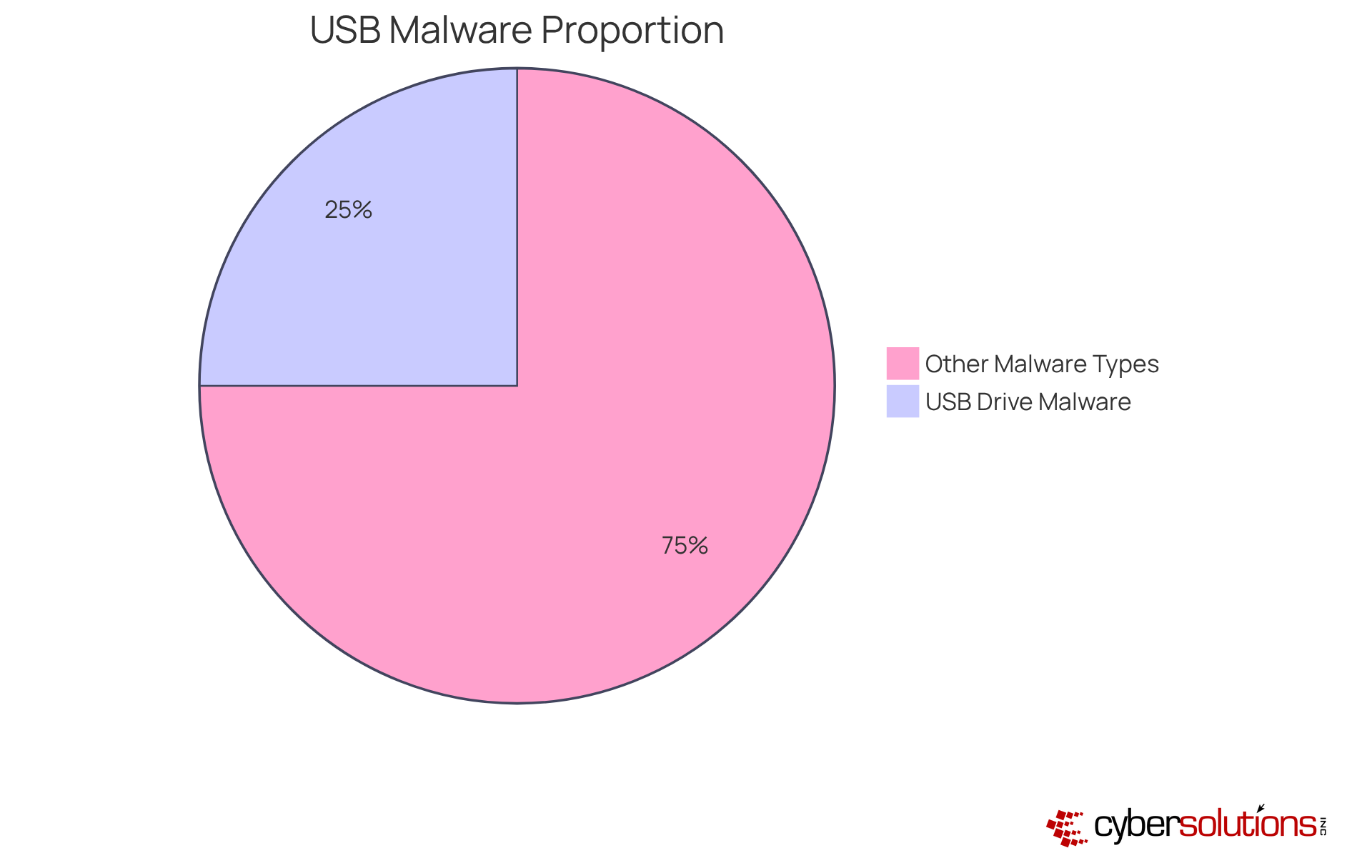
This pie chart shows how much USB drive malware contributes to the total amount of harmful software. The blue slice represents USB drive malware, which makes up 25% of all harmful software, while the gray slice represents other types of malware, making up the remaining 75%. This helps illustrate the significant role USB drives play in cyber threats.

Identify Risks Associated with USB Drive Malware

In an era where data breaches can cripple organizations, the risks associated with USB drive malware demand immediate attention. The implications of these threats are profound, affecting not just individual users but entire organizations. Key risks include:

  1. Data Breaches: Malware can exfiltrate sensitive data, resulting in unauthorized access to confidential information. A survey revealed that 70% of businesses have traced the loss of sensitive information to USB flash memory sticks, highlighting the critical nature of this threat.
  2. Financial Loss: Organizations may face substantial costs related to data recovery, system repairs, and potential legal liabilities. The average cost of a data breach in the United States is estimated at $9.44 million, underscoring the financial impact of such incidents.
  3. Reputational Damage: A malicious software incident can severely harm an organization's reputation, eroding customer trust and confidence. For instance, the DentaQuest data breach exposed sensitive personal and health-related information of approximately 2.6 million individuals, increasing the risk of identity theft and fraud.
  4. Operational Disruption: Malware infections can lead to system downtime, affecting productivity and business continuity. In one case, 55% of data loss incidents related to USB drives were attributed to malware-infected devices, which introduced malicious code into corporate networks.
  5. Ransomware Threats: Some USB malware can encrypt files and demand ransom for their release, complicating recovery efforts. The emergence of ransomware families, such as Lalia Ransomware, illustrates the changing risk landscape.

The consequences of ignoring USB security can be devastating, leading to data breaches and significant financial losses. To safeguard against these threats, organizations must take proactive measures to secure their USB device usage and invest in robust security awareness programs to mitigate these risks effectively.
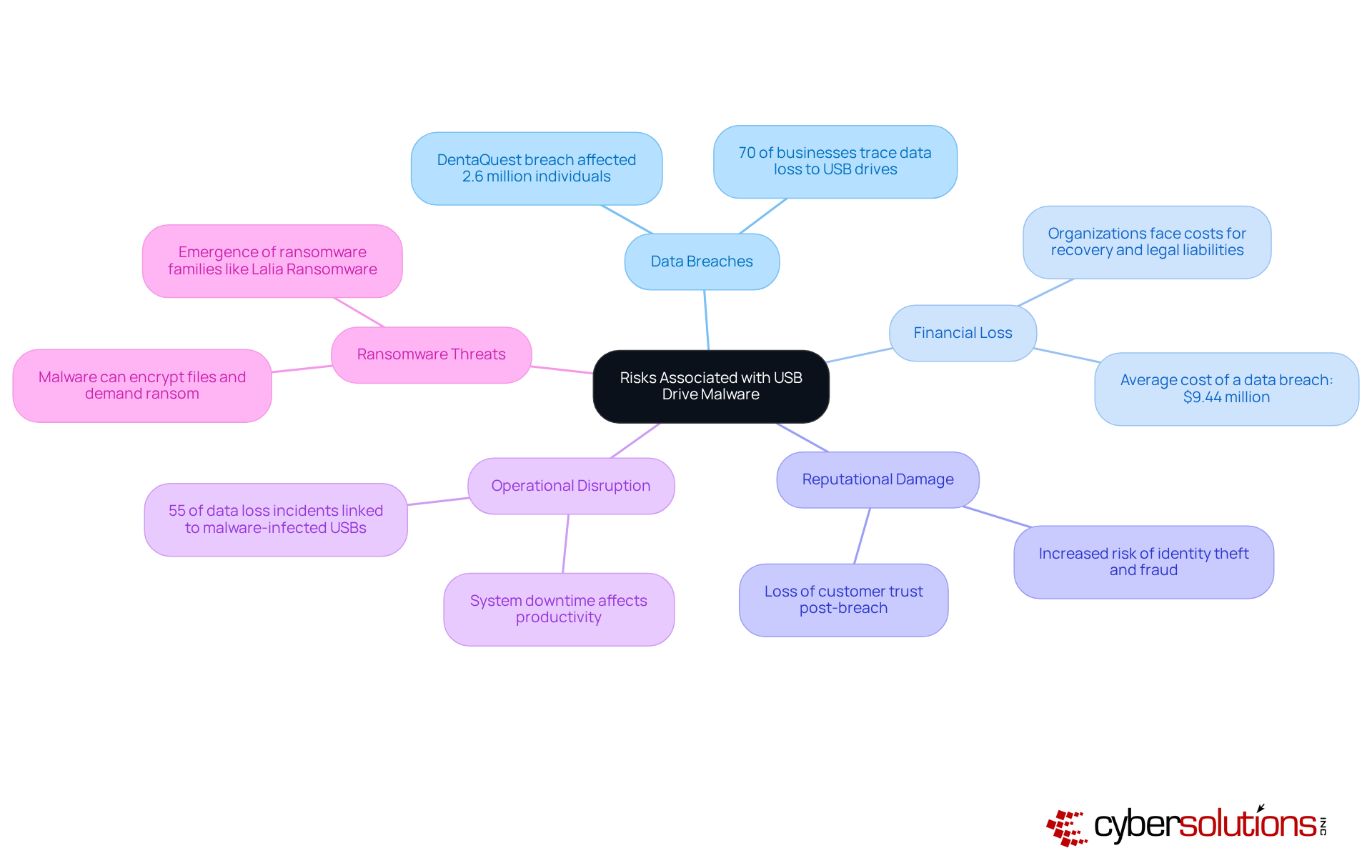
This mindmap starts with the central theme of USB drive malware risks. Each branch represents a specific risk, and the sub-branches provide additional details or statistics related to that risk. This structure helps you see how each risk connects to the overall threat posed by USB malware.

Implement Protective Measures Against USB Drive Malware

In an era where cyber threats are increasingly sophisticated, safeguarding against USB drive malware has become a necessity for healthcare organizations, not just a precaution. To effectively protect sensitive information, organizations must adopt a multifaceted strategy that combines technical safeguards with robust procedural measures:

  1. Disable AutoRun: It's crucial to understand that USB devices can harbor dangerous malware, including ransomware and keyloggers, which can wreak havoc on your systems. Prevent the automatic execution of programs upon connecting USB devices to mitigate this risk.
  2. Utilize Antivirus Software: Make sure every system is armed with the latest antivirus software that scans USB devices for malware before you even think about accessing them. Regular updates to security software are essential to defend against the latest vulnerabilities and threats.
  3. Educate Employees: Invest in thorough training programs that not only highlight the risks of unknown USB devices but also emphasize the critical role of cybersecurity practices in your organization. As Derek Brennan, Customer Success Manager, states, "If a system depends on people remembering to be careful, it will fail. That’s why encryption matters."
  4. Establish Device Control Policies: Limit USB storage usage to only those devices you trust, and keep a close eye on their activity to thwart any unauthorized access. This is particularly important as data breaches involving USB devices often go unnoticed for weeks or months.
  5. Encourage Encrypted USB Devices: Promote the use of encrypted USB devices to safeguard sensitive data, so that even if a device goes missing, your information stays protected. The risk of using unencrypted USB storage devices can lead to significant data breaches, as highlighted in various studies.
  6. Conduct Regular Security Audits: Conduct regular assessments of USB usage and security protocols to spot vulnerabilities and bolster your defenses. Regular audits help identify unauthorized access and strengthen security protocols, which is vital in maintaining compliance with industry regulations.

By implementing these protective measures, organizations can significantly reduce the risk of USB drive malware infections, thereby safeguarding sensitive information and ensuring compliance with industry regulations. Failing to implement these measures could leave your organization vulnerable to devastating breaches that compromise patient data and trust.
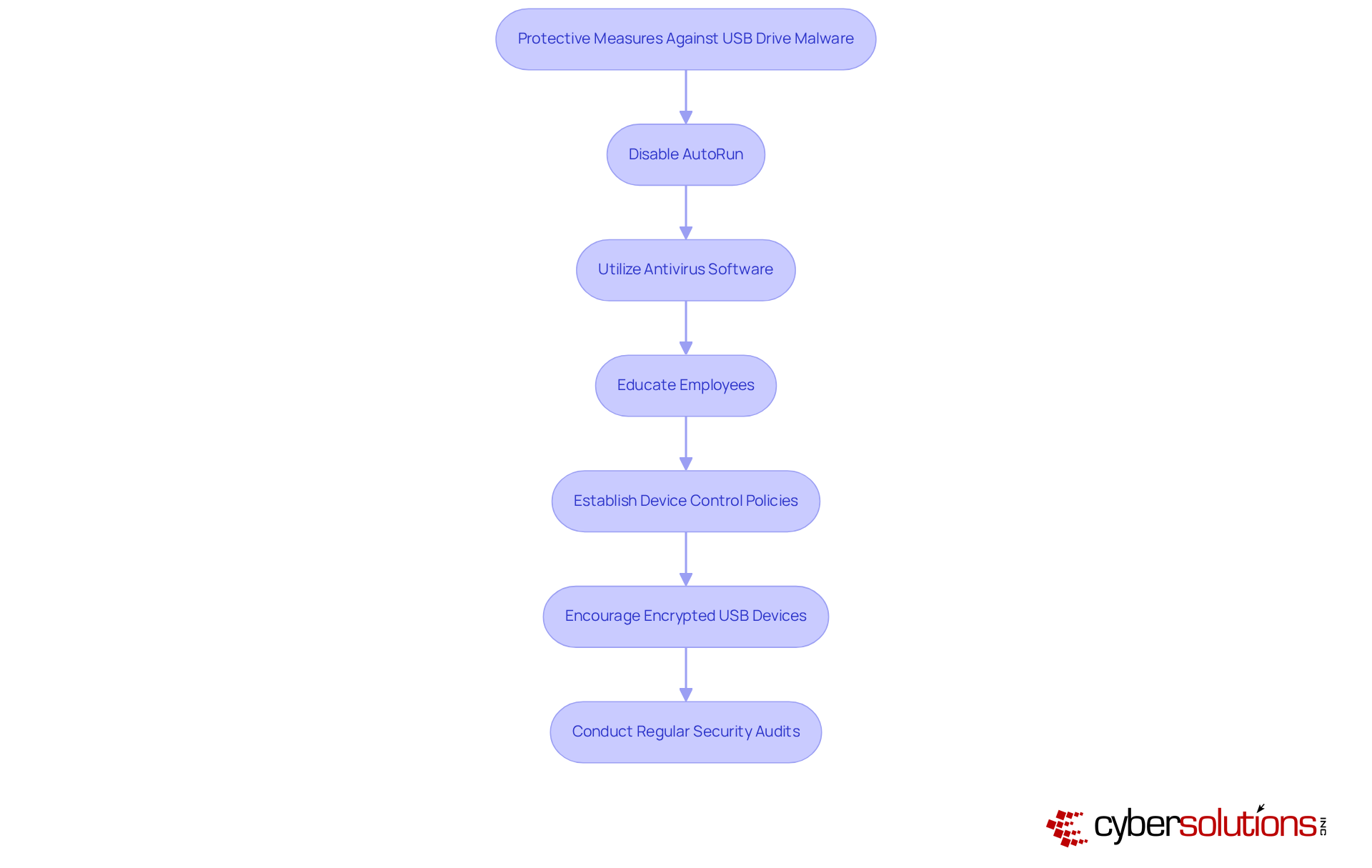
Each box represents a step you can take to protect your organization from USB malware. Follow the arrows to see the recommended order of actions, starting from disabling AutoRun to conducting regular audits. Each step is crucial for building a strong defense against cyber threats.

Maintain Vigilance and Update Security Practices

In an era where cyber threats loom larger than ever, the healthcare sector faces unique challenges that demand immediate attention and action. Cybersecurity is an ongoing commitment that requires continuous vigilance and adaptation to emerging threats. To effectively safeguard against USB drive malware, organizations should adopt the following strategies:

  1. Regularly Update Software: Keeping operating systems, applications, and security software up to date is essential for closing security gaps that could be exploited by malware.
  2. Monitor Risk Intelligence: Staying informed about emerging risks and vulnerabilities related to USB devices through intelligence feeds and cybersecurity news is crucial for proactive defense.
  3. Conduct Regular Training: Continuous training for employees reinforces best practices and keeps them informed of the latest risks, significantly reducing the likelihood of human error, which accounts for 88% of all cyber incidents. This training should highlight the significance of vigilance against threats posed by USB drive malware specifically.
  4. Review Security Policies: Periodically reviewing and updating security policies ensures they reflect the latest technological advancements and risk landscapes, aligning with regulatory requirements such as HIPAA, PCI-DSS, and GDPR. This alignment is critical for compliance and effective risk management.
  5. Implement Incident Response Plans: Developing and maintaining incident response plans allows organizations to quickly address any malicious software infections or security breaches, minimizing potential damage.
  6. Adopt Application Allowlisting: Implementing application allowlisting is a proactive measure that prevents unauthorized or malicious applications from executing on your systems. By permitting only pre-approved software to operate, organizations can greatly diminish the risk of harmful programs, ransomware, and other dangers. Features such as centralized management and continuous monitoring capabilities enhance control and compliance with stringent regulations like HIPAA, PCI-DSS, and GDPR.
  7. Utilize Managed Security Services: Engaging with a Managed Security Service Provider (MSSP) like Cyber Solutions can enhance your cybersecurity posture through 24/7 monitoring and response to risks, ensuring that your organization is always safeguarded against evolving challenges.

Fostering a culture of vigilance and continuous improvement can significantly enhance resilience against threats like USB drive malware and other cybersecurity challenges. For instance, companies that effectively contain data breaches within 200 days save an average of $1 million compared to those that do not, highlighting the financial benefits of proactive cybersecurity measures. Without a proactive approach to cybersecurity, organizations risk not only their data but also their financial stability and reputation in an increasingly digital world.

This flowchart outlines key strategies for enhancing cybersecurity against USB drive malware. Each box represents a specific action that organizations can take to improve their security posture. Follow the arrows to see how these strategies connect to the central goal of maintaining vigilance and adapting to emerging threats.

Conclusion

In South Carolina, the threat of USB drive malware looms larger than ever, posing significant risks to organizations that underestimate its impact. USB drive malware often slips into systems unnoticed, resulting in serious consequences like data breaches, financial losses, and damage to reputation. Recognizing these dangers and implementing robust security measures - such as disabling AutoRun features and utilizing antivirus software - can significantly mitigate risks and protect sensitive information.

The article highlights several key strategies to combat USB drive malware:

  • Disable AutoRun features
  • Utilize antivirus software
  • Educate employees about the risks associated with unknown USB devices

Additionally, establishing device control policies and conducting regular security audits are crucial steps in maintaining a secure environment. Organizations must also prioritize compliance with industry regulations such as HIPAA, PCI-DSS, and GDPR to ensure they are prepared for any potential threats.

It's crucial for organizations to cultivate a culture of vigilance and ongoing improvement in their battle against USB drive malware. By adopting proactive cybersecurity measures and engaging with experts like Cyber Solutions, organizations can enhance their resilience against evolving threats. By prioritizing cybersecurity and engaging with experts, organizations can not only safeguard their data but also fortify their reputation in a digital-first world.

Frequently Asked Questions

What is USB drive malware?

USB drive malware refers to harmful software specifically designed to infect computers through USB flash drives or other removable media. It often spreads without the user's awareness.

How prevalent is USB drive malware?

Approximately 25% of harmful software is classified as USB drive malware, making USB devices a major vector for cyber threats. In South Carolina, 27% of organizations have identified USB drive malware as the source of infection incidents.

Why is USB drive malware a concern for organizations in South Carolina?

The prevalence of USB drive malware poses significant risks to organizations, particularly in cities like Charleston, Columbia, and Greenville. It can lead to data breaches and compromise patient data security, impacting organizational integrity and trust.

What strategies can organizations implement to combat USB drive malware?

Organizations can take several effective measures, including: - Disabling the Autorun feature to prevent automatic execution of harmful code. - Using application allowlisting to restrict unauthorized software. - Keeping security software updated to combat emerging threats.

How does application allowlisting help in preventing USB drive malware?

Application allowlisting proactively prevents unauthorized applications from executing, significantly reducing the attack surface and helping organizations meet compliance requirements such as HIPAA, PCI-DSS, and GDPR.

What are the potential future implications of USB drive malware?

Forecasts suggest that by 2026, USB drive malware could account for over half of all cyberattacks. Ignoring these threats could lead to devastating impacts on patient data security and organizational integrity.

How can Cyber Solutions assist organizations in addressing USB drive malware threats?

Cyber Solutions offers comprehensive firewall and network security solutions, including managed IT services that encompass application allowlisting, ensuring that only approved applications can run on the network, thus enhancing cybersecurity posture.

List of Sources

  1. Define USB Drive Malware and Its Prevalence
    • Using Caution with USB Drives | CISA (https://cisa.gov/news-events/news/using-caution-usb-drives)
    • Honeywell’s 2024 USB Threat Report reveals significant rise in malware frequency, highlighting growing concerns - Industrial Cyber (https://industrialcyber.co/news/honeywells-2024-usb-threat-report-reveals-significant-rise-in-malware-frequency-highlighting-growing-concerns)
    • Master USB Malware: Detect, Prevent, and Educate Your Team — Cyber Solutions Inc (https://discovercybersolutions.com/blog-posts/master-usb-malware-detect-prevent-and-educate-your-team)
    • 25% Of Malware Spread Via USB Drives (https://darkreading.com/vulnerabilities-threats/25-of-malware-spread-via-usb-drives)
  2. Identify Risks Associated with USB Drive Malware
    • Using Caution with USB Drives | CISA (https://cisa.gov/news-events/news/using-caution-usb-drives)
    • Master USB Malware: Detect, Prevent, and Educate Your Team — Cyber Solutions Inc (https://discovercybersolutions.com/blog-posts/master-usb-malware-detect-prevent-and-educate-your-team)
    • FBI warns that hackers are mailing malware on USB drives to their targets - Kingston Technology (https://kingston.com/en/blog/data-security/fbi-warning-companies-mailed-usb-drives)
    • June 2026: Biggest Cyber Attacks, Data Breaches, Ransomware Attacks (https://cm-alliance.com/cybersecurity-blog/june-2026-biggest-cyber-attacks-data-breaches-ransomware-attacks?hs_amp=true)
    • How USB Sticks Cause Data Breach, Malware Woes (https://darkreading.com/cyber-risk/how-usb-sticks-cause-data-breach-malware-woes)
  3. Implement Protective Measures Against USB Drive Malware
    • FBI warns that hackers are mailing malware on USB drives to their targets - Kingston Technology (https://kingston.com/en/blog/data-security/fbi-warning-companies-mailed-usb-drives)
    • Using Caution with USB Drives | CISA (https://cisa.gov/news-events/news/using-caution-usb-drives)
    • USB Drive Security Best Practices You Need to Implement Now (https://currentware.com/blog/usb-drive-security-best-practices)
    • Protect Your Business: Best Practices Against USB Flash Drive Hacks — Cyber Solutions Inc (https://discovercybersolutions.com/blog-posts/protect-your-business-best-practices-against-usb-flash-drive-hacks)
    • The Ongoing Risk of USB Drives | CrowdStrike (https://crowdstrike.com/en-us/blog/usb-drives-threaten-enterprise-security)
  4. Maintain Vigilance and Update Security Practices
    • The Ongoing Risk of USB Drives | CrowdStrike (https://crowdstrike.com/en-us/blog/usb-drives-threaten-enterprise-security)
    • BadUSB, USB Baiting, and Firmware Manipulation: The Evolving Removable Media Threat Landscape for ICS in 2026 (https://shieldworkz.com/blogs/badusb-usb-baiting-and-firmware-manipulation-the-evolving-removable-media-threat-landscape-for-ics-in-2026)
    • Cybersecurity News Roundup: Mid-April to Mid-June 2026 (https://linkedin.com/pulse/cybersecurity-news-roundup-mid-april-mid-june-zrnvf)
    • 225 Cybersecurity Stats and Facts for 2026 (https://vikingcloud.com/blog/cybersecurity-statistics)
    • Cybersecurity Alerts & Advisories | CISA (https://cisa.gov/news-events/cybersecurity-advisories)
Recent Posts
Essential Risk Management Techniques for Cybersecurity Leaders
Understanding USB Drive Malware: Risks and Protective Measures
Master CMMC Security Support: A Complete Guide for C-Suite Leaders
What is a Managed IT Provider and Why It Matters for Your Business
Understanding MSP Software Meaning: Key Insights for Executives
4 Essential Cyber Security Procedures for C-Suite Leaders
Is Adware Malware? Comparing Risks and Impacts for Businesses
What Makes Ransomware Distinct from Other Malware Types?
What is a MSP Provider and Why It Matters for Your Business
Why Phishing Works: Understanding Its Tactics and Impact
What is CMMC 2.0 Compliance? A Guide for C-Suite Leaders
Why Your Business Needs a Firewall Monitoring Service Now
4 Email Safety Best Practices for C-Suite Leaders to Implement
Why MSP Acronym Technology Matters for C-Suite Leaders
5 Essential Disaster Recovery Plan Best Practices for C-Suite Leaders
What is IT Support for SMBs and Why It Matters for Your Business
Digital Certificate Explained: Importance, Applications, and Types
Master Flash Drive Malware: Risks, Prevention, and Response Strategies
What Are IT Department Services and Why They Matter for Businesses
Crafting an Effective Incident Response Plan for Your Business
Best Practices for Choosing a Helpdesk Provider Effectively
Best Practices for Hosting and Managed Services in Business Resilience
Boost Cyber Awareness with Two-Factor Authentication Best Practices
What Does Failover Mean and Why It Matters for Business Continuity
Best Practices to Manage Multiple Firewall Devices Effectively
Achieve NIST 800-171 Compliance: A Step-by-Step Guide for Leaders
4 Best Practices for Backing Up Your Data Effectively
What is IT Support for Manufacturing Firms and Why It Matters
Master Cloud Management Gateway Costs: Best Practices for C-Suite Leaders
Understanding How Desktop Virtualization Works for Business Success
Back Up vs Backup: Key Differences for C-Suite Leaders
Best Practices for a Successful Managed Service Business
Best Practices for Your CMMC System Security Plan Development
Understanding the MSP Pricing Guide: Importance and Key Components
Master NIST 800-171 Compliance Consulting for Business Success
CMMC 2.0 Assessment Guide: A Case Study on Compliance Success
MSP vs ISP: Key Differences for C-Suite Leaders to Consider
What Questions Are Essential for Effective Risk Assessments?
Understanding MSP Provider Meaning: Services, Benefits, and Challenges
5 Steps for Executives to Manage an IT Emergency Effectively
MSP vs CSP: Key Differences Every C-Suite Leader Should Know
4 Best Practices to Reduce IT Management Costs for C-Suite Leaders
Master Healthcare Phishing: Strategies to Protect Your Organization
Best Practices to Combat Firewall Threats for C-Suite Leaders
10 Benefits of Out of Hours IT Support for Business Resilience
Understanding Compliance: Steps to Be in Compliance Meaningfully
10 Reasons C-Suite Leaders Choose Flat Rate IT Support
Why Is Logging Important for Cybersecurity and Business Resilience?
Master TOAD Cybersecurity: Understand, Analyze, and Defend Against Threats
What is a Traditional Firewall? Definition, Evolution, and Uses
Master Multiple Vendor Management: 4 Best Practices for C-Suite Leaders
Password Spraying vs Stuffing: Key Differences for C-Suite Leaders
4 Best Practices for Engaging an IT Service LLC Effectively
What Are Digital Certificates in Web Browsers and Why They Matter
10 Essential Items for Your CMMC Level 2 Controls Spreadsheet
Credential Stuffing vs Spraying: Key Differences Every C-Suite Must Know
4 Best Practices for Disaster Recovery Technology Solutions
CMMC vs NIST: Key Differences and Business Impacts Explained
Master Cyber Security Price: Budgeting for Effective Protection
Why C-Suite Leaders Choose Outsourced IT Solutions for Growth
Best Practices for a Strong Password Protection Policy
What is a Simple Disaster Recovery Plan and Why It Matters
Align MSP Services with Business Goals: 4 Best Practices for Leaders
10 Strategic Benefits of Managed IT Software for Business Leaders
10 Benefits of Managed IT Services in MN for Business Growth
5 Steps for C-Suite Leaders on How to Backup Business Data
Understanding the Definition of Acceptable Use Policy for Leaders
10 Essential Elements of an Acceptable Use Agreement
4 Best Practices for Effective IT Services in Commercial Settings
How to Explain Digital Certificates for Enhanced Cybersecurity
What 'Lot Best' Stands for in Cyber Security: Key Insights for Leaders
4 Best Practices for Strengthening Organizational Information Security
4 Best Practices for Effective Security Compliance Assessment
10 Business Security Managed Services to Enhance Your Operations
Protect Your Business: Combat Malware on USB Drives Effectively
Understanding Managed IT Services: Latest Trends and Insights
Understand the Difference Between Spyware and Adware for Your Business
4 Best Practices for Effective Data Privacy Awareness Training
What MSSP Stands For: Key Insights for Business Security Leaders
4 Key Insights on Cyber Security Services Pricing for Leaders
What Is the Purpose of an Acceptable Use Policy in Business?
Why Is NIST Compliance Mandatory for Your Organization's Success?
Understanding Acceptable Use Policy in Cybersecurity for Leaders
Estimate How Long It Takes to Backup Your Computer Effectively
4 Key Managed Service Provider Reviews for C-Suite Leaders
4 Best Practices for Effective Privileged User Monitoring
Master Threat Scenarios: Best Practices for C-Suite Leaders
4 Best Practices to Combat Phishing in Healthcare
What Is Cloud App Security? Importance, Features, and Risks Explained
What Is the Main Difference Between Vulnerability Scanning and Penetration Testing?
Master Security Drills: Best Practices for C-Suite Leaders
Why Information Security Is the Responsibility of Every Leader
Why Security Is Everyone's Responsibility in Your Organization
What Is a Good Way to Protect Your Data from Computer Malfunctions?
10 Cloud Services in Lafayette for Business Growth and Security
Master CMMC-RP Compliance: Strategies for C-Suite Leaders
Build Your Cybersecurity Tech Stack: 4 Essential Best Practices
Understanding the MSP Environment Meaning for Business Leaders
Understanding the Cost of Cyberattacks: Key Insights for Executives
4 Best Practices for Data in Use Encryption Success in Business