Managed IT Services Insights

Master Google Search Operators for Effective Local IT Consulting

Master Google Search Operators for Effective Local IT Consulting

Introduction

Mastering the art of information retrieval is crucial in the fast-paced realm of local IT consulting. In this landscape, Google Search Operators emerge as powerful tools that can refine searches and elevate the quality of results. They enable professionals to quickly pinpoint the most relevant data. Yet, many IT consultants struggle to harness these operators effectively, often overlooking valuable insights that could significantly enhance their service delivery.

What strategies can transform a simple search into a targeted inquiry? How can consultants sidestep common pitfalls that lead to irrelevant outcomes? By addressing these questions, we can unlock the potential of information retrieval and empower IT consultants to deliver exceptional results.

Understand Google Search Operators and Their Importance in Local IT Consulting

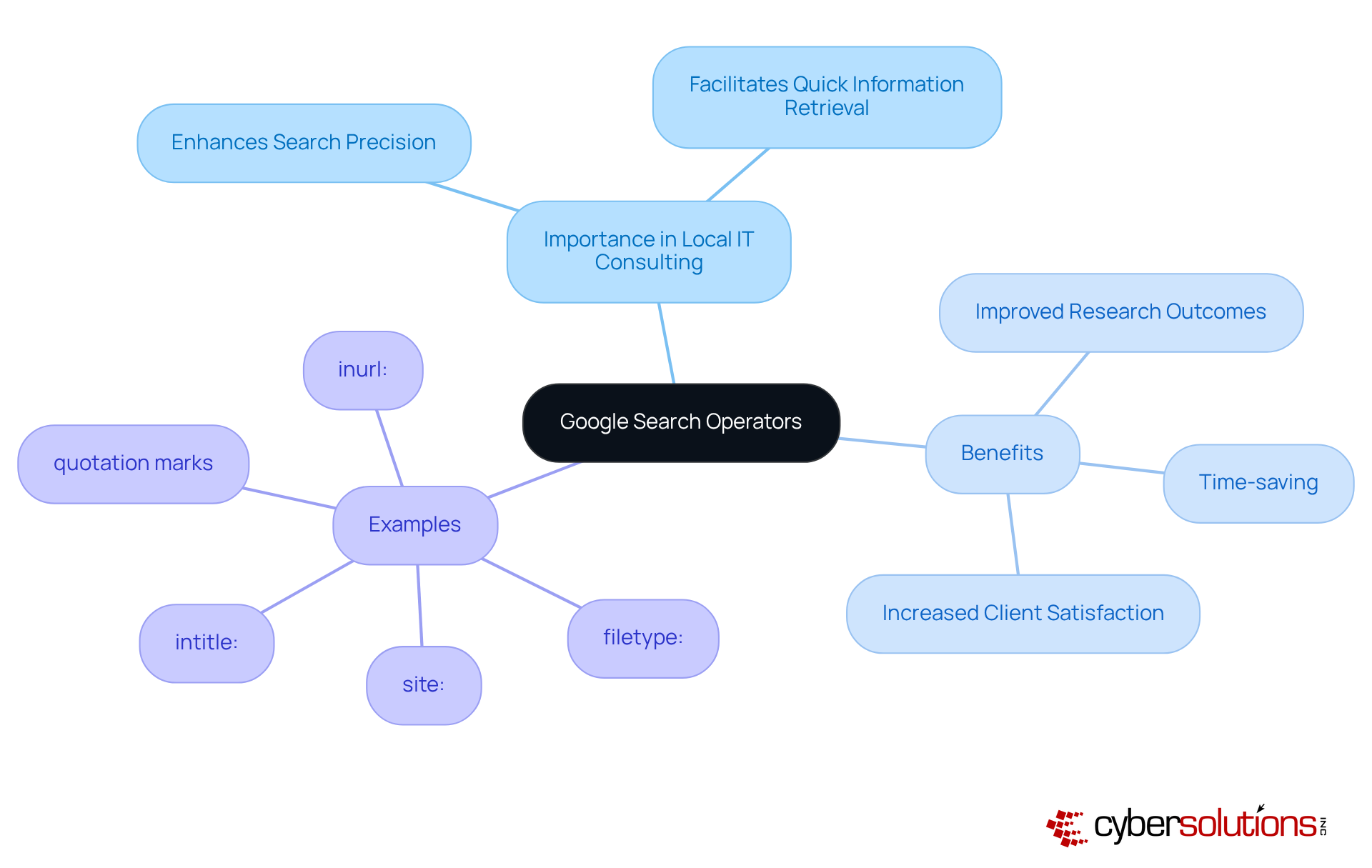
Google Search Operators are essential commands that significantly enhance the precision of inquiries on Google. Grasping these operators is crucial for local IT consulting. They empower professionals to filter results effectively, ensuring they quickly locate the most relevant information. Operators like site:, intitle:, and filetype: are particularly advantageous for honing inquiries to specific domains, titles, or document types.

By mastering these tools, IT professionals not only save time but also elevate their research outcomes. This mastery leads to improved service delivery and heightened client satisfaction. Are you ready to leverage these powerful operators to transform your search capabilities?

The center shows the main topic, while branches illustrate the importance, benefits, and examples of search operators. Follow the branches to see how each part contributes to enhancing search capabilities.

Utilize Key Google Search Operators for Enhanced Local Search Results

To enhance local results, IT specialists must strategically leverage essential Google Search Operators. Consider this: the near: function is vital for pinpointing services within a specific geographical area, while the site: function hones inquiries to focus on local business directories or review platforms. By combining commands, such as intitle: with relevant local keywords, advisors can generate highly targeted outcomes that resonate with prospective clients. For instance, a query like intitle:IT consulting near:New York can unveil local competitors and highlight engagement opportunities.

Using these tools not only boosts visibility but also positions consultants effectively within the local market, drawing in more relevant traffic to their services. It's crucial to recognize that 46% of Google inquiries are actively seeking local businesses, underscoring the significance of these strategies. As Chima Mmeje aptly states, "By utilizing query functions, you can enhance your retrieval outcomes and discover what you seek." However, advisors must exercise caution; misusing these operators can lead to irrelevant results.

The central node represents the main goal of enhancing local search results. Each branch shows a different search operator, with further details on how to use them effectively. Follow the branches to understand how each operator contributes to better search outcomes.

Combine Google Search Operators for Targeted Information Retrieval

Combining Google Search Operators is crucial for IT professionals looking to enhance the specificity of their search results. By using parentheses to group terms, you can create complex queries like (IT consulting OR managed services) AND (New York OR California). This method enables consultants to uncover relevant articles, case studies, or competitor analyses that are geographically specific.

Moreover, employing the - operator to exclude certain terms further refines your results, ensuring that only the most pertinent information is retrieved. Additionally, the as_rights parameter restricts inquiries to files with specific usage rights, which is essential for obtaining credible references. The nnn..yyyy parameter allows you to explore within numeric ranges, helping advisers locate products or information that meet specific criteria.

Mastering these combinations and utilizing Google's advanced query form to construct custom inquiry strings can streamline your research processes and uncover valuable insights. For instance, a specialist might leverage the allintitle: operator to find pages with specific title keywords related to competitor evaluations, significantly enhancing the relevance of search results. By applying these advanced techniques, local IT consulting experts can dramatically improve their information retrieval capabilities.

Follow the flow from the starting point to see how each operator can be combined to refine your search results. Each box represents a technique, and the arrows show how they connect to improve your search strategy.

Overcome Challenges in Using Google Search Operators Effectively

Google Search Operators hold immense power, yet they can pose significant challenges for users, especially in the field of IT consulting. Common pitfalls include:

  1. Overcomplicating queries
  2. Neglecting quotation marks for exact phrase matching
  3. Forgetting to capitalize 'OR' in searches

To overcome these hurdles, it’s wise to begin with straightforward inquiries, gradually incorporating more advanced techniques as confidence builds. For example, utilizing the filetype: command to find downloadable resources or the inurl: command to discover guest posting opportunities can clarify syntax and enhance usage. Resources showcasing effective query examples can further bolster understanding.

By proactively addressing these challenges, local IT consulting can markedly enhance retrieval capabilities, resulting in more precise and relevant outcomes. Research indicates that individuals who adopt a systematic approach to query functions experience a notable increase in successful results, underscoring the necessity of mastering these tools in a competitive landscape.

As Ray Day, an expert on Google Search Operators, aptly states, 'When used correctly, Google search operators can save hours of scrolling and clicking, delivering exactly what you need on the first try.

This flowchart guides you through common challenges and strategies for using Google Search Operators effectively. Follow the arrows to see how to move from identifying pitfalls to implementing solutions.

Conclusion

Mastering Google Search Operators is not just beneficial; it’s a game-changer for local IT consulting. This skill empowers professionals to refine their search strategies and access pertinent information effortlessly. By understanding and applying these operators, IT consultants can significantly enhance their research efficiency and improve service delivery, ultimately leading to greater client satisfaction and a competitive edge.

Essential operators like site:, intitle:, and near: are highlighted as crucial tools for targeting local results effectively. Moreover, the article underscores the importance of combining operators and employing advanced techniques to sidestep common pitfalls. By addressing challenges and refining search queries, local IT consultants can dramatically boost their information retrieval capabilities, yielding more relevant and actionable insights.

Embracing the power of Google Search Operators streamlines research processes and positions IT consultants to thrive in a competitive landscape. By leveraging these strategies, professionals can ensure they remain at the forefront of their field, delivering exceptional value to clients while enhancing their own expertise. The journey to mastering these tools begins now-take the first step towards transforming your search capabilities and unlocking new opportunities in local IT consulting.

Frequently Asked Questions

What are Google Search Operators?

Google Search Operators are essential commands that enhance the precision of inquiries on Google, allowing users to filter results effectively.

Why are Google Search Operators important for local IT consulting?

They are crucial for local IT consulting as they help professionals quickly locate the most relevant information, improving research outcomes and service delivery.

Can you give examples of useful Google Search Operators?

Yes, operators like site:, intitle:, and filetype: are particularly advantageous for honing inquiries to specific domains, titles, or document types.

How do Google Search Operators benefit IT professionals?

By mastering these operators, IT professionals save time and elevate their research outcomes, leading to improved service delivery and heightened client satisfaction.

What is the overall impact of using Google Search Operators in IT consulting?

The use of Google Search Operators transforms search capabilities, enabling IT professionals to find information more efficiently and effectively.

Recent Posts
10 Essential Technical Safeguards for HIPAA Compliance
Compare Multi-Factor Authentication Companies: Features and Benefits
How Much Does Cyber Security Cost? A Step-by-Step Budget Guide
Master Google Search Operators for Effective Local IT Consulting
Understanding Managed Security Companies: Importance and Key Features
Select the Right Multi-Factor Authentication Vendors for Success
10 Essential CMMC Practices for C-Suite Leaders to Implement
What Are the Key Advantages of Penetration Testing Over Vulnerability Scanning?
Master Managed Cyber Security for Business: Key Steps and Insights
What Is an AUP Policy? Essential Steps for C-Suite Leaders
Penetration Test vs Vulnerability Assessment: Key Differences Explained
Understanding Cyber Assessment Services: Importance and Key Features
Which Backup Method Best Protects Your Critical Data?
Essential Proactive Security Measures for C-Suite Leaders
Effective HIPAA HITECH Compliance Solutions for C-Suite Leaders
Best Practices for Choosing IT Services in Concord
Create an Effective Acceptable Use Policy for Employees
4 Essential IT Budget Examples for C-Suite Leaders
5 Steps to Stay Compliant with Ontario's Employment Standards Act
Understanding the Benefits of Vulnerability Scanning for Leaders
Choose Wisely: MSP or MSSP for Your Business Needs
Understanding the IT Managed Services Model: Definition and Benefits
Master Firewall Management Services: Best Practices for C-Suite Leaders
Best Practices for a Successful Managed IT Helpdesk
Master Backup and Disaster Recovery BDR Solutions for Business Resilience
10 Key Steps to Meet CMMC 2.0 Level 2 Requirements
Maximize Impact with Cyber Security Simulation Exercises Best Practices
Maximize Security with Offsite Data Backup Services Best Practices
4 Best Practices for Effective Computer Security Awareness Training
Why C-Suite Leaders Need Managed Hosting Cloud Solutions Now
4 Multi-Factor Authentication Options to Enhance Security for Leaders
Master Cloud Hosting Managed: Best Practices for C-Suite Leaders
Essential Cyber Security Measures for Businesses in 2026
Master CMMC Regulations: Essential Steps for Compliance Success
Why Staff Security Awareness Training is Crucial for Your Organization
Understanding Cloud Hosting Management: Importance, Evolution, and Key Features
Master CMMC Standards: Essential Steps for Compliance and Success
Maximize ROI with Your Information Technology MSP: 4 Best Practices
4 Best Practices to Maximize Uptime in Cloud Infrastructure
10 Key Benefits of Partnering with IT MSPs for Your Business
What is Cyber Intelligence? Key Insights for C-Suite Leaders
5 Best Practices to Prevent Ransomware for C-Suite Leaders
Master Data Storage Disaster Recovery: Key Strategies for C-Suite Leaders
5 Best Practices for Using SIEM in Security Management
Understanding EDR Meaning in Security for Executive Strategy
CMMC Overview: Key Features and Compliance Insights for Leaders
Understanding Managed Services Technology: Definition and Key Insights
Ransomware History: Key Milestones Every C-Suite Leader Must Know
Create an Effective Cyber Attack Response Plan in 6 Steps
Why the Importance of Backing Up Data Cannot Be Overlooked
10 Essential Defense in Depth Examples for C-Suite Leaders
Master Disaster Backup: Essential Strategies for C-Suite Leaders
4 Best Practices for MSP Backup and Recovery Success
Master Backup and Disaster Recovery for Business Resilience
Which Firewall Should I Use? A Step-by-Step Guide for Leaders
Master Dark Web Protection Services to Safeguard Your Business
Maximize Cybersecurity with Managed Service Provider Strategies
Master USB Thumb Drive Hacks: Prevention and Response Strategies
Enhance Cybersecurity with Deep Packet Inspection and SSL Best Practices
What Is a Digital Certificate Used For in Cybersecurity?
Master CMMC Compliance Before the Deadline: Key Steps to Follow
What Is Managed Cloud Hosting and Why It Matters for Your Business
Why C-Suite Leaders Choose Managed Services Hosting for Success
Understanding Vulnerability Scanning in Cyber Security for Leaders
Why SSL Deep Packet Inspection is Essential for Cybersecurity Leaders
Protect Your Business: Best Practices Against USB Flash Drive Hacks
Protect Your Business from Thumb Drive Hacks: Essential Security Steps
Maximize Managed Service Provider Security: Best Practices for C-Suite Leaders
Understanding Threat Vector Meaning: Importance for Business Leaders
Understanding LOTL Attacks: Mechanisms, Prevention, and Impact
4 Best Practices for Effective Managed Web Security Strategies
Understanding the Consequences of Not Backing Up Your Information
Why Your Systems Should Be Scanned Monthly for Optimal Security
3 Best Practices for Effective Cyber Assessments in 2026
4 Key Benefits of Desktop Managed Services for C-Suite Leaders
6 Steps for C-Suite Leaders to Implement a Managed Services Helpdesk
Office vs 365: Key Differences, Features, and Costs for Leaders
Maximize Business Resilience with Co-Managed IT Solutions
Create Your CMMC SSP Template: A Step-by-Step Approach
What Is the Benefit of a Defense in Depth Approach for Organizations?
4 Essential Cloud App Security Best Practices for C-Suite Leaders
8 Best IT Support Services for C-Suite Leaders in 2026
4 Key Steps to Evaluate IT Security Outsourcing Companies
Master Change Management in Cyber Security: A Step-by-Step Guide
4 Steps to Comply with Regulations for C-Suite Leaders
Maximize Business Resilience with IT Security as a Service Best Practices
Achieve NIST 800-171 Certification: A Step-by-Step Guide for Leaders
What Are the Benefits of a Defense-in-Depth Approach in Cybersecurity?
10 Benefits of IT Department Outsourcing for C-Suite Leaders
5 Key Steps: When Is CMMC Compliance Required for Your Business?
How Does a Vulnerability Scanner Work? Key Insights for Leaders
Enhance Security with Information Security as a Service Best Practices
Why Choosing a Local IT Service Provider Boosts Business Success
Master CMMC Implementation: Steps for C-Suite Leaders to Succeed
CMMC vs. NIST 800-171: Key Similarities and Compliance Strategies
Master IT Support Price: Key Strategies for C-Suite Leaders
Crafting Effective Password Security Infographics: Best Practices
Understanding Desktop as a Service Cost for C-Suite Leaders
Master CMMC 2.0 Level 1 Requirements for Business Success
Understanding CMMC Level 3 Requirements for Defense Contractors

Join our newsletter

Sign up for the latest industry news.
We care about your data in our privacy policy.
Thank you! Your submission has been received!
Oops! Something went wrong while submitting the form.