Introduction
USB flash drives have become indispensable tools for data transfer, but their convenience carries a significant risk: the potential for cyberattacks. As organizations increasingly depend on these devices, it’s vital to understand the vulnerabilities they introduce. The question arises: what measures can businesses implement to protect themselves from the looming threat of USB flash drive hacks? Moreover, how can they foster a culture of security awareness among employees?
In today’s digital landscape, the threat of cyberattacks is ever-present, particularly in sectors that handle sensitive information. For organizations, the implications of these vulnerabilities can be severe, leading to data breaches that compromise both security and trust. Therefore, it’s essential to adopt proactive strategies that not only safeguard data but also educate employees about the risks associated with USB flash drives.
To effectively shield against these threats, businesses should consider implementing robust security protocols, such as:
- Encryption
- Access controls
Additionally, regular training sessions can empower employees to recognize potential threats and respond appropriately. By cultivating a culture of security awareness, organizations can significantly reduce their risk of falling victim to cyberattacks.
Understand USB Flash Drive Vulnerabilities
While USB flash storage devices are convenient tools for information transfer, organizations must confront the significant risks posed by a data breach. The landscape of cybersecurity is fraught with vulnerabilities, and understanding these risks is crucial for safeguarding sensitive information. Here are some of the most pressing concerns:
- Malware Infections: USB drives can carry malware that infects systems upon connection, including ransomware and keyloggers that can compromise sensitive data. In 2026, malware attacks represented a staggering 51% of all malware attacks, underscoring the urgent need for protective measures. Cyber Solutions Inc. offers expert services, ensuring that compromised endpoints are cleaned, patched, and reimaged where necessary. As cybersecurity expert Bill Mew states, "Organizations must consider revenue, profit, and risk equally to mitigate data security & cyber security risks."
- Physical Theft or Loss: The small size of USB devices makes them easy to misplace or steal, potentially leading to a breach that results in unauthorized access to sensitive information. A recent report indicates that physical theft incidents are on the rise, highlighting the importance of secure handling practices.
- Social Engineering Attacks: Attackers often employ tactics like leaving infected USB flash drives in public places, hoping someone will plug them into their computer out of curiosity. This method has proven effective in numerous cases, resulting in data breaches.
- BadUSB Attacks: This advanced technique involves reprogramming USB devices to behave maliciously, circumventing conventional protective measures. Such attacks have become increasingly prevalent, necessitating heightened awareness and preventive strategies.
Recognizing these vulnerabilities is the first step in developing a robust security posture. Organizations must implement comprehensive policies and training to mitigate risks associated with USB flash storage usage, including the potential for data loss. Moreover, adopting advanced security measures as part of Cyber Solutions Inc.'s proactive network hardening strategies can significantly decrease the attack surface, ensuring that only authorized applications are permitted to operate. This approach not only enhances security but also improves overall resilience.

Implement Robust Security Protocols
To effectively mitigate the risks associated with a USB flash drive, organizations must adopt security protocols that are not just advisable but essential in today’s digital landscape.
- Encryption: Start by utilizing encrypted USB drives to safeguard data. This ensures that sensitive information remains protected, even if the device is lost or stolen. AES encryption is highly recommended for its strong security capabilities and reliability.
- Access Controls: Next, restrict USB access to authorized personnel only. Implement comprehensive policies that limit the use of USB storage to designated devices and users, thereby minimizing potential exposure to threats. This may include policy updates requiring users to register their USB devices with IT before use and restricting access based on user roles.
- Antivirus and Malware Scanning: Ensure that all USB devices undergo thorough scanning before connecting to any system. Regular updates to antivirus software are essential to effectively detect and neutralize the latest threats.
- Disable Autorun Features: It’s crucial to prevent the automatic execution of programs from USB drives. This simple step can significantly reduce the risk of malware infections.
- Regular Audits: Finally, carry out security audits within the organization. This helps identify and correct any vulnerabilities or unauthorized access, strengthening the overall protective stance. Reviewing logs of USB access and ensuring compliance with established policies is vital.
By adopting these optimal methods, organizations can enhance their safeguards against breaches caused by USB flash drives, ensuring adherence to regulations and best practices. Given that the typical expense of a breach can amount to millions, investing in these protocols is not merely a protective measure but a financial necessity. Additionally, organizations should prepare detailed documentation, including incident reports, to demonstrate compliance during audits. This aligns with tailored remediation strategies that address compliance gaps, including necessary policy updates and system upgrades.
Enhance Employee Awareness and Training
To effectively mitigate risks associated with USB flash drives, organizations must invest in comprehensive training programs that encompass several key areas:
- Recognizing Threats: Employees must be educated on the dangers of plugging in unknown USB drives, including the potential for malware infections and data breaches. With over 90% of data breaches involving removable media, awareness is crucial. Training should also include phishing awareness, as this is a common vector for attacks.
- Proper Usage: Proper USB usage is essential. Training should emphasize secure storage and transportation methods to prevent unauthorized access or loss.
- Incident Reporting: Establishing clear protocols for reporting lost or stolen USB drives is vital. Employees need to understand how to respond quickly to lessen possible damage, as prompt reporting can significantly diminish the impact of an incident.
- Ongoing Training: Conducting periodic training sessions keeps cybersecurity awareness fresh and relevant. As new threats emerge, ongoing education ensures that employees remain vigilant and informed. Effective programs run continuously, not just once a year.
- Simulated Attacks: Implementing simulated attacks can effectively test employee responses and reinforce training. These practical exercises enhance engagement and help employees internalize best practices for recognizing and responding to threats. Research indicates that such simulations can significantly improve employee preparedness against cyber threats. Additionally, training staff on maintaining proper security protocols is vital for overall network hardening.

Leverage Advanced Technologies for Data Protection
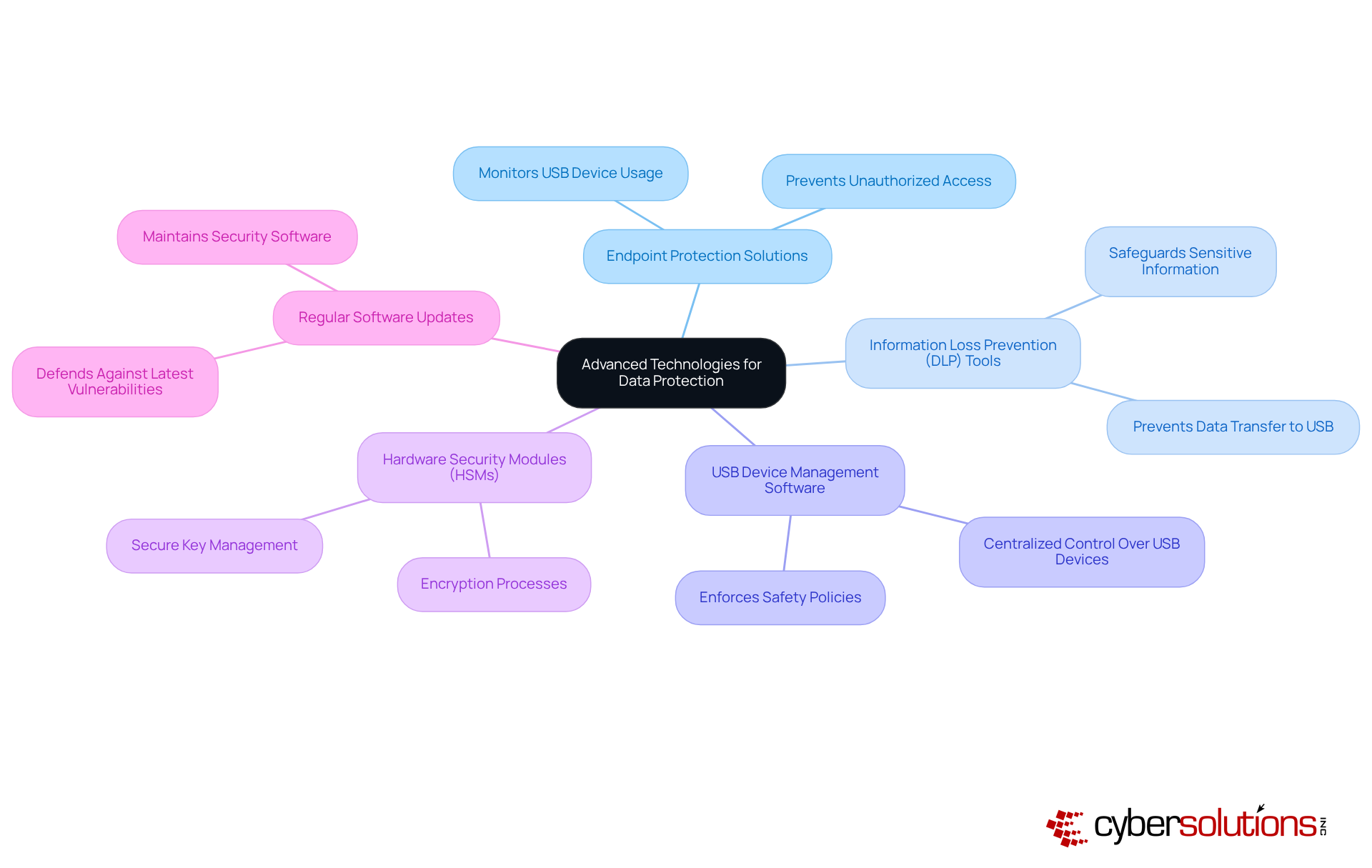
In today's digital landscape, cybersecurity is paramount for organizations, especially when it comes to USB flash drive vulnerabilities. To enhance data security, organizations should consider the following advanced technologies:
- Endpoint Security: Implement endpoint security software that monitors and controls USB device usage across the organization, effectively preventing unauthorized access and data exfiltration.
- Data Loss Prevention: Employ DLP solutions to oversee and safeguard sensitive information, ensuring that data is not transferred to USB storage devices to avoid a data breach without appropriate authorization.
- Device Control: Utilize software that can prevent malware infections by facilitating centralized control over USB devices, allowing organizations to enforce safety policies and monitor device usage effectively.
- Hardware Security Modules: Leverage HSMs for secure key management and encryption processes, ensuring that sensitive data is protected against unauthorized access during a data transfer.
- Regular Software Updates: Maintain a routine of updating all security software and systems to defend against the latest vulnerabilities and threats.
By adopting these technologies, organizations can significantly bolster their defenses to prevent data breaches, addressing the unique challenges posed by today's cyber threats.
Conclusion
In today’s digital landscape, safeguarding sensitive information against USB flash drive hacks is not just important; it’s essential. Organizations must recognize the vulnerabilities associated with USB devices and implement robust security protocols to mitigate risks effectively. With human error being a leading cause of data breaches, the significance of employee awareness and training cannot be overstated.
Key strategies to consider include:
- Utilizing encrypted drives
- Enforcing strict access controls
- Conducting thorough malware scans
Moreover, regular audits and comprehensive employee training programs are vital for fostering a culture of security awareness. By leveraging advanced technologies such as endpoint protection solutions and information loss prevention tools, organizations can significantly enhance their defense mechanisms against potential threats.
As we navigate an increasingly digital world, the security of USB flash drives must not be overlooked. Organizations should prioritize these best practices - not only to protect their data but also to maintain trust and compliance. Taking proactive steps today will pave the way for a more secure future, ensuring that sensitive information remains protected from unauthorized access and cyber threats.
Frequently Asked Questions
What are the main vulnerabilities associated with USB flash drives?
The main vulnerabilities include malware infections, physical theft or loss, social engineering attacks, and BadUSB attacks.
How do malware infections occur through USB flash drives?
USB drives can carry malware that infects systems upon connection, including ransomware and keyloggers, which can compromise sensitive data. In 2026, malware infections via USB devices accounted for 51% of all malware attacks.
What is the risk of physical theft or loss of USB flash drives?
The small size of USB devices makes them easy to misplace or steal, leading to unauthorized access to sensitive information. Reports indicate that 30% of organizations have experienced incidents of USB flash memory theft.
What are social engineering attacks in relation to USB flash drives?
Attackers may leave infected USB flash drives in public places, hoping individuals will plug them into their computers out of curiosity, which can lead to significant data breaches.
What are BadUSB attacks?
BadUSB attacks involve reprogramming USB devices to behave maliciously, bypassing conventional security measures. These attacks have become increasingly common, requiring heightened awareness and preventive strategies.
How can organizations defend against USB flash drive vulnerabilities?
Organizations should implement comprehensive policies and training to mitigate risks associated with USB flash storage usage. Additionally, adopting application allowlisting as part of network hardening strategies can significantly reduce the attack surface by ensuring only authorized applications are allowed to operate.
List of Sources
- Understand USB Flash Drive Vulnerabilities
- industrialcyber.co (https://industrialcyber.co/nist/nist-publication-warns-that-usb-devices-pose-serious-cybersecurity-threats-to-ics-offers-guidance-for-mitigation)
- infosecurity-magazine.com (https://infosecurity-magazine.com/news/usb-malware-spreads-cryptominer)
- honeywell.com (https://honeywell.com/us/en/news/2024/04/cybersecurity-in-2024-usb-devices-continue-to-pose-major-threat)
- kingston.com (https://kingston.com/en/blog/data-security/fbi-warning-companies-mailed-usb-drives)
- Implement Robust Security Protocols
- kiteworks.com (https://kiteworks.com/ebook-top-10-trends-in-data-encryption-an-in-depth-analysis-on-aes-256)
- verito.com (https://verito.com/blog/256-bit-aes-encryption)
- upguard.com (https://upguard.com/blog/secure-sensitive-data-on-a-usb-flash-drive)
- securityweek.com (https://securityweek.com/nist-publishes-guide-for-protecting-ics-against-usb-borne-threats)
- electroiq.com (https://electroiq.com/stats/encryption-software-statistics)
- Enhance Employee Awareness and Training
- ironscales.com (https://ironscales.com/guides/phishing-awareness-training/cyber-security-awareness-training)
- industrialcyber.co (https://industrialcyber.co/nist/nist-publication-warns-that-usb-devices-pose-serious-cybersecurity-threats-to-ics-offers-guidance-for-mitigation)
- keepnetlabs.com (https://keepnetlabs.com/blog/security-awareness-training-topics)
- securitymentor.com (https://securitymentor.com/security-awareness-training-statistics-and-trends)
- guardz.com (https://guardz.com/blog/40-security-awareness-statistics-msps-cant-ignore-in-2025)
- Leverage Advanced Technologies for Data Protection
- gminsights.com (https://gminsights.com/industry-analysis/data-loss-prevention-market)
- stratviewresearch.com (https://stratviewresearch.com/4234/data-loss-prevention-market.html?srsltid=AfmBOopAAw7pZEMRY6c2az7OosnqpELR3diR-YLkV0A2brQgfkiU9oE7)
- medium.com (https://medium.com/@cyberpromagazine/cybersecurity-quotes-that-define-the-future-of-digital-protection-64897c07bfc6)
- electroiq.com (https://electroiq.com/stats/endpoint-security-statistics)
- dqchannels.com (https://dqchannels.com/data-privacy-day-security-quotes-leaders)