


In today’s world, data is the lifeblood of organizations, and neglecting to back it up can lead to catastrophic consequences. The stakes are incredibly high; potential losses can range from operational disruptions to crippling financial penalties, especially in sectors where data protection is legally mandated. With the frequency of cyberattacks and hardware failures on the rise, organizations must ask themselves: how can they effectively safeguard their critical information and ensure business continuity amidst these ever-present threats?
The current landscape of cybersecurity threats is daunting. Healthcare organizations, in particular, face unique challenges that require immediate attention. As cybercriminals become more sophisticated, the implications for these organizations are severe. They risk not only financial loss but also damage to their reputation and trust with patients.
To address these challenges, Cyber Solutions offers robust strategies tailored to the specific needs of healthcare CFOs. By implementing comprehensive data backup and recovery plans, organizations can mitigate risks and protect their vital information. The time to act is now-ensuring that your organization is prepared for any eventuality is not just prudent; it’s essential.
In today's digital landscape, the importance of robust cybersecurity cannot be overstated. Information duplication is not just a technical procedure; it’s a vital strategy for safeguarding your organization against the risks of data loss, which can include data loss due to equipment failures, accidental deletions, or cyberattacks. The primary goal of data preservation is to protect essential information, enabling organizations to recover swiftly from data loss incidents and maintain operations.
As cyber threats and system failures become increasingly common, having a strong backup strategy is essential - not merely a best practice but a cornerstone of operational resilience and continuity. Consider this: unanticipated outages can be devastating, while small businesses face downtime costs ranging from $8,000 to $100,000 an hour. These figures underscore the financial imperative of ensuring data availability.
Organizations are strongly encouraged to implement comprehensive backup solutions. Recovery systems should capture data at least once a day to ensure its integrity. The widely recognized 3-2-1 recovery rule - maintaining three copies of data on two different media types, with one copy stored off-site - has proven effective in building robust recovery infrastructures. Real-world examples demonstrate the necessity of these strategies; organizations employing immutable and air-gapped backups have significantly enhanced their data protection, reducing risks.
As data management regulations evolve, particularly regarding localization and sovereignty, establishing tailored governance frameworks is crucial for compliance. Cybersecurity experts warn that the lack of proper backup strategies can lead to staggering costs regarding data protection. A modern backup strategy is crucial for business continuity, as it ensures organizations can recover quickly and maintain customer trust, highlighting the importance of data security.
By prioritizing structured protection frameworks and conducting recovery tests quarterly, businesses can navigate the complexities of today’s digital environment while effectively safeguarding their essential information.

Neglecting to secure information can result in severe consequences of data loss. Imagine the scenarios, such as irreversible damage, operational disruptions, and financial ruin. For healthcare organizations, the stakes are even higher. When entities experience data damage due to hardware failures, cyberattacks, or human errors, they risk losing sensitive patient information, which underscores the consequences of data loss and can severely impact operations.
Consider this: studies show that 94% of businesses suffering a major data failure do not survive. Alarmingly, 43% never reopen, and 51% shut down within two years. Without a solid contingency plan, organizations face significant risks, exposing themselves to legal liabilities and regulatory penalties, particularly in sectors like healthcare and finance, where data protection is mandated by law. The financial fallout from data breaches can be staggering, illustrating the hidden costs, which include recovery costs, lost revenue, and reputational harm.
Cyber Solutions has demonstrated its expertise in data recovery, notably restoring 4,500 endpoints after a ransomware attack. This underscores the critical need for a robust backup strategy. Their layered defense approach, which includes application allowlisting, not only enhances recovery efforts but also ensures data integrity, effectively shielding organizations against future threats.
In today's landscape, can you afford to overlook the importance of cybersecurity? The time to act is now.
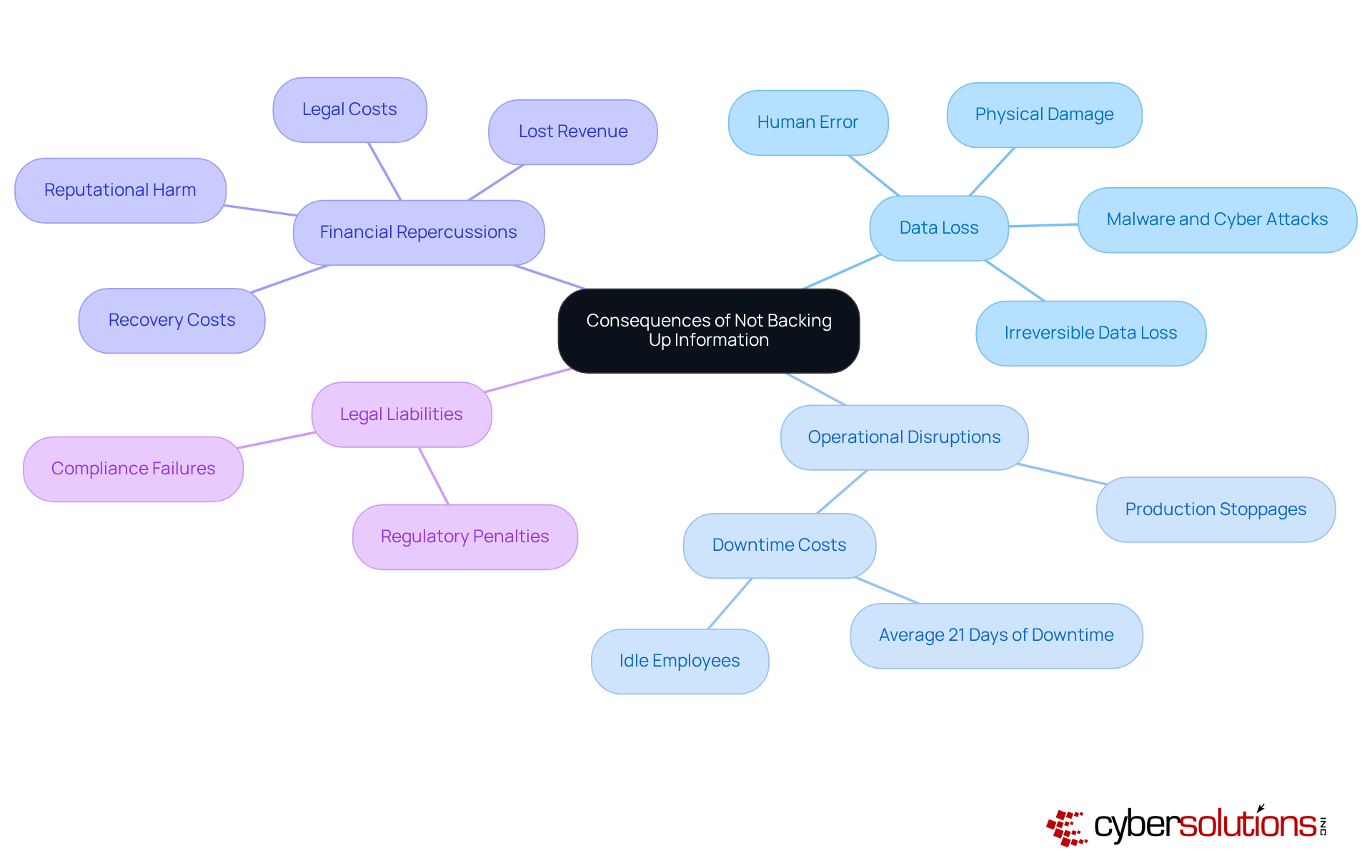
Data deletion poses significant risks to organizations, stemming from a variety of situations that demand immediate attention.
Consider a scenario where a company relies solely on local storage without a recovery strategy, which illustrates the consequences of data loss. If a fire were to destroy its servers, the organization could find itself unable to recover critical data. Understanding these threats is essential for companies to develop strategies that address potential vulnerabilities.
In today’s digital landscape, the consequences of data loss extend beyond mere inconvenience; they can jeopardize an organization's operational integrity. By recognizing the unique challenges posed by these threats, organizations can take proactive steps to safeguard their data. Implementing best practices is not just advisable; it is imperative for survival in an increasingly hostile environment.

In today's digital landscape, organizations must recognize the importance of data backup to ensure efficient information preservation. One of the most effective strategies is the 3-2-1 rule: maintain three copies of your data on two different media types, with one copy stored offsite. This approach significantly reduces the risk of data loss due to hardware failures or disasters that could impact your primary site, which emphasizes the necessity of a robust backup plan.
Moreover, regularly evaluating backup systems is essential. This ensures that your information can be retrieved successfully when needed. Testing backups is another critical step; it guarantees consistency and minimizes the likelihood of human errors that can jeopardize data integrity.
Additionally, encryption adds an indispensable layer of security, safeguarding sensitive information from unauthorized access. By adhering to these best practices, organizations can greatly enhance their data protection efforts and mitigate the risks of data loss, ensuring business continuity even in the face of potential disasters.

Neglecting the importance of data backup can lead to catastrophic consequences for organizations, jeopardizing their operational integrity, financial health, and reputation. In today’s digital landscape, ensuring that information is securely backed up isn’t just a precaution; it’s a fundamental necessity for maintaining resilience. By recognizing the critical nature of data preservation, organizations can effectively shield themselves from the myriad risks associated with data loss.
The necessity of a robust backup strategy is underscored by several compelling arguments. Startling statistics reveal the survival rates of businesses that suffer major data failures, emphasizing the urgency of action. The 3-2-1 backup rule stands out as a vital strategy, advocating for multiple data copies to mitigate risks from hardware failures, cyberattacks, and unforeseen disasters. Furthermore, regular recovery testing and the implementation of encryption are essential practices that bolster data integrity.
Ultimately, the message is clear: proactive measures in data backup are indispensable for any organization striving to thrive in today’s digital environment. The potential financial and operational repercussions of neglecting data backup are too significant to overlook. By prioritizing effective data backup strategies, organizations not only protect their critical information but also ensure business continuity, foster customer trust, and navigate the complexities of regulatory compliance. The time to act is now-secure your future by safeguarding your data today.
What is the primary purpose of data backup?
The primary purpose of data backup is to protect essential information, enabling organizations to recover swiftly from data loss incidents and maintain business continuity.
Why is data backup important for organizations?
Data backup is important because it safeguards against data loss due to equipment failures, accidental deletions, or cyberattacks, which can have significant financial implications for organizations.
What are the potential costs associated with data loss for businesses?
Unanticipated outages can cost mid-sized companies over $9,000 per minute, while small businesses may face downtime costs ranging from $8,000 to $100,000 an hour.
What is the recommended frequency for data backups?
Organizations are strongly encouraged to implement daily automated backups to ensure data integrity.
What is the 3-2-1 backup rule?
The 3-2-1 backup rule involves maintaining three copies of data on two different media types, with one copy stored off-site, to build a robust recovery infrastructure.
How can organizations enhance their data protection against threats like ransomware?
Organizations can enhance their data protection by employing immutable and air-gapped backups, which help ensure data integrity against ransomware and malware threats.
What is the significance of compliance in data management?
As data management regulations evolve, particularly regarding localization and sovereignty, establishing tailored governance frameworks is crucial for compliance and effective data protection.
How often should recovery tests be conducted?
Businesses should conduct recovery tests quarterly to effectively safeguard their essential information and navigate the complexities of the digital environment.
Managed IT Service Provider | Cyber Security | Incident Response | Compliance As A Service | Hosted Phone Service | Managed Security Service Provider | AI As A Service