


The landscape of productivity software has undergone a remarkable transformation, compelling organizations to make pivotal decisions regarding the tools they employ to bolster efficiency and security. The stark contrast between Office and Microsoft 365 reveals critical differences that can significantly influence an organization’s operational resilience and cybersecurity posture. As companies evaluate the advantages of traditional software against the sophisticated features of subscription-based services, a pressing question emerges: how can leaders discern which option aligns best with their distinct needs while navigating the intricate dynamics of cost, collaboration, and compliance?
The distinction between Office vs 365 is crucial in today’s digital landscape, especially when considering the importance of cybersecurity. Office is a one-time purchase that provides essential applications like Word, Excel, and PowerPoint, but it lacks ongoing updates and cloud integration. In contrast, 365 operates on a subscription basis, offering not only these applications but also a suite of additional tools designed to enhance productivity and collaboration. Key features include communication and collaboration tools through Teams, which facilitate teamwork.
Moreover, the 365 suite prioritizes security, integrating advanced security and compliance elements that are notably absent in the traditional Office. Security is particularly vital, as it proactively prevents unauthorized software from executing, significantly reducing the risk of malware, ransomware, and compliance issues. This capability continuously monitors application activity, ensuring that only authorized applications can operate, thereby protecting sensitive data and helping organizations meet stringent regulations.
Real-world examples illustrate this shift: many organizations have successfully transitioned from Office to Office 365, leveraging its features and continuous updates to bolster their operations. As companies increasingly recognize the importance of a secure and collaborative work environment, moving towards 365 is not just advantageous; it’s essential for maintaining a competitive edge in today’s digital realm.
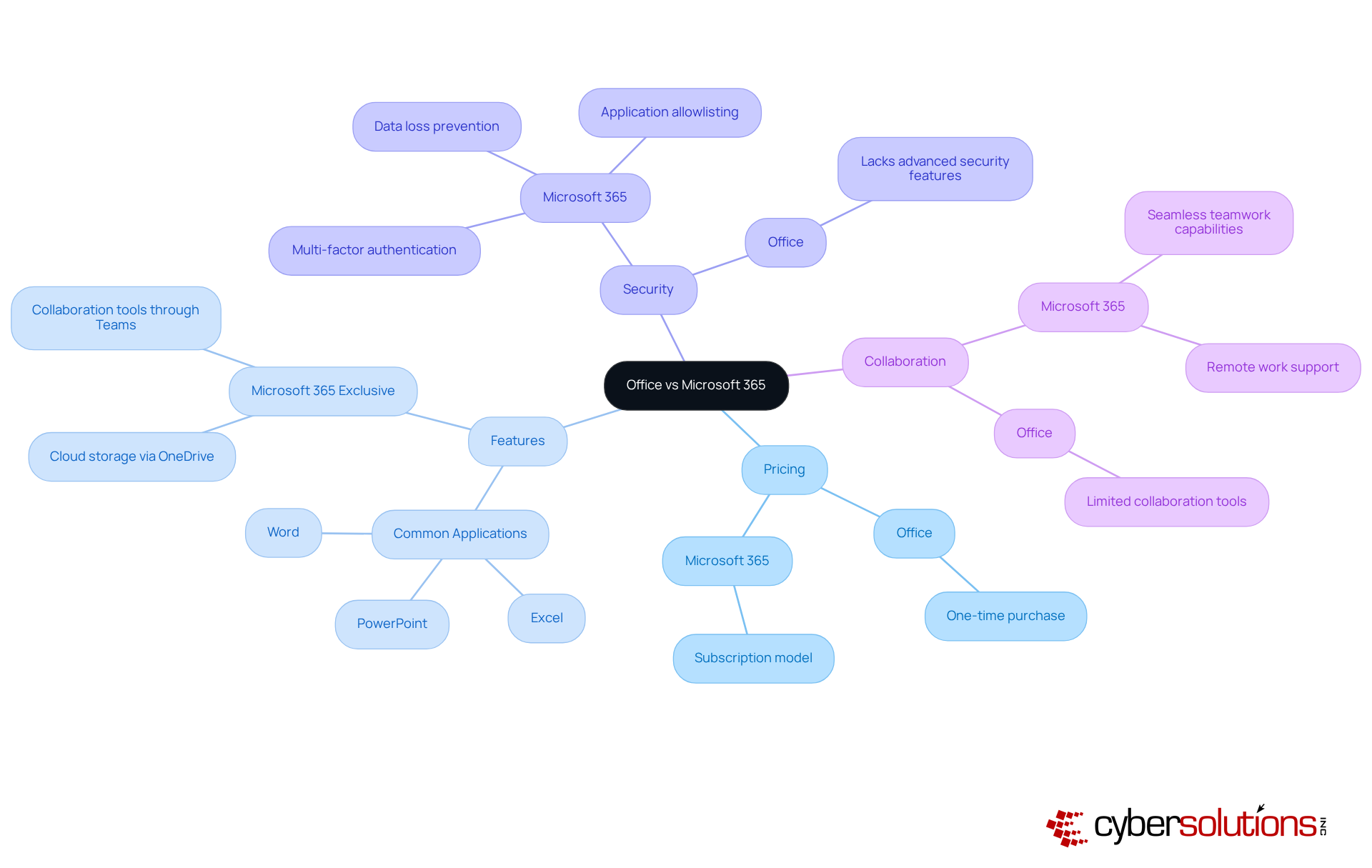
When it comes to productivity and collaboration, the Microsoft 365 suite stands out as a powerhouse compared to Office. With its cloud-based infrastructure, Microsoft 365 enables real-time collaboration, allowing multiple users to work on documents simultaneously. Recent statistics reveal that organizations leveraging Microsoft 365's collaboration tools have seen a significant increase in productivity, with data indicating a marked improvement in team efficiency.
Moreover, Microsoft 365 integrates advanced tools like Copilot, which assist users in content creation and task automation. When comparing Office vs Microsoft 365, it is clear that while Office remains a robust option, it falls short in offering these collaborative and AI-enhanced features, making it less ideal for organizations that thrive on dynamic teamwork and innovation. Additionally, the Microsoft 365 suite enhances security with advanced protocols, including data encryption and multi-factor authentication - essential for sectors like healthcare and finance that face stringent regulatory requirements.
It's important to note that starting July 1, 2026, the Microsoft 365 suite will see an average price increase of 16%, reflecting the enhanced availability of AI, security, and management features. This price adjustment underscores the necessity for C-suite leaders to weigh the benefits of Microsoft 365, especially in light of its advanced capabilities and features.

The analysis reveals a significant contrast that organizations must consider. When considering Office vs 365, it's important to note that while Office typically requires a one-time purchase, which may seem more budget-friendly at first glance, this model lacks future updates and enhancements. On the other hand, Office vs 365 operates on a subscription basis, involving ongoing monthly or annual fees. Although this may appear more expensive initially, the subscription model includes regular updates, cloud services, and enhanced features. These elements can lead to substantial cost savings through improved efficiency.
For organizations focused on digital transformation, the subscription model often delivers a more favorable return on investment. As it evolves to meet the growing demands of the digital landscape, companies that have adopted Office vs 365 report improved productivity and a stronger security posture. For example, Schleswig-Holstein invested nine million euros in 2026 to switch from traditional Office software to Office vs 365, ultimately saving 15 million euros annually. Furthermore, with over 90% of Fortune 500 companies relying on Office vs 365, the platform's reliability and effectiveness are well established.
Additionally, adopting a flat-rate pricing model for IT services, such as those offered by Cyber Solutions, can simplify budgeting and enhance financial predictability. By integrating Cyber Solutions' services with Office vs 365, organizations can manage their IT expenses without unexpected costs, ensuring a seamless and effective operational framework. How can your organization leverage these insights to enhance its cybersecurity and operational efficiency?

In today's digital landscape, cybersecurity is not just a necessity; it's a critical imperative for sectors like healthcare, finance, and government. With Microsoft 365 at the forefront, organizations face unique challenges that demand robust solutions. Microsoft 365 stands out as an ideal choice, equipped with integrated protective features and compliance tools that help meet regulatory obligations such as HIPAA and GDPR. This makes it a top selection for companies that require enhanced security.
Moreover, Cyber Solutions offers tailored IT services designed to address the specific protection and compliance needs of these industries. With advanced tools like encryption, threat detection, and secure access controls, organizations can effectively safeguard against evolving cyber threats. But what about smaller businesses or those with less stringent security needs? In such cases, the choice between Office and Microsoft 365 may be more suitable, providing a straightforward solution without the complexities of ongoing subscriptions.
However, for organizations operating in rapidly evolving sectors, the continuous updates and collaborative features of Microsoft 365, combined with Cyber Solutions' expertise, can provide a significant competitive edge. This powerful combination enables businesses to adapt swiftly to changing market demands while ensuring audit readiness and ongoing compliance. Are you ready to elevate your cybersecurity strategy and protect your organization effectively?

The choice between Office and Microsoft 365 is more than just a software preference; it’s a strategic decision that can significantly impact an organization’s productivity and security in today’s digital landscape. As businesses navigate an environment filled with evolving technology threats, understanding the differences between these two options becomes crucial. Microsoft 365 stands out with its subscription-based model, offering continuous updates, advanced security features, and collaborative tools that are essential for modern workflows.
Consider the unique challenges organizations face today. Microsoft 365’s cloud integration and real-time collaboration capabilities not only meet immediate operational needs but also align with long-term strategic goals. Enhanced security measures, such as multi-factor authentication and application allowlisting, are vital for industries that prioritize compliance and cybersecurity. While the initial investment in Microsoft 365 may be higher, the ongoing support and updates can lead to significant savings and improved efficiency over time.
Ultimately, the decision between Office and Microsoft 365 should be guided by an organization’s specific needs and future aspirations. As industries evolve, embracing tools that foster collaboration and bolster security is essential for maintaining a competitive edge. Organizations must carefully assess their current and future requirements, recognizing that the right choice can enhance productivity and fortify their cybersecurity posture in a landscape fraught with challenges. Transitioning to Microsoft 365 may well be a strategic move toward sustainable growth and resilience in the face of evolving threats.
What is the main difference between Office and Microsoft 365?
The main difference is that Office is a one-time purchase providing essential applications like Word, Excel, and PowerPoint, while Microsoft 365 operates on a subscription basis, offering these applications along with additional tools for productivity and collaboration.
What are some key features of Microsoft 365?
Key features of Microsoft 365 include cloud storage via OneDrive, collaboration tools through Teams, and advanced security features such as multi-factor authentication and data loss prevention.
How does Microsoft 365 enhance security compared to the traditional Office suite?
Microsoft 365 enhances security by integrating features like multi-factor authentication, data loss prevention, and application allowlisting, which prevents unauthorized software from executing and reduces the risk of malware and compliance issues.
What is application allowlisting, and why is it important?
Application allowlisting is a security measure that proactively prevents unauthorized software from running. It continuously monitors application activity to ensure that only authorized applications can operate, thereby reducing vulnerabilities and helping organizations meet compliance requirements.
Why are organizations transitioning from Office to Microsoft 365?
Organizations are transitioning to Microsoft 365 to leverage its robust security features, continuous updates, and enhanced collaboration tools, which help bolster operational resilience and maintain a competitive edge in the digital landscape.
Managed IT Service Provider | Cyber Security | Incident Response | Compliance As A Service | Hosted Phone Service | Managed Security Service Provider | AI As A Service