


Creating a resilient IT recovery plan is not merely a technical necessity; it stands as a strategic imperative that can determine an organization's survival amid unforeseen disruptions. With staggering statistics revealing that 93% of businesses lacking a solid recovery strategy fail to recover from data disasters, the stakes have never been higher. This guide delves into the essential steps leaders must take to develop an effective IT recovery plan, ensuring not only the continuity of operations but also the protection of critical data and resources.
How can organizations navigate the complexities of IT recovery while aligning with business priorities and minimizing risks? The answers lie in a structured approach that combines thorough planning, stakeholder engagement, and continuous improvement. By embracing these strategies, organizations can not only safeguard their operations but also enhance their resilience against future challenges.
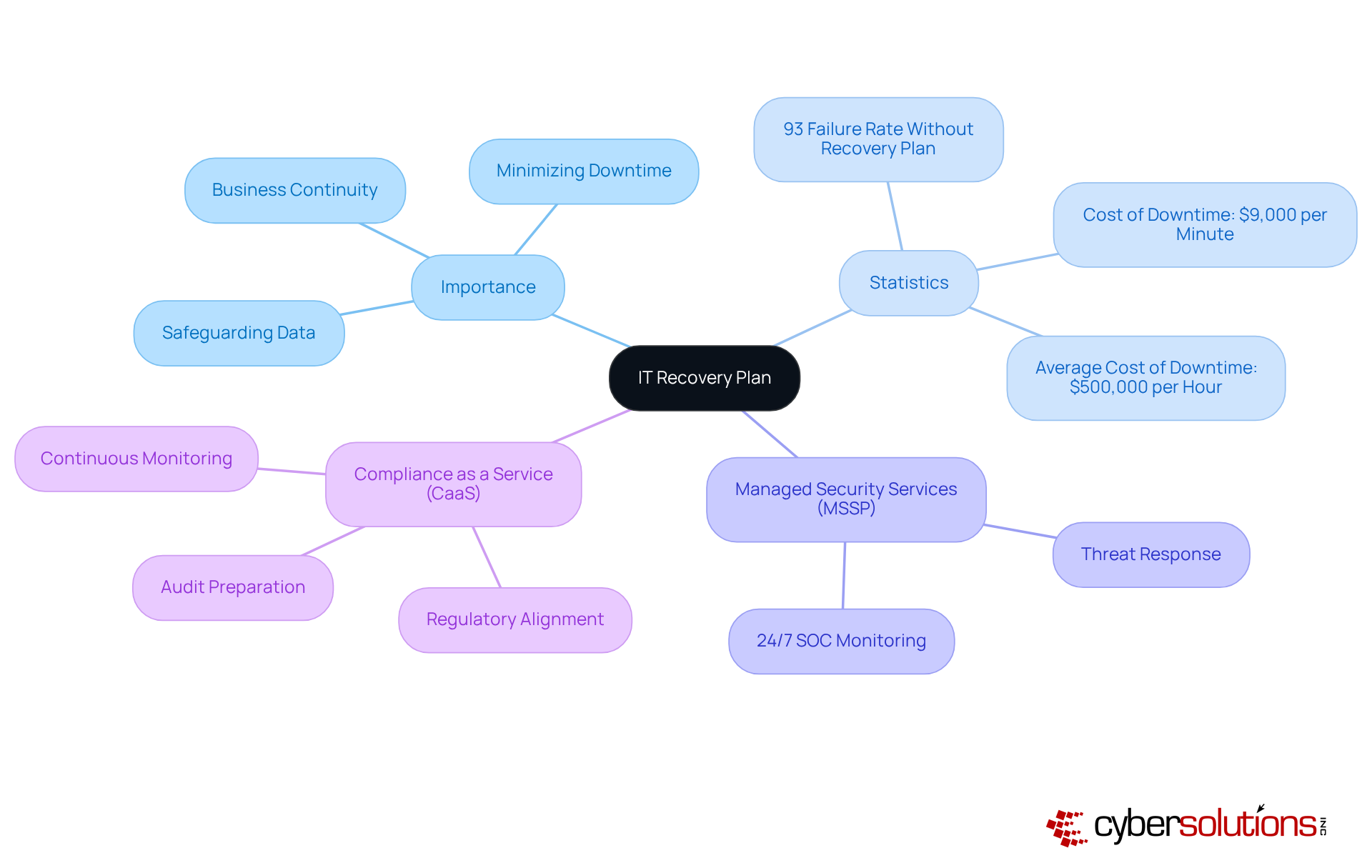
An IT recovery plan is not merely a document; it serves as a crucial strategy that details how an organization will recover its IT systems and operations following a disruptive event, such as a cyberattack, natural disaster, or hardware failure. The importance of this strategy is immense; it ensures business continuity, minimizes downtime, and safeguards critical data. Without a well-defined recovery plan, organizations face significant risks, including financial losses, reputational damage, and potential regulatory penalties.
Consider this: businesses that face substantial data disasters without a proven restoration strategy have a staggering failure rate. Moreover, the costs can escalate quickly, translating to over $500,000 per hour for larger enterprises. This is where Cyber Solutions steps in. By leveraging extensive managed security services, which include monitoring and threat response, organizations can bolster their resilience and shield themselves from potential threats.
Additionally, integrating compliance as a service ensures that organizations stay aligned with regulatory requirements, facilitating audit preparation and continuous monitoring. Alarmingly, recent statistics reveal that 46% of small enterprises have never assessed their IT contingency strategies, leaving them vulnerable to the harsh realities of unforeseen disruptions. By understanding the elements and objectives of an IT recovery plan, leaders can better prepare their organizations for unexpected challenges.
To effectively align your IT restoration strategy with organizational priorities, it’s crucial to first identify the mission-critical applications and services within your organization. Conducting a business impact analysis is essential to assess the potential impact of downtime on these critical functions. Establishing recovery time objectives and recovery point objectives that reflect the organization’s tolerance for downtime and data loss is a vital step in this process.
Involving key stakeholders from various departments ensures that the restoration strategy addresses their specific needs and concerns, fostering a collaborative environment. Regular testing and updating of the recovery plan can significantly mitigate risks associated with IT failures. As Kevin Diffily aptly states, "Effective recovery begins with planning." This alignment not only enhances operational resilience but also minimizes the impact of disruptions on overall organizational performance.
Consider this: more than half of all data backups fail. This statistic underscores the importance of a robust backup strategy. By prioritizing these strategies, organizations can better prepare for potential disruptions and safeguard their critical operations.

In today's rapidly evolving digital landscape, the importance of an IT recovery plan cannot be overstated. Start by compiling a detailed inventory of all IT assets, including hardware, software, and network components. This foundational step is crucial for understanding your organization's infrastructure. Employ inventory management tools; these tools significantly enhance accuracy and completeness, ensuring no asset is overlooked.
Next, meticulously map the dependencies among these systems to grasp their interactions and mutual support. This mapping should highlight system and application dependencies. Why is this important? Understanding these relationships is vital for effective recovery planning. With a comprehensive inventory, organizations can prioritize their efforts in the recovery process based on the criticality of each system. This strategic approach ensures that essential services are restored swiftly and efficiently, safeguarding the integrity of healthcare services.

Establishing a team is not just important; it’s essential. This team should include representatives from IT, operations, and management. By clearly defining the roles and responsibilities of each member, you ensure that everyone understands their specific tasks during a crisis. A well-structured communication plan is crucial, detailing how information will be shared among team members and stakeholders. This strategy must encompass guidelines for both internal and external communication, ensuring that all parties are kept informed about the restoration status and any necessary actions.
Regular reviews and updates of these roles and communication paths are vital. They allow the team to adapt to organizational changes and enhance overall effectiveness. Alarmingly, only 54% of organizations have a comprehensive strategy for disaster management. This statistic underscores the necessity for preparedness during emergencies; it fosters collaboration and ensures that critical information flows seamlessly across all levels of the organization.
As Richard Branson aptly noted, communication is the most crucial skill for any leader, emphasizing its significance in disaster management. Furthermore, consider this: the financial repercussions of inadequate planning and the lack of an effective recovery plan are not just pressing; they are alarming. Are you prepared to face these challenges head-on?

Establishing comprehensive recovery procedures as part of your IT strategy is not just a best practice; it’s a necessity for safeguarding your organization. These procedures must clearly outline the specific steps required for each system in your inventory. They should detail actions for data backup, system reinstatement, and application reactivation. By utilizing orchestration tools like ACE Remote Recovery Manager (ARRM), you can significantly enhance these processes. Automation of restoration tasks reduces human error and accelerates recovery times, making your strategy more effective.
It’s crucial to document these procedures in a format that is easily accessible to all team members. Regular updates of these procedures are essential to adapt to evolving technologies and business processes. This ensures that your recovery plan remains effective and aligned with the needs of the organization. As Kevin Diffily, Sr. Product Marketing Manager, aptly states, 'An effective recovery plan relies on regular, realistic testing and continuous strategy maintenance.'
Moreover, consider this: the cost of downtime is projected at $9,000 per minute. This staggering figure underscores the importance of having a recovery plan in place. Don’t wait for a disaster to strike; take action now to protect your organization.

In today’s healthcare landscape, the importance of a robust IT recovery plan cannot be overstated. Organizations must prioritize the efficiency of their testing procedures by conducting exercises that closely mimic real-life scenarios. These exercises are not just routine; they are essential for evaluating the team’s ability to execute under pressure. After each test, a debriefing session should follow to pinpoint areas for improvement, allowing for swift revisions to the recovery plan.
It’s crucial to review the IT recovery plan at least annually or whenever significant changes occur within the IT environment or business operations. Furthermore, organizations should implement training programs across departments and quarterly tabletop exercises to ensure ongoing readiness. This commitment to testing not only keeps the strategy relevant but also enhances its effectiveness in addressing potential threats. Did you know that 75% of businesses without a recovery plan shut down within three years of an attack? This statistic underscores the urgent need for regular testing and enhancement.
Moreover, organizations that engage in routine exercises report improved restoration outcomes. Many identify deficiencies in their strategies that can be addressed proactively. By fostering a culture of readiness and collecting metrics and feedback during exercises—such as restoration time objectives and success rates—companies can significantly bolster their resilience against unforeseen disruptions.
Consider our recent case study: a healthcare provider that successfully recovered from a ransomware attack ahead of schedule, thanks to rapid deployment and a collaborative effort. This reinforces the value of having an IT recovery plan in place within 24 hours. By adopting a layered approach that includes endpoint isolation and user training, organizations can not only recover more effectively but also enhance their cybersecurity posture for the future.
An effective IT recovery plan is not just a luxury; it’s a necessity for organizations determined to protect their operations from unpredictable disruptions. This comprehensive strategy outlines not only how to restore IT systems but also underscores the vital importance of business continuity, minimizing downtime, and safeguarding valuable data. Organizations that overlook the development of a robust recovery plan expose themselves to significant risks, including financial losses and reputational damage.
Creating a successful IT recovery plan involves several key steps:
The significance of a well-structured IT recovery plan cannot be overstated. It serves as a lifeline during crises, enabling organizations to navigate challenges with confidence and agility. By prioritizing these strategies, organizations not only enhance their operational resilience but also position themselves for long-term success in an increasingly complex digital landscape. Taking proactive steps today to develop and refine an IT recovery plan will ensure preparedness for tomorrow's uncertainties.
What is an IT recovery plan?
An IT recovery plan is a strategic document that outlines how an organization will recover its IT systems and operations after a disruptive event, such as a cyberattack, natural disaster, or hardware failure.
Why is an IT recovery plan important?
An IT recovery plan is crucial for ensuring business continuity, minimizing downtime, and protecting critical data. Without it, organizations risk facing financial losses, reputational damage, and regulatory penalties.
What are the risks of not having a restoration strategy?
Organizations without a proven restoration strategy have a 93% failure rate in surviving significant data disasters and can incur costs of up to $9,000 per minute during downtime.
How can organizations enhance their resilience against IT disruptions?
Organizations can enhance their resilience by leveraging Managed Security Services (MSSP) for 24/7 monitoring and threat response, as well as integrating Compliance as a Service (CaaS) to ensure alignment with regulatory requirements.
What is the significance of a Business Impact Analysis (BIA)?
A Business Impact Analysis (BIA) helps organizations identify mission-critical applications and services, assess the potential impact of downtime, and establish Recovery Time Objectives (RTOs) and Recovery Point Objectives (RPOs).
How can organizations ensure their IT recovery plan meets various departmental needs?
Involving key stakeholders from different departments in the planning process ensures that the IT recovery strategy addresses their specific needs and fosters a collaborative approach to recovery.
Why is regular testing of the IT recovery plan important?
Regular testing and updating of the IT recovery plan are essential to mitigate risks associated with IT failures and ensure that the backup processes are reliable.
What statistic highlights the importance of a reliable backup process?
More than half of all data backups fail, emphasizing the need for a reliable and regularly tested backup process to safeguard critical operations.
Managed IT Service Provider | Cyber Security | Incident Response | Compliance As A Service | Hosted Phone Service | Managed Security Service Provider | AI As A Service