
Maximize Efficiency with Virtual Desktop as a Service Best Practices

Maximize Efficiency with Virtual Desktop as a Service Best Practices

Introduction

The rapid evolution of technology is fundamentally reshaping how businesses operate. Virtual Desktop as a Service (DaaS) stands out as a transformative solution in the IT landscape, enhancing flexibility and mobility while providing a cost-effective alternative to traditional desktop infrastructures. However, as organizations increasingly embrace DaaS, they encounter critical decisions regarding its implementation and optimization.

How can companies effectively navigate the complexities of adopting DaaS to maximize efficiency and drive success? This question is pivotal as businesses seek to leverage the full potential of this innovative technology.

Define Virtual Desktop as a Service (DaaS)

Virtual Environment as a Service (VaaS) is revolutionizing the way users interact with technology, offering virtual workspaces accessible via the internet. Unlike traditional setups where operating systems and software reside on local machines, virtual desktop as a service (DaaS) provides these environments on remote servers managed by external providers. This innovative model empowers users to access their desktops from any device with an internet connection, enhancing flexibility and mobility.

DaaS solutions come equipped with features such as centralized management, automatic updates, and robust security measures. These attributes make them an attractive option for companies looking to streamline IT operations and reduce costs. In fact, the virtual desktop as a service market was valued at over USD 9.82 billion in 2025, with projections indicating significant growth, estimated to reach USD 11.53 billion in 2026, and a compound annual growth rate (CAGR) exceeding 19.4% through 2035. This surge reflects the increasing demand for cloud-based services, particularly for virtual desktop as a service, driven by trends in remote work and BYOD policies, alongside the necessity for efficient, scalable IT solutions.

Key players in the Desktop as a Service market include industry giants like:

  • VMware
  • Citrix Systems
  • Microsoft
  • Google Cloud
  • Amazon Web Services

These companies are not only shaping the competitive landscape but also fostering innovation in cloud-based computing solutions. As organizations navigate the complexities of modern IT environments, the adoption of DaaS could be the strategic move that enhances operational efficiency and drives business success.

The center represents DaaS, with branches showing its definition, features, market growth, and key companies. Each branch helps you understand different aspects of DaaS and how they connect.

Compare DaaS with Traditional Virtual Desktop Infrastructure (VDI)

While both virtual desktop as a service and Virtual Desktop Infrastructure (VDI) offer virtual desktop environments, they differ significantly in management and deployment. VDI requires organizations to maintain their own hardware and software infrastructure, leading to higher upfront costs and ongoing maintenance expenses. In contrast, the virtual desktop as a service operates on a subscription-based model where the service provider manages the infrastructure, allowing companies to avoid capital expenses and reduce operational costs. Moreover, virtual desktop as a service enhances scalability, enabling businesses to swiftly adjust their desktop resources according to fluctuating demands without significant IT involvement.

However, C-suite leaders must be aware of common pitfalls associated with both models. For instance, while DaaS can lower initial expenses, it’s crucial for companies to choose a reliable service provider to prevent potential service interruptions. Conversely, VDI may offer greater control over the environment but can result in unexpected costs if not managed properly.

To illustrate the effectiveness of virtual desktop as a service, consider a mid-sized healthcare organization that transitioned from VDI to virtual desktop as a service. By adopting DaaS, they not only reduced their IT overhead by 30% but also improved their ability to scale resources during peak patient intake periods. This flexibility allowed them to maintain operational efficiency without compromising service quality.

Furthermore, sharing this document on platforms like LinkedIn and Facebook can enhance engagement and provide valuable insights to peers in the industry.

The central node represents the main topic of comparison. Each branch shows key aspects of DaaS and VDI, helping you understand their differences and similarities at a glance.

Highlight Benefits of Implementing DaaS

Implementing virtual desktop as a service is not just a trend; it’s a strategic move that offers organizations a wealth of advantages.

  • Cost Efficiency: DaaS significantly reduces the need for substantial upfront investments in hardware and software, transforming IT expenditures into predictable monthly costs. This shift allows organizations to allocate resources more effectively, enhancing overall financial management.

  • Scalability: Organizations benefit from the ability to easily modify their workstation environments according to fluctuating demands. This flexibility enables businesses to scale resources up or down without incurring significant infrastructure costs, ensuring optimal resource allocation.

  • Improved Protection: The service boosts data protection by keeping sensitive information in secure data centers instead of on local devices. This method reduces the threat of data breaches and losses, with statistics showing that organizations using Desktop as a Service encounter 60% fewer breach incidents compared to those depending on conventional workstations. As CA Communications indicates, 'Our virtual desktop as a service solutions are crafted to effortlessly merge with your current infrastructure, ensuring a seamless shift to cloud-based workstations.'

  • Simplified Management: By outsourcing routine maintenance tasks such as updates, backups, and security to the service provider, IT teams can concentrate on strategic initiatives that drive business growth. This streamlined management reduces operational burdens and enhances overall efficiency.

  • Enhanced Accessibility: Desktop as a Service enables employees to reach their virtual desktops from any place, encouraging remote work opportunities and increasing productivity. This accessibility is crucial in today’s hybrid work environment, where flexibility is paramount for maintaining workforce engagement and performance. A case study on 'Expert Implementation of Virtual Desktop as a Service' demonstrates that companies encounter minimal disruption during the transition, enabling a more efficient execution.

The central node represents the overall benefits of DaaS, while each branch highlights a specific advantage. Follow the branches to explore how each benefit contributes to organizational success.

Outline Steps for Successful DaaS Implementation

To successfully implement virtual desktop as a service, organizations must take decisive action. Here’s how to navigate this transformative journey:

  1. Assess Current Infrastructure: Begin by evaluating your existing IT resources. Identify gaps that can be effectively filled by virtual desktop as a service, ensuring a solid foundation for your transition.

  2. Define Objectives: Establish clear goals for what your organization aims to achieve with virtual desktop as a service (DaaS). Whether it’s cost savings, improved security, or enhanced flexibility, having defined objectives will guide your efforts.

  3. Select a virtual desktop as a service provider: Research and choose a reputable virtual desktop as a service provider that meets your organization’s needs and compliance requirements. This decision is crucial for a successful implementation.

  4. Plan for Migration: Develop a detailed migration plan. This should include timelines, resource allocation, and risk management strategies to mitigate potential challenges.

  5. Implement Protection Measures: Ensure robust protocols are in place to safeguard sensitive data during and after the transition. Protecting your data is paramount.

  6. Train Employees: Provide comprehensive training for employees. Familiarizing them with the new system is essential for maximizing productivity and minimizing disruptions.

  7. Continuously monitor the virtual desktop as a service environment and optimize it. Make necessary adjustments to optimize performance and security, ensuring that your organization reaps the full benefits of DaaS.

By following these steps, organizations can effectively harness the power of DaaS, transforming their IT landscape and enhancing operational efficiency.
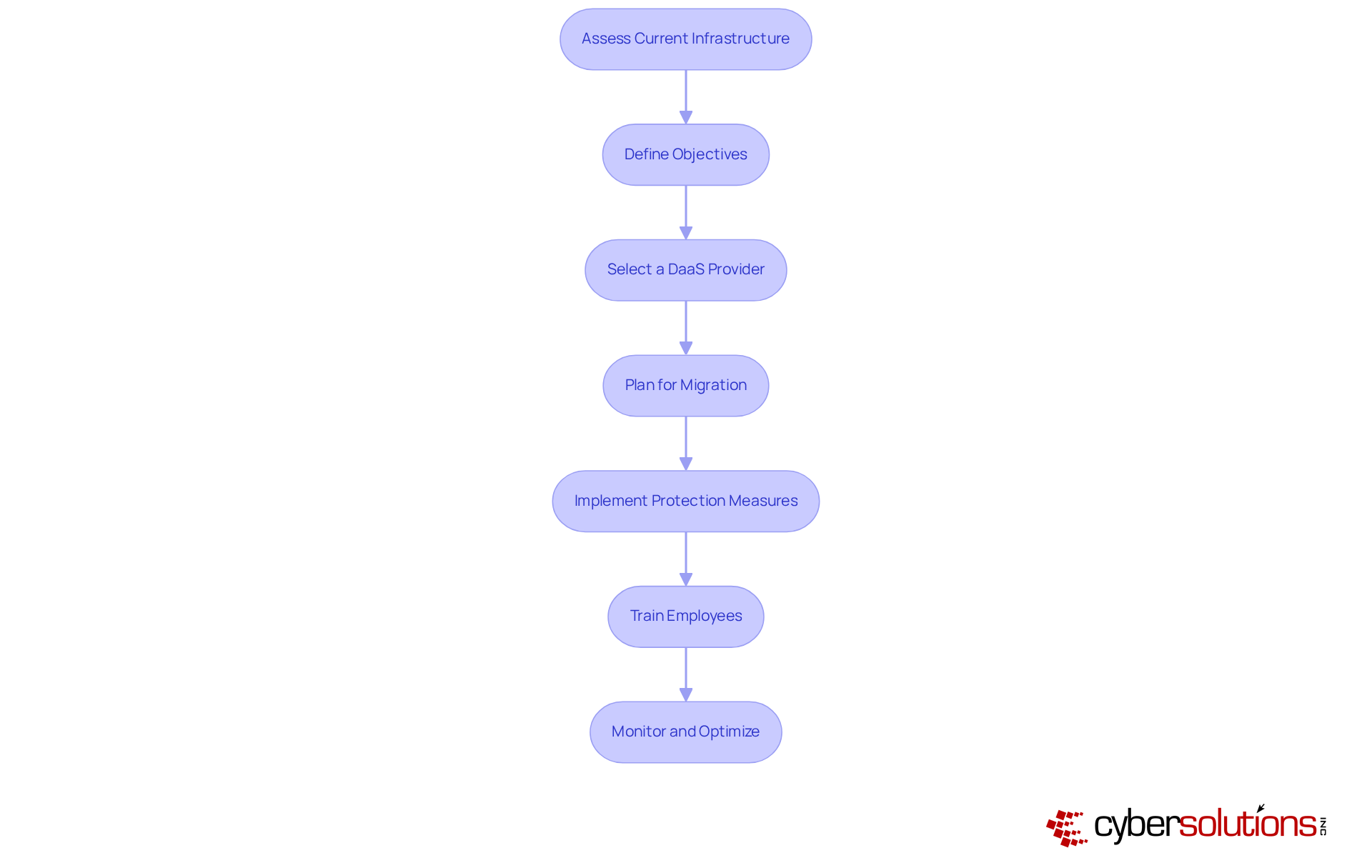
Each box represents a crucial step in implementing DaaS. Follow the arrows to see how each step builds on the previous one, guiding you through the entire process.

Conclusion

Embracing Virtual Desktop as a Service (DaaS) is not just a trend; it’s a pivotal shift in how organizations manage their IT environments. By leveraging cloud-based solutions, businesses can significantly enhance flexibility, reduce costs, and improve operational efficiency. The ability of DaaS to streamline processes and adapt to the evolving demands of the workforce highlights its critical role in modern IT strategies.

This article has illuminated the numerous advantages of DaaS over traditional Virtual Desktop Infrastructure (VDI). From cost efficiency and scalability to enhanced security and simplified management, DaaS presents a compelling case for organizations eager to modernize their desktop solutions. The outlined steps for successful implementation act as a roadmap, guiding organizations through this transition effectively, ensuring they maximize benefits while minimizing disruption.

Ultimately, adopting DaaS transcends a mere technological upgrade; it’s a strategic decision that can propel business success in a competitive landscape. Organizations must evaluate their current IT infrastructures, define clear objectives, and select the right service providers to fully harness the potential of DaaS. By doing so, they position themselves to thrive in an increasingly digital world, where flexibility and efficiency are not just advantages but necessities.

Recent Posts
Maximize Efficiency with Virtual Desktop as a Service Best Practices
Create a Cyber Security Assessment Report in 5 Simple Steps
7 Steps to Create Your IT Disaster Plan Effectively
4 Best Practices for Cyber Security Awareness Training for Staff
3 Best Practices for Effective Workplace Security Awareness Training
Master Backup and DR Solutions for Business Resilience
Understanding EDR: The Full Form and Its Importance in Cybersecurity
Understanding Endpoint Detection and Response (EDR) in Cybersecurity
Understanding EDR Meaning in Cyber Security for Business Leaders
4 Best Practices for Implementing EDR Technologies in Cybersecurity
Understanding the Incident Response Plan: Importance and Key Components
Optimize Cybersecurity Costs: 4 Essential Strategies for Leaders
NIST 800-171 Summary: Essential Insights for C-Suite Leaders
6 Steps to Create an Effective IT Recovery Plan for Leaders
Master Cyber Security Risk Assessments: Key Practices for Leaders
4 Best Practices for Managed IT Solutions for Business Success
Define Managed IT Services: A Step-by-Step Guide for Executives
Maximize Efficiency with Proven Managed IT Support Solutions
What Are Managed IT Services? Key Benefits and Insights for Leaders
Achieve Cybersecurity Maturity Model Compliance: A Step-by-Step Guide
4 Steps to Calculate the Cost of Cyber Security for Your Business
5 Essential Backup and Disaster Recovery Procedures for Leaders
Master CMMC Security Services: Key Practices for Compliance Success
Understanding the Managed IT Department: Importance and Key Features
10 Essential Technical Safeguards for HIPAA Compliance
Compare Multi-Factor Authentication Companies: Features and Benefits
How Much Does Cyber Security Cost? A Step-by-Step Budget Guide
Master Google Search Operators for Effective Local IT Consulting
Understanding Managed Security Companies: Importance and Key Features
Select the Right Multi-Factor Authentication Vendors for Success
10 Essential CMMC Practices for C-Suite Leaders to Implement
What Are the Key Advantages of Penetration Testing Over Vulnerability Scanning?
Master Managed Cyber Security for Business: Key Steps and Insights
What Is an AUP Policy? Essential Steps for C-Suite Leaders
Penetration Test vs Vulnerability Assessment: Key Differences Explained
Understanding Cyber Assessment Services: Importance and Key Features
Which Backup Method Best Protects Your Critical Data?
Essential Proactive Security Measures for C-Suite Leaders
Effective HIPAA HITECH Compliance Solutions for C-Suite Leaders
Best Practices for Choosing IT Services in Concord
Create an Effective Acceptable Use Policy for Employees
4 Essential IT Budget Examples for C-Suite Leaders
5 Steps to Stay Compliant with Ontario's Employment Standards Act
Understanding the Benefits of Vulnerability Scanning for Leaders
Choose Wisely: MSP or MSSP for Your Business Needs
Understanding the IT Managed Services Model: Definition and Benefits
Master Firewall Management Services: Best Practices for C-Suite Leaders
Best Practices for a Successful Managed IT Helpdesk
Master Backup and Disaster Recovery BDR Solutions for Business Resilience
10 Key Steps to Meet CMMC 2.0 Level 2 Requirements
Maximize Impact with Cyber Security Simulation Exercises Best Practices
Maximize Security with Offsite Data Backup Services Best Practices
4 Best Practices for Effective Computer Security Awareness Training
Why C-Suite Leaders Need Managed Hosting Cloud Solutions Now
4 Multi-Factor Authentication Options to Enhance Security for Leaders
Master Cloud Hosting Managed: Best Practices for C-Suite Leaders
Essential Cyber Security Measures for Businesses in 2026
Master CMMC Regulations: Essential Steps for Compliance Success
Why Staff Security Awareness Training is Crucial for Your Organization
Understanding Cloud Hosting Management: Importance, Evolution, and Key Features
Master CMMC Standards: Essential Steps for Compliance and Success
Maximize ROI with Your Information Technology MSP: 4 Best Practices
4 Best Practices to Maximize Uptime in Cloud Infrastructure
10 Key Benefits of Partnering with IT MSPs for Your Business
What is Cyber Intelligence? Key Insights for C-Suite Leaders
5 Best Practices to Prevent Ransomware for C-Suite Leaders
Master Data Storage Disaster Recovery: Key Strategies for C-Suite Leaders
5 Best Practices for Using SIEM in Security Management
Understanding EDR Meaning in Security for Executive Strategy
CMMC Overview: Key Features and Compliance Insights for Leaders
Understanding Managed Services Technology: Definition and Key Insights
Ransomware History: Key Milestones Every C-Suite Leader Must Know
Create an Effective Cyber Attack Response Plan in 6 Steps
Why the Importance of Backing Up Data Cannot Be Overlooked
10 Essential Defense in Depth Examples for C-Suite Leaders
Master Disaster Backup: Essential Strategies for C-Suite Leaders
4 Best Practices for MSP Backup and Recovery Success
Master Backup and Disaster Recovery for Business Resilience
Which Firewall Should I Use? A Step-by-Step Guide for Leaders
Master Dark Web Protection Services to Safeguard Your Business
Maximize Cybersecurity with Managed Service Provider Strategies
Master USB Thumb Drive Hacks: Prevention and Response Strategies
Enhance Cybersecurity with Deep Packet Inspection and SSL Best Practices
What Is a Digital Certificate Used For in Cybersecurity?
Master CMMC Compliance Before the Deadline: Key Steps to Follow
What Is Managed Cloud Hosting and Why It Matters for Your Business
Why C-Suite Leaders Choose Managed Services Hosting for Success
Understanding Vulnerability Scanning in Cyber Security for Leaders
Why SSL Deep Packet Inspection is Essential for Cybersecurity Leaders
Protect Your Business: Best Practices Against USB Flash Drive Hacks
Protect Your Business from Thumb Drive Hacks: Essential Security Steps
Maximize Managed Service Provider Security: Best Practices for C-Suite Leaders
Understanding Threat Vector Meaning: Importance for Business Leaders
Understanding LOTL Attacks: Mechanisms, Prevention, and Impact
4 Best Practices for Effective Managed Web Security Strategies
Understanding the Consequences of Not Backing Up Your Information
Why Your Systems Should Be Scanned Monthly for Optimal Security
3 Best Practices for Effective Cyber Assessments in 2026
4 Key Benefits of Desktop Managed Services for C-Suite Leaders
6 Steps for C-Suite Leaders to Implement a Managed Services Helpdesk

Join our newsletter

Sign up for the latest industry news.
We care about your data in our privacy policy.
Thank you! Your submission has been received!
Oops! Something went wrong while submitting the form.